We've been watching the repeats of the old robot wars for a while now and with the start of the new series we thought we'd quite like to have some small scale wars at home. While I'd like to build a pair of robots from scratch, this would likely take more time than I have available. So I took my fingers to amazon to look for a couple of RC vehicles that had more than just the driving controls, so the extra functions could be utilised to drive weapons/flippers etc.
After a bit of searching I found a double pack of "battle tanks". They have the expected forwards, backwards and rotate left/right drive controls, but also have rotating turrets and some other buttons (fire, fx1, fx2, demo and on/off). Out-of-the-box the game is that each tank has three lives and has to shoot the other - they have a IR LED and receiver mounted on the turret (you can see them on the Panzer). The tanks also produce a bunch of sound effects to accompany the game.
Taking a look at the board inside one of the tanks, you can see that it's primarily made up of four ICs: the first one implements the radio receiver and the majority of the game (red); it's connected directly to the IR and RF electronics, as well as the three 'lives' LEDs on top of the turret. The red chip is connected to the second IC (blue) by a single data line (the two cyan pins on the red/blue chips). The blue chip generates both the sound effects (the speaker is directly connected to it - green wires: SP-/SP+) and the signals required to drive the two H-bridge ICs that control the tracks (green) and turret motors (yellow).
The data line is an one-way path from the red IC to the blue IC. Data is sent nine bits at a time, with a ~970us high/~240us low indicating the start (the zero line in the image above is at the high/low transition). The bits themselves are encoded as a either ~100us or ~240us pulses, with a ~100us gap between them. Assuming 100us is one and 240us is zero, the above example decodes as "100000100".
Some button presses translate to multiple bytes (above is the demo button). The red IC also tracks a certain amount of state: the fx2 button will cycle through three different set of bytes on each button press. Here's most of the mappings:
shoulderR   110000000
shoulderL   101000000

left        100010000
right       100001000
forward     100000100
backwards   100000010

demo        100000000 100000000
shoot+sound 100000000 000000010
fx1         000001100 100000000
byebye      000010010
on          000000100
off         000010010 100000000
fx2,1       000011010 100000000
fx2,2       000000110 100000000 000000110
fx2,3       000000010 100000000
From here it should be possible to remove the blue chip and then patch in a microcontroller. It should be able to detect the controls and then either drive the existing H-bridges, or additional servos, sensors etc. Removing the IR receiver and tying it's line should effectively disable the built-in game.
That's the plan anyway...
When I was pulling apart my u8plus smartwatch, I noted that there were five unlabelled pads, and that these were likely jtag:
Although I had reasonable results with jtagenum, nothing I tried worked with a real adaptor. I turned to google and rediscovered bunnie/xob's work on fernvale. Xob specifically mentions problems with jtag:
"In theory it has JTAG, which should let us attach a debugger and break the execution flow of the CPU. However, we never got it working, and it's unclear what steps must be taken, or even which set of pins to use."
Making the assumption that if bunnie/xob couldn't get the jtag working, I was unlikely to stumble on the required magic. Instead I pulled xob's repo to see what it would do with the mt6261. It was able to connect and extract a bunch of information:
Waiting for serial port to connect: .......
Setting serial port parameters... Ok
Initiating communication... Ok
Getting hardware version... 0xcb01
Getting chip ID... 0x6261
Getting boot config (low)... 0x0000
Getting boot config (high)... 0x0000
Getting hardware subcode... 0x8000
Getting hardware version (again)... 0xcb01
Getting chip firmware version... 0x0001
Getting security version... v 5
Enabling security (?!)... Ok
Reading ME... 00000000 ad 3f 07 fa 5e 5d 0b ad  10 71 b2 02 3d 5b e5 a3  |.?..^]...q..=[..|
Disabling WDT... Ok
Reading RTC Baseband Power Up (0xa0710000)... 0x0002
Reading RTC Power Key 1 (0xa0710050)... 0xa357
Reading RTC Power Key 2 (0xa0710054)... 0x67d2
Setting seconds... Ok
Disabling alarm IRQs... Ok
Disabling RTC IRQ interval... Ok
Enabling transfers from core to RTC... Ok
Reading RTC Baseband Power Up (0xa0710000)... 0x0002
Getting security configuration... None.
Getting PSRAM mapping... 0x0000
Disabling PSRAM -> ROM remapping... Ok
Checking PSRAM mapping... 0x0002
Checking on PSRAM mapping again... 0x0002
Updating PSRAM mapping again for some reason... Ok
Reading some fuses... 0x00000000
Enabling UART... 0x0000
This looked promising but it was hanging before it could attempt to upload the first stage. A lucky guess (based on reading *somewhere* that 6261 had less SRAM) at hacking the load address and the stack address let it continue though to:
Loading Fernly USB loader... checksum matches 0x1ec6 Ok
Executing Ferly USB loader... Ok
Waiting for Fernly USB loader banner...
At this point, it seems that we might have code running on the cpu; the watch was unresponsive until I pulled the USB - I was hoping I had at least crashed it..
The fernly usb loader is able to read/write memory pretty trivially, so I used it's functions to dump the 4MB of onboard flash (at 0x0). I also attempted to 'spray' all over the area where the uart blocks are on the 6260; with the bus pirate connected to the hardware uart, I thought I'd at least see something random spit out - no luck.
Having a dump of the flash to analyse is useful, but - from reading though the fernly information - a dump of the rom (at 0xfff00000) is where a lot of the hardware detail is hiding. I didn't expect that to be a problem, I expected the usb loader to just dump it out for me; instead it hung, turns out that area is protected from usb reads.
After quite a while of searching for something even remotely looking like a memory map for the 6261, so I could use the uart to dump the rom, I came across this post by jimparis. He'd been through the same process, and also hadn't been able to find the uarts. What he had found though was the address of the vibration motor; his code buzzed the motor on my watch too. Jim also says "So I'm sure that code is running now. What's next? Try to find and dump the internal ROM via the motor? :/"
When I read that, I vaguely remembered reading about how the original ipod rom was dumped and thought that I could do something similar with the vibrator motor. My set up is much simplier than the ipod - I de-soldered the motor and after a quick examination with the scope, I patched the line into an adruino.
The assembler for the mt6261-test image was modified to loop through a memory range, reading in a 32 bit value, and then generating a pulse for each bit. I'm lazy - I chose a short 'on' (1x call to delay()) for zero, a long 'on' (2x calls to delay(), so double the length), using 'off' to represent the gap between bits; e.g:
1 0 1 0 0 1 = off, long, off, short, off, long, off, short, off, short, off, long, off
The main assembler loop was debugged using qemu-arm+gdb (the image can be used as a qemu flash image) before attempting to upload to the real device. On the arduino side, a pin was monitored and the length of the pulses was tracked. If the pulse was over a certain threshold then a '1' is output, otherwise a '0'. To validate the method before dumping the unknown rom, I dumped the first part of the flash - this was compared with the data dumped using the usb loader and after a few tweaks they were bit perfect. A small bit of throwaway python was hacked together to reassemble the bits into a file:
s = """
10110000000000000000000001010111
01111111111111111111111101010111
01111111111111111111111101010111
01111111111111111111111101010111
01111111111111111111111101010111
01111111111111111111111101010111
01111111111111111111111101010111
01111111111111111111111101010111
...
00000000000000000000000000001110
00000000000001000000000000001110
00000000000000100000000000001110
00000000000001100000000000001110
00000000000000010000000000001110
00000000000011010000000000001110
"""

import struct

l = s.replace("\n\n", "\n").split('\n')

f = open('file.dat', 'wb')

for x in l:
  try:
    i = int(x[::-1], 2)
    f.write(struct.pack('I', i))
  except:
    pass

f.close()
This method wasn't fast - and I suspect that the pulse lengths could be reduced somewhat - but it was getting late, and in the end I just left it running overnight. When I got up, it had stopped before the end of the 64k - however when reassembled I had a 44k file, that seemed to contain the whole rom :) - here's some strings:
SF_BOOT
BRLYT
P0Dx
[USBDL] Waiting for start cmd over 1 min ...
p[USBDL] Waiting for host's response over 1 min ...
8pGpGpG
 -JD2
KXhA
p!LD4
ACM COMMU.
ACM DATA
ACM VIRTUALCOM
RC_INIT
JM	5X
EM15M
pRESV0
H@xpG
xSxG"
pBOOTRETY
pBoot failed, reset ...
System halt!
DELY@
pUART0\
p1_ENJump to BL
MhhB
D^[a5d
pUART,\
p1_EN
xpGLI
EEEEMMM
 h,I
FILE_INFO
	HpG
SCTLCERT
"x1h
BBBB
I	h
ZZZZ
HapG
`BA02
G G(G0G8G8
"#KBC{D
Invalid Operation
Divide By Zero
Overflow
Underflow
Inexact Result
: Heap memory corrupted
Unknown signal
X65dAl
Abnormal termination
Arithmetic exception:
Illegal instruction
Interrupt received
Illegal address
Termination request
Stack overflow
Redirect: can't open:
Out of heap memory
User-defined signal 1
User-defined signal 2
Pure virtual fn called
C++ library exception
My fork of the fernly repo (including the arduino sketch) can be found here (mt6261 branch).
I noticed this smart watch on Amazon for the bargain price of £7.51, which was just too cheap to ignore - I didn't expect much but I was quite surprised at how functional it actually was... Anyhow, it was never expected to stay in once piece for long, and after an hour I took the screwdriver to it.
The back is covered by a aluminium plate that seemed to be sticky backed; it came off pretty easily. Underneath was four screws that released the back cover.
Inside, not much too see: a 200mAh, 3.7v battery, speaker, reset button (on the right) and what looks like a bluetooth antenna at the bottom.
With the battery and the speaker pulled back we can see a MediaTek MT6261 SoC and supporting components on the left. On the right are connections for the reset button (mounted on top of the usb connector), speaker and what I assume is a vibrator motor connected to 'VIB'. The touchscreen is also connected at the top, with it's controller mounted on the flat flex cable. The home/power button is tucked in on the far left.
The other side of the board, removed from the shell: the connections to the LCD are at the bottom, the power button on the right and some test pads sprinkled all over :)
The 'D+' and 'D-' and the proximity to the USB suggest the four pads on the left are for the USB; VBAT is positive side of the battery; PWR connects to the power/home button. Just slightly covered by the green label is RXD and TXD - which is likely our UART, and two others ('OW2' and 'OL0'). Above them next to PWR are five unlabelled pads - hopefully these are JTAG.
Wires connected to the GND, RXD and TXD, ready for the bus pirate. With the green label removed we can see that the two adjacent pads are actually labelled 'KROW2' and 'KCOL0'...? (I also added a scrap of sticky label to protect the LCD connections a little.)
And finally, the bootloader (@115200):
F1: 0000 0000
V0: 0000 0000 [0001]
00: 0000 0000
U0: 0000 0001 [0000]
G0: 0002 0000 [0000]
T0: 0000 00BB
Jump to BL


~~~ Welcome to MTK Bootloader V005 (since 2005) ~~~
**===================================================**


Bye bye bootloader, jump to=0x1000b5b0
During our recent move we found an old Tiger "Wheel of Fortune" electronic game - most of my tools/toys were packed and/or moved at this point so I couldn't do much more than have a quick look inside. Last weekend I found myself wide-awake, very, very early and decided to take a closer look.
The game picks a category (phrase, person, thing etc) and an answer, then you and the cpu-controlled player two, take turns to spin the wheel and guess at the answer. There's a small number of categories built in, but more on the supplied cartridge ("Cartridge 1"). More cartridges were also available separately.
Probing the cart pins with my scope while pressing buttons, I could see that one line lit up when pressing the 'puzzle/cat./enter' button. More probing with my logic sniffer and bus pirate revealed it used a mode 1 SPI bus, with the LSB first. The read protocol is simple: a two byte address is sent by the game (via the MOSI line), and a one byte response is returned using MISO. For example here is the game (MOSI, third row) requesting the byte at 0x0 (two bytes: 0x0 and 0x0) and the cart returning 0xA5 (MISO, first row).
With the protocol worked out I wrote a python script to drive the bus pirate so I could sequentially read the cart's address space and dump the ROM. For dynamic analysis I also placed the dump in the progmem of an arduino mega, running a simple SPI loop that also logs all reads.
00000000  a5 01 12 3a 21 f7 1a e4  23 17 22 e9 12 39 1c 1e  |...:!...#."..9..|
00000010  16 03 01 40 06 fc 1b 25  25 25 25 25 25 25 25 25  |...@...%%%%%%%%%|
00000020  25 25 25 25 25 25 25 25  25 25 25 25 25 00 00 00  |%%%%%%%%%%%%%...|
00000030  00 00 00 00 00 00 00 00  00 00 00 00 00 00 00 00  |................|
And after running numerous tests, seems to be explained as:
0x00   0xA5 - magic byte, cart is ignored if this isn't here
0x01   0x01 - this seems to be the cart number; it's purpose is to detect if the
              cart has been changed and if so re-read 0x02(number of categories)
0x02   0x12 - number of categories (actually (n*2)-2))
0x03   0x3a - low byte of the address of the first category ('TITLE')
0x04   0x21 - high byte of the address of the first category
0x05   0xf7 - low byte of cat. 'PEOPLE'
0x06   0x1a - high byte of cat. 'PEOPLE'
0x07   0xe4 - low byte of cat. 'FICTIONAL CHARACTER'
0x08   0x23 - high byte of cat. 'FICTIONAL CHARACTER'
etc
The game cycles though each category in turn until it runs out, it then reads 0x101 and 0x102, which eventually causes it to jump back to the first entry again.
Both the categories and the answers are stored as 20 byte long arrays, that are copied to the 2x 10 char display. Initially it looked as if the chars might just be ascii, but only the vowels were decoding correctly, the other letters appeared to be missing a bit. Turns out that the vowels are 'special' and have to be bought when playing the game - the missing bit is the 'buy' flag. Interesting there's a second flag - that's not used in the game - that gives you that letter, for free, from the start:
    | |||| <<< 0 - 31 (1=A, 2=B etc)
 0001 0011
 ^^^ <<< flags
 ABC

 A = always show
 B = buy
 C = ?
There's only 32 valid characters (A-Z and a handful of symbols) and possibly a third flag ('C') - although this didn't seem to have any effect during testing.
The game picks an answer by taking the base address of the category and multiplying an internal counter by 20.
Having worked all of that out I wouldn't to be able to do something at least a little bit useful; as I could 1) detect a button press and 2) display text on the screen I thought a TOTP token might be interesting.
Because the game doesn't support numbers when reading from the cart - and a TOTP token is all numbers - I've had to come up with a 'creative' mapping (squint - it's almost right!):
0 -> O
1 -> I
2 -> Z
3 -> E
4 -> A
5 -> S
6 -> G
7 -> T
8 -> B
9 -> P
Here's a video showing it in action; the 'PRESS CAT FOR TOTP' message is the only answer in the embedded data, and all letters have the 'always show' bit set. The TOTP code is constantly calculated and written to a overlay variable that is read instead of the real address of the category when the button is pressed.
In a final design, the code would be installed on a ATTiny(+RTC) and placed inside a 3D printed cartridge shell, so it could quickly be swapped in when needed. An attacker looking to acquire the token would have an additional barrier of identifying the device amongst more obvious targets.
Code is hacked together from many SPI examples and Luca Dentella's TOTP code. It can be found here.
We've recently moved house and needed a new doorbell - as I mentioned previously, I'm often working with headphones on and can easily miss a delivery, so I need to be able to trigger a real-time alert to my phone. We chose one of the many, many "1 by one" wireless, 433MHz kits (the one with the big red button).
The simpliest solution seemed to be to use an RTL SDR dongle to sniff the 433MHz band, and then trigger the existing UDP 'latch' that the code on my phone is polling for. However - for whatever reason - my SDR dongle doesn't seem to see any 433MHz traffic. (It has spent the last year living in the shed so maybe it's not so good anymore...)
A second option was to use a cheap 433MHz receiver board I have, and an arduino to do the sniffing and triggering. This sounded feasible but also sounded like mostly software dev; I write a lot of code in the day job and decided that a hardware hack would be more interesting.
The PCB in the receiver is made up of four ICs:
Probing the board with the scope revealed the overall design and exposed some of the power saving features (this is a battery powered receiver):
Based on this, two options are available: the line from the NT200M to the SXD043, essentially triggering on detection of the learnt code; or the line from the SXD043 to the LM4890's shutdown pin, triggering on any playback.
I decided to use to use the 'playback' line on the SXD043, just because it's easier to test - both the volume and chime buttons trigger playback (or I can ground the trigger line), whereas I'd need to press the doorbell - already attached to the front door frame - to test from the NT200M.
The line is fed through an NPN transistor to invert the signal, suitable to patch into the same old DG834v4's GPIO button I was using before.
Image of the transmitter board:
After seeing my previous work on hackaday, one of the designers of the Pace4000/Di4000 - David Fields (aka Vorchan) contacted me:
"Reading your article really took me back, 14 years ago we designed that box. It was actually called DSB for dual standard box since it was the worlds first cable box to support both DocSIS and Davic, the two cable standards at the time. It was designed to support many different cable operators around the world. Telewest and NTL (before the Virgin merger) both took boxes, from the debug you have a rebranded NTL box. The CPU is a Conexant chip (cannot remember the full number) video decoder. It runs VXWorks as the OS. The Broadcom BCM3250 chip is just the cable interface, full docsis/davic modem and video downstream tuner. The conexant CPU runs all the software."
David worked on the hardware and was able to identify some of the other pin outs on the board, and confirm my guess that PL8600 was a serial header (U8600's layout matches a MAX232):
(Click here for a large version.)
ID      Colour    Description
--      ------    -----------
PL8600  Yellow    UART - also routed to pins 10 and 12 on the SCART
                  "At boot up as part of the boot loader the box sends out a short UART message, I think AT1,
                  which when connected to a PC running some manufacturing test/service software called DigDeBug
                  would cause the PC to send back a different message that the boot loader would use to boot the
                  box into testing mode and not the normal user UI. Other than this AT command there is no other
                  debug on the UART, its all turned off."

PL1300  Blue      UART for the Broadcom cable modem chip
                  "This was used for Broadcom specific test modes to get extra cable modem debug from that processor."

PL1     Purple    I2C to control the tuners directly
                  "Used to allow RF development engineers to control the two tuners (tall metal cans) directly
                  instead of going via the Broadcom chip. This allowed for quicker bring up and test of the tuners
                  while drivers were written."

PL5600  Green     Used to change the voltage on the NOR reset pin.
                  "This allows up to temporary unlock the NOR boot loader for reprogramming."

PL5300  Red       JTAG
All of these look like interesting avenues for further research, PL8600 and PL1 initially: PL8600 can be further explored using JTAG+openocd+gdb to identify what the boot loader is sending and/or expecting to receive (more on this soon). And - making the assumption that the tuners are always controlled over the same I2C bus - I should be able to sniff PL1 using my bus pirate while forcing the box into 'tuning mode' (see here and here).
While researching what was already known about my pace 4000 box, I'd read that it could be booted into a test mode by pressing and holding the up and down buttons as you power it on. The 4x seven segment display on the front of the box changes to 'Ldr' and on the TV it shows this:
At this point the screen goes black and the front display changes to '----'. If the up/down buttons are released it runs through what I would guess is a hardware test routine; the display changes to 'PL:XX' - where XX is an incrementing two digit number - until XX is 21. It then moves onto the 'AP:XX' tests - 00 to 52 - at AP:31 a black and white Virgin media logo is shown on the TV:
If during the period '----' is displayed on the front screen, the up/down buttons continue to be pressed, the box boots instead into an 18 page diagnostic mode. The front display changes to 'diag'. Most of it is what you might expect: software versions, tuner/channel data etc - pages 9 - 12 are a bit more interesting. Here's a grab of each page:
This page almost guarantees that the bootloader contains some sort of CRC check. It also helpfully provides the exact start and end memory locations for the loader and the 'platform':
The memory map should hopefully help in locating the flash, so that over jtag I can restore the image if required:
The code 16 "Tuning parameters corrupt" events seem to relate to changes in the in-memory image caused by using soft-breakpoints; 'Err1' is displayed on the front display when that happens:
As I don't have a cable feed, the default boot actually does very little; the front panel shows 'Er11', 'Er12' then 'nit' and the TV just shows a black screen. I believe it needs to first download the 'nit' channel information from the cable network, before it will continue to the regular UI. For this reason I decided that the 'diag' mode was likely to be more interesting, but didn't really fancy having to hold the buttons down every time I wanted to reboot the box. I decided first to locate the switch point in the binary, that could be patched out when I attached openocd/gdb.
The set up is the same as I used previously: busblaster connected to the jtag pins; openocd configured to use the busblaster, with a simple arm config and listening for gdb on port 3333; and arm-none-eabi-gdb from the the gnu tools.
Openocd is executed like this, so that it halts the CPU as soon as it starts:
lee@monkeybox ~/Documents $ sudo openocd -f busblaster.cfg -f conexant_arm.cfg -c init -c halt -c targets
And gdb: connects to openocd and tells gdb how many hardware breakpoints we have:
arm-none-eabi-gdb -ex "target remote localhost:3333" -ex "set remote hardware-breakpoint-limit 2"
I'd discovered when playing with the front display that the instruction @ 0x1c240 got hit a few times during startup and that the display changed on the 11th, 31st, 40th and 82nd hit. I also knew that the 82nd hit changed text to 'nit' - which isn't shown when booting into the test modes - the switch must be before that point.
I iteratively halved the number of hits before I held down the buttons until I'd isolated that the keypress detection was between hit 35 and 36. From those two points I traced forwards/backwards (the lr register is your friend) and found this likely looking assembler:
0x00001154	0xe3a07000	MOV r7, #0x0
0x00001158	0xe3c050ff	BIC r5, r0, #0xff             <<<< r5 = r0 & 0xffffff00
0x0000115c	0xe3550e60	CMP r5, #0x600                <<<< if r5 == 0x600
0x00001160	0x0a000033	BEQ 0x00001234
0x00001164	0x8a00000c	BHI 0x0000119c
0x00001168	0xe3550f80	CMP r5, #0x200                <<<< if r5 == 0x200
0x0000116c	0x0a00001b	BEQ 0x000011e0
0x00001170	0x8a000004	BHI 0x00001188
0x00001174	0xe3550000	CMP r5, #0x0                  <<<< if r5 == 0x0
0x00001178	0x0a000014	BEQ 0x000011d0
0x0000117c	0xe3550f40	CMP r5, #0x100                <<<< if r5 == 0x100
0x00001180	0x0a000014	BEQ 0x000011d8
0x00001184	0xea00002a	B 0x00001234
0x00001188	0xe3550fc0	CMP r5, #0x300                <<<< if r5 == 0x300
0x0000118c	0x0a000017	BEQ 0x000011f0
0x00001190	0xe3550e40	CMP r5, #0x400                <<<< if r5 == 0x400
0x00001194	0x0a000017	BEQ 0x000011f8
0x00001198	0xea000025	B 0x00001234
0x0000119c	0xe3550e90	CMP r5, #0x900                <<<< if r5 == 0x900
0x000011a0	0x0a000017	BEQ 0x00001204
0x000011a4	0x8a000004	BHI 0x000011bc
0x000011a8	0xe3550e70	CMP r5, #0x700                <<<< if r5 == 0x700
0x000011ac	0x0a00000f	BEQ 0x000011f0
0x000011b0	0xe3550e80	CMP r5, #0x800                <<<< if r5 == 0x800
0x000011b4	0x0a00000c	BEQ 0x000011ec
0x000011b8	0xea00001d	B 0x00001234
0x000011bc	0xe3550ea0	CMP r5, #0xa00                <<<< if r5 == 0xa00
0x000011c0	0x0a00000a	BEQ 0x000011f0
0x000011c4	0xe3550eb0	CMP r5, #0xb00                <<<< if r5 == 0xb00
0x000011c8	0x0a000007	BEQ 0x000011ec
0x000011cc	0xea000018	B 0x00001234
Setting a breakpoint on 0x1154 revealed that r0 - before having the last eight bits masked off - is 0x300 when the box is booted normally and 0x911 when up/down is pressed. Breaking and modifying the value of r0, I could trivially boot into the diag mode, however it's quite obvious that there are more than just those two modes available.
0x0 and 0x100 don't appear to do very much, TV screen is black and the front display just shows 'Err1' (more on this later). 0x400 shows the blue 'NTL Loader' but the text has changed and we appear to have booted into an ethernet/serial download mode:
0x600 runs the into the same mode as 0x900 but doesn't show the 'NTL Loader'.
0x800 and 0xb00 display the 'NTL Loader', again text is different and the box goes into a tuning mode; first through the 'Hard Coded Channel list' and then a full scan - front display changes to Err4, Er12, Er11, nit and 'H XX' (XX: 00 - 50) for the hardcoded list and 'S XX' (XX: 00 - 89) for the scan:
0xa00 shows a black screen and just says 'nit'.
In order to gain a little more insight into the modes I've traced the first 20-30 instructions for each mode:
Each column is the sequence of instructions executed for that mode; where a short sequence (i.e. a function) is shared between two or more mode sequences they've been highlighted in the same colour. White patches are unique to that mode.
It's easy to see that the five modes (0x900, 0x200, 0x400, 0x800 and 0xb00) that display the 'NTL Loader' all call the 'blue' function - analysis of this code shows it simply sets a global flag. The flag is then read in the 'yellow' function, which returns a 0 or 1 and ultimately causes the code to branch into the purple/pink code - otherwise it ends up at brown.
0x100 clearly shows that it enters a "while(1){}" style construct @ 0x24ac and so it's understandable why it doesn't do anything. Interestingly it tries to write "Multi-ICE Download" to the TV beforehand, even though it hasn't been initialised.
0x0 does seem to be actually doing something, although as yet I haven't taken a look. Again it attempts to write a string to the TV that hints at it's real purpose: "ARM Debugger Download" :)
As you can see in the first image at the top of the page I was also able to modify the strings written to the TV. At 0x12bc I also found a call to what must be drawrect():
0x000012a0	0xe3a03c85	MOV r3, #0x8500
0x000012a4	0xe2833054	ADD r3, r3, #0x54
0x000012a8	0xe52d3004	STR r3, [r13, #-0x4]!     << r3 contains the colour
0x000012ac	0xe3a02fb4	MOV r2, #0x2d0            << r2 = 720
0x000012b0	0xe3a01000	MOV r1, #0x0              << r1 = 0
0x000012b4	0xe1a00001	MOV r0, r1                << r0 = 0
0x000012b8	0xe3a03f90	MOV r3, #0x240            << r3 = 576 - PAL :)
0x000012bc	0xeb0040e5	BL 0x00011658             << drawrect(r0, r1, r2, r3)
0x12a0 through to 0x12a8 set the 16 bit colour (might be 0xRGBA?); r2 is set to the width @ 0x12ac and r3 is set to the height @ 0x12b8 - 720x576: full screen PAL; r0 and r1 are the x and y coords. Messing with the values before the call to drawrect() let me produce these:
With the jtag pins found on the pace 4000 I though it would be nice if I could do something with it. It can (obviously) output video to a TV but I don't have a screen with a SCART input in the lab. Instead I thought I'd exercise my vanity and write my name on the 4x seven segment LED display on the front of the box.
The device is a black box with no documentation regarding the hardware, boot loader or OS. I knew that the CPU was an ARM - it has 'ARM' printed on it - which means the likely initial entry point is @ 0x0. If I halted the CPU as soon as the device was powered, I could catch it in a loop @ 0x638 where it was zeroing it's memory (adding '-c init -c halt' to the end of the openocd command line will make it halt the processor immediately) :
0x00000638	0xe8a007fc	STM r0!, {r2, r3, r4, r5, r6, r7, r8, r9, r10}
0x0000063c	0xe1500001	CMP r0, r1
0x00000640	0xbafffffc	BLT 0x00000638
From this early point in the execution I could reset the pc register back to 0x0 and step through from the start of the firmware using gdb - any later and it seems that some globals get set and interrupts have been enabled, which cause the code to branch into an infinite loop at several points.
The box runs through a handful of four char strings when it's powered on. Poking round further with gdb I eventually found a breakpoint (0x1c240) where on the 11th, 31st, 40th and 82nd hit it changes the text to '----', 'PACE', 'Err1' and 'nit' respectively. From here it jumps into a general purpose memory copy function, that reads a byte from RAM and writes it to 0x31500335:
0x0001c2e4	0xe1a0c00d	MOV r12, r13
0x0001c2e8	0xe92dd800	STMDB r13!, {r11, r12, r14, r15}
0x0001c2ec	0xe59f3030	LDR r3, [r15, #0x30]
0x0001c2f0	0xe24cb004	SUB r11, r12, #0x4
0x0001c2f4	0xe3a0c000	MOV r12, #0x0
0x0001c2f8	0xe5933000	LDR r3, [r3]
0x0001c2fc	0xe15c0001	CMP r12, r1
0x0001c300	0xe0800003	ADD r0, r0, r3
0x0001c304	0x2a000004	BCS 0x0001c31c
0x0001c308	0xe4d23001	LDRB r3, [r2], #0x1  <<< read from RAM @r2 into r3
0x0001c30c	0xe4c03001	STRB r3, [r0], #0x1  <<< write r3 to @r0 (0x31500335)
As soon as the STRB (SToRe Byte) command was executed the display changed. Stepping back and forth over 0x1c30c changing the value r3 revealed something interesting: the bottom half of the first two of the segments changed and the bottom of segments three and four changed to what one and two had just been - more iterations showed changes to the top half's, along with the colon in the middle and the three status LEDs on the right.
It was now apparent that the display was split into four sections and I could simply write each section in turn, by writing four times to 0x31500335, pushing the data round anti-clockwise until I had updated the whole display. I'd noticed though, that this wasn't what happened when the display was updated by the firmware; the whole display updated in one go.
Taking a look at the 10th hit of 0x1c240 showed that another byte was being written to the address before the one in the 11th call (@0x31500334). Changes here didn't affect the display until the 11th break on 0x1c240. At this point I wrongly assumed that the display could be addressed by writing to 0x31500332, 0x31500333, 0x31500334 and 0x31500335 - where the '335 write also updated the screen. By Examining the two hits before it was demonstrated that the sequence was in fact: three writes to '334 and a final write to '335 to update the screen - all the writes caused a shift round to the next section; these gdb commands will update the whole display:
set $pc = 0x1c30c
set $r0 = 0x31500334
set $r3 = 0xff
ni

set $pc = 0x1c30c
set $r0 = 0x31500334
set $r3 = 0xff
ni

set $pc = 0x1c30c
set $r0 = 0x31500334
set $r3 = 0xff
ni

set $pc = 0x1c30c
set $r0 = 0x31500335
set $r3 = 0xff
ni
In the above 'map' you can see the four sections - red, blue, green and pink - of a byte each, where every bit corresponds to an individual segment (A-H). Note that the two LEDs that make up the colon between the two '88' digits are addressed as a single bit (A). As an added complication bits A-C and F-H are inverted i.e. you set them off to light them up; D and E are the other way around:
          ABCDEFGH
0xe7    0b11100111    A-H off
0x18    0b00011000    A-H on
Writing to the segments is done by first writing in turn pink, then green and blue to 0x31500334. Then finally red to 0x31500335 which will also update the display.
I now had enough information to program the display and after working out the values based on the map I could write my name using this:
set $pc = 0x1c30c
set $r0 = 0x31500334
set $r3 = 0xfb
ni

set $pc = 0x1c30c
set $r0 = 0x31500334
set $r3 = 0xd7
ni

set $pc = 0x1c30c
set $r0 = 0x31500334
set $r3 = 0xe0
ni

set $pc = 0x1c30c
set $r0 = 0x31500335
set $r3 = 0x01
ni
My expectation was that these byte values would be pre-calculated and hardcoded somewhere in the firmware image but I couldn't find them. I noticed in the 'strings' output the four char strings I had been seeing on the display:
PRIMARY LOADER
Ldr
Err1                                <<<
RAM Fail
Err2
**********NVRAM Fail***********
Err3
FLASH Fail
Er40
Cache Initialise Fail
LED Initialise Fail
PACE                                <<<
Key Initialise Fail
I2C Initialise Fail
Graphics Initialise Fail
DENC Initialise Fail
SCART Initialise Fail
REMOD Initialise Fail
Engineering mode
Failed to read keys
ENGINEERING MODE:
0000
0000
Found platform
Decompressed platform
FAILED TO GET PROTECTED CONFIGURATION DATA
----                                <<<
I was interested to see how the conversion was done so I set a rwatch breakpoint on the address of 'PACE'. The process is split into two parts, the first part takes each of the four chars in turn and uses their value as an index into this lookup table:
0x0001fc04: 4d 42 4d 32 39 4c 56 36 35 31 20 28 57 41 52 4e 49 4e 47 3a 20 55 6e 74 65 73 74 65 64 29 00 00
0x0001fc24: 00 00 00 00 00 00 00 00 00 00 00 00 00 40 00 00 3f 06 5b 4f 66 6d 7d 07 7f 6f 00 00 00 00 00 00
               A  B  C  D  E  F  G  H  I  J  K  L  M  N  O  P  Q  R  S  T  U  V  W  X  Y  Z
0x0001fc44: 00 77 7f 39 3f 79 71 3d 76 06 1f 00 38 00 37 3f 73 67 50 6d 78 3e 00 00 00 66 00 79 64 4f 00 08
               a  b  c  d  e  f  g  h  i  j  k  l  m  n  o  p  q  r  s  t  u  v  w  x  y  z
0x0001fc64: 00 5f 7c 58 5e 7b 71 6f 74 04 0e 00 06 00 54 5c 73 67 50 6d 78 1c 00 00 00 6e 00 00 30 00 40 00
0x0001fc84: 01 01 01 00 80 01 80 00 2d 2d 2d 2d 00 00 00 00 00 00 00 00 b7 1d c1 04 6e 3b 82 09 d9 26 43 0d
0x0001fca4: dc 76 04 13 6b 6b c5 17 b2 4d 86 1a 05 50 47 1e b8 ed 08 26 0f f0 c9 22 d6 d6 8a 2f 61 cb 4b 2b
0x0001fcc4: 64 9b 0c 35 d3 86 cd 31 0a a0 8e 3c bd bd 4f 38 70 db 11 4c c7 c6 d0 48 1e e0 93 45 a9 fd 52 41
0x0001fce4: ac ad 15 5f 1b b0 d4 5b c2 96 97 56 75 8b 56 52 c8 36 19 6a 7f 2b d8 6e a6 0d 9b 63 11 10 5a
These byte values represent which parts of an individual seven-segment to light up:
  7654321
0b1111111

 1
6 2
 7
5 3
 4
'PACE' is translated to: 73 77 39 79 and looks like this:
         7654321
P 0x73 0b1110011
A 0x77 0b1110111
C 0x39 0b0111001
E 0x79 0b1111001

 1     1     1     1
6 2   6 2   6     6
 7     7           7
5     5 3   5     5
             4     4
The second part of the process uses masking and shifting to map the idealised representation of the bit sequences to the four coloured sections mapped out earlier. The four chars are first reversed (e.g. 0x79773979 becomes 0x79397779) and then split into two 16 bit words i.e. as 0xAAAABBBB.
Each of A and B are further split into 0xXXYY and bits 1, 2 and 6 from both X and Y (which are the top half of the letters) are shifted into place as the pink and green sections. Bits 3, 4, 5 and 7 (the bottom half's) - again from both X and Y - are shifted to become the red and blue sections. The final values are then xor'd against 0xe7 to flip the inverted (A-C and F-H) bits.
The following python was written against the assembler to validate the approach:
#python implementation of the PACE 4000 ASCII to 88:88 display.
#
#It first reads the 4 char ASCII string and maps that to this lookup table (base+char):
'''
0x0001fc04: 4d 42 4d 32 39 4c 56 36 35 31 20 28 57 41 52 4e 49 4e 47 3a 20 55 6e 74 65 73 74 65 64 29 00 00
0x0001fc24: 00 00 00 00 00 00 00 00 00 00 00 00 00 40 00 00 3f 06 5b 4f 66 6d 7d 07 7f 6f 00 00 00 00 00 00
0x0001fc44: 00 77 7f 39 3f 79 71 3d 76 06 1f 00 38 00 37 3f 73 67 50 6d 78 3e 00 00 00 66 00 79 64 4f 00 08
0x0001fc64: 00 5f 7c 58 5e 7b 71 6f 74 04 0e 00 06 00 54 5c 73 67 50 6d 78 1c 00 00 00 6e 00 00 30 00 40 00
0x0001fc84: 01 01 01 00 80 01 80 00 2d 2d 2d 2d 00 00 00 00 00 00 00 00 b7 1d c1 04 6e 3b 82 09 d9 26 43 0d
0x0001fca4: dc 76 04 13 6b 6b c5 17 b2 4d 86 1a 05 50 47 1e b8 ed 08 26 0f f0 c9 22 d6 d6 8a 2f 61 cb 4b 2b
0x0001fcc4: 64 9b 0c 35 d3 86 cd 31 0a a0 8e 3c bd bd 4f 38 70 db 11 4c c7 c6 d0 48 1e e0 93 45 a9 fd 52 41
0x0001fce4: ac ad 15 5f 1b b0 d4 5b c2 96 97 56 75 8b 56 52 c8 36 19 6a 7f 2b d8 6e a6 0d 9b 63 11 10 5a

the lookup table describes the individual LEDs that need to be lit up to show the letter - for an idealised display.

However the PACE4000 display is wacky (the digits are across byte boundaries - split around the middle and need to be shifted in) and so we then need to mangle it using masking/shifting to give us the four bytes we need to shift in.

 -   -
| | | |
 -   -
| | | |
 -   -

lookup table bit pattern:
 1
6 2
 7
5 3
 4

'''

lookup = [
  0x4d, 0x42, 0x4d, 0x32, 0x39, 0x4c, 0x56, 0x36, 0x35, 0x31, 0x20, 0x28, 0x57, 0x41, 0x52, 0x4e, 0x49, 0x4e,
  0x47, 0x3a, 0x20, 0x55, 0x6e, 0x74, 0x65, 0x73, 0x74, 0x65, 0x64, 0x29, 0x00, 0x00, 0x00, 0x00, 0x00, 0x00,
  0x00, 0x00, 0x00, 0x00, 0x00, 0x00, 0x00, 0x00, 0x00, 0x40, 0x00, 0x00, 0x3f, 0x06, 0x5b, 0x4f, 0x66, 0x6d,
  0x7d, 0x07, 0x7f, 0x6f, 0x00, 0x00, 0x00, 0x00, 0x00, 0x00, 0x00,
 0x77, #A
 0x7f, #B
 0x39, #C
 0x3f, #D
 0x79, #E
 0x71, #F
 0x3d, #G
 0x76, #H
 0x06, #I
 0x1f, #J
 0x00, #K
 0x38, #L
 0x00, #M
 0x37, #N
 0x3f, #O
 0x73, #P
 0x67, #Q
 0x50, #R
 0x6d, #S
 0x78, #T
 0x3e, #U
 0x00, #V
 0x00, #W
 0x00, #X
 0x66, #Y
 0x00, #Z
 0x79,
 0x64,
 0x4f,
 0x00,
 0x08,
 0x00,
 0x5f, #a
 0x7c, #b
 0x58, #c
 0x5e, #d
 0x7b, #e
 0x71, #f
 0x6f, #g
 0x74, #h
 0x04, #i
 0x0e, #j
 0x00, #k
 0x06, #l
 0x00, #m
 0x54, #n
 0x5c, #o
 0x73, #p
 0x67, #q
 0x50, #r
 0x6d, #s
 0x78, #t
 0x1c, #u
 0x00, #v
 0x00, #w
 0x00, #x
 0x6e, #y
 0x00, #z
 0x00, 0x30, 0x00, 0x40, 0x00, 0x01, 0x01, 0x01, 0x00, 0x80, 0x01, 0x80, 0x00, 0x2d, 0x2d, 0x2d, 0x2d, 0x00,
 0x00, 0x00, 0x00, 0x00, 0x00, 0x00, 0x00, 0xb7, 0x1d, 0xc1, 0x04, 0x6e, 0x3b, 0x82, 0x09, 0xd9, 0x26, 0x43,
 0x0d, 0xdc, 0x76, 0x04, 0x13, 0x6b, 0x6b, 0xc5, 0x17, 0xb2, 0x4d, 0x86, 0x1a, 0x05, 0x50, 0x47, 0x1e, 0xb8,
 0xed, 0x08, 0x26, 0x0f, 0xf0, 0xc9, 0x22, 0xd6, 0xd6, 0x8a, 0x2f, 0x61, 0xcb, 0x4b, 0x2b, 0x64, 0x9b, 0x0c,
 0x35, 0xd3, 0x86, 0xcd, 0x31, 0x0a, 0xa0, 0x8e, 0x3c, 0xbd, 0xbd, 0x4f, 0x38, 0x70, 0xdb, 0x11, 0x4c, 0xc7,
 0xc6, 0xd0, 0x48, 0x1e, 0xe0, 0x93, 0x45, 0xa9, 0xfd, 0x52, 0x41, 0xac, 0xad, 0x15, 0x5f, 0x1b, 0xb0, 0xd4,
 0x5b, 0xc2, 0x96, 0x97, 0x56, 0x75, 0x8b, 0x56, 0x52, 0xc8, 0x36, 0x19, 0x6a, 0x7f, 0x2b, 0xd8, 0x6e, 0xa6,
 0x0d, 0x9b, 0x63, 0x11, 0x10, 0x5a]


s = 'PACE'
#s = 'LEE '

m = 0
shift = 0
for c in s:
  i = ord(c)
  #print i
  #print hex(lookup[i])
  m = m | (int(lookup[i]) << shift)
  shift += 8

#print "m:", hex(m)
r0 = m

#r0 = 0x79397773
#expected = 99 db 01 34


#there are 4 segments:

#pink segment - uses last two bytes i.e. 0x????XXYY (Y=1st, X=2nd)
#top half of digits one and two
#bits 1, 2 and 6 are the top half in the source bytes (XX and YY)

#extract bit 6 from XX
r2 = r0 & 0x2000        #0x0000c8a4	0xe2002d80	AND r2, r0, #0x2000
r2 = r2 >> 0xa          #0x0000c8a8	0xe1a02522	MOV r2, r2, LSR #0xa
#extract bits 1 and 2 from YY
r3 = r0 & 0x3           #0x0000c8ac	0xe2003003	AND r3, r0, #0x3
r3 = r3 << 0x5          #0x0000c8b0	0xe1a03283	MOV r3, r3, LSL #0x5
r2 = r2 | r3            #0x0000c8b4	0xe1822003	ORR r2, r2, r3
#extract bit 6 from YY
r3 = r0 & 0x20          #0x0000c8b8	0xe2003020	AND r3, r0, #0x20
r3 = r3 >> 0x1          #0x0000c8bc	0xe1a030a3	MOV r3, r3, LSR #0x1
r2 = r2 | r3            #0x0000c8c0	0xe1822003	ORR r2, r2, r3
#extract bit 1 from XX
r3 = r0 & 0x100         #0x0000c8c4	0xe2003f40	AND r3, r0, #0x100
r3 = r3 >> 0x6          #0x0000c8c8	0xe1a03323	MOV r3, r3, LSR #0x6
r2 = r2 | r3            #0x0000c8cc	0xe1822003	ORR r2, r2, r3
#extract bit 2 from XX
r3 = r0 & 0x200         #0x0000c8d0	0xe2003f80	AND r3, r0, #0x200
r3 = r3 >> 0x8          #0x0000c8d4	0xe1a03423	MOV r3, r3, LSR #0x8
r2 = r2 | r3            #0x0000c8d8	0xe1822003	ORR r2, r2, r3
#flip the inverted bits
r2 = r2 ^ 0xe7          #0x0000c8dc	0xe22220e7	EOR r2, r2, #0xe7
print "pink: ",hex(r2)

#red segment - uses last two bytes i.e. 0x????XXYY (Y=1st, X=2nd)
#bottom half of digits one and two
#bits 3, 4, 5 and 7 are the bottom half in the source bytes (XX and YY)

#extract bit 3 from YY
r3 = r0 & 0x4           #0x0000c8e4	0xe2003004	AND r3, r0, #0x4
#extract bit 4 from YY
r2 = r0 & 0x8           #0x0000c8e8	0xe2002008	AND r2, r0, #0x8
r2 = r2 >> 0x1          #0x0000c8ec	0xe1a020a2	MOV r2, r2, LSR #0x1
r2 = r2 | (r3 << 0x1)   #0x0000c8f0	0xe1822083	ORR r2, r2, r3, LSL #0x1
#extract bit 5 from YY
r3 = r0 & 0x10          #0x0000c8f4	0xe2003010	AND r3, r0, #0x10
r3 = r3 >> 0x3          #0x0000c8f8	0xe1a031a3	MOV r3, r3, LSR #0x3
r2 = r2 | r3            #0x0000c8fc	0xe1822003	ORR r2, r2, r3
#extract bit 7 from YY and bits 3, 4 and 5 from XX
r3 = r0 & 0x1c40        #0x0000c900	0xe2003d71	AND r3, r0, #0x1c40
r2 = r2 | (r3 >> 0x6)   #0x0000c904	0xe1822323	ORR r2, r2, r3, LSR #0x6
#extract bit 7 from XX
r3 = r0 & 0x4000        #0x0000c908	0xe2003c40	AND r3, r0, #0x4000
r3 = r3 >> 0x7          #0x0000c90c	0xe1a033a3	MOV r3, r3, LSR #0x7
r2 = r2 | r3            #0x0000c910	0xe1822003	ORR r2, r2, r3
#flip the inverted bits
r2 = r2 ^ 0xe7          #0x0000c914	0xe22220e7	EOR r2, r2, #0xe7
print "red:  ",hex(r2)

#green segment - uses first two bytes i.e. 0xXXYY???? (Y=3rd, X=4th)
#top half of digits three and four
#bits 1, 2 and 6 are the top half in the source bytes (XX and YY)

#shift r0 16 bits, so that it's just working on 0xXXXX
r0 = r0 >> 0x10         #0x0000c91c	0xe1a00820	MOV r0, r0, LSR #0x10
#extract bits 1 and 2 from YY
r3 = r0 & 0x3           #0x0000c920	0xe2003003	AND r3, r0, #0x3
r3 = r3 << 0x5          #0x0000c924	0xe1a03283	MOV r3, r3, LSL #0x5
#extract bit 6 from XX
r2 = r0 & 0x2000        #0x0000c928	0xe2002d80	AND r2, r0, #0x2000
r2 = r2 >> 0xa          #0x0000c92c	0xe1a02522	MOV r2, r2, LSR #0xa
r2 = r2 | r3            #0x0000c930	0xe1822003	ORR r2, r2, r3
#extract bit 6 from YY
r3 = r0 & 0x20          #0x0000c934	0xe2003020	AND r3, r0, #0x20
r3 = r3 >> 0x1          #0x0000c938	0xe1a030a3	MOV r3, r3, LSR #0x1
r2 = r2 | r3            #0x0000c93c	0xe1822003	ORR r2, r2, r3
#extract bit 1 from XX
r3 = r0 & 0x100         #0x0000c940	0xe2003f40	AND r3, r0, #0x100
r3 = r3 >> 0x6          #0x0000c944	0xe1a03323	MOV r3, r3, LSR #0x6
r2 = r2 | r3            #0x0000c948	0xe1822003	ORR r2, r2, r3
#extract bit 2 from XX
r3 = r0 & 0x200         #0x0000c94c	0xe2003f80	AND r3, r0, #0x200
r3 = r3 >> 0x8          #0x0000c950	0xe1a03423	MOV r3, r3, LSR #0x8
r2 = r2 | r3            #0x0000c954	0xe1822003	ORR r2, r2, r3
#flip the inverted bits
r2 = r2 ^ 0xe7          #0x0000c958	0xe22220e7	EOR r2, r2, #0xe7
print "green:",hex(r2)

#blue segment - uses first two bytes i.e. 0xXXYY???? (Y=3rd, X=4th)
#bottom half of digits three and four
#bits 3, 4, 5 and 7 are the bottom half in the source bytes (XX and YY)

#extract bit 3 from YY
r3 = r0 & 0x4           #0x0000c964	0xe2003004	AND r3, r0, #0x4
#extract bit 4 from YY
r2 = r0 & 0x8           #0x0000c968	0xe2002008	AND r2, r0, #0x8
r2 = r2 >> 0x1          #0x0000c96c	0xe1a020a2	MOV r2, r2, LSR #0x1
r2 = r2 | (r3 << 0x1)   #0x0000c970	0xe1822083	ORR r2, r2, r3, LSL #0x1
#extract bit 5 from YY
r3 = r0 & 0x10          #0x0000c974	0xe2003010	AND r3, r0, #0x10
r3 = r3 >> 0x3          #0x0000c978	0xe1a031a3	MOV r3, r3, LSR #0x3
r2 = r2 | r3            #0x0000c97c	0xe1822003	ORR r2, r2, r3
#extract bit 7 from YY and bits 3, 4 and 5 from XX
r3 = r0 & 0x1c40        #0x0000c980	0xe2003d71	AND r3, r0, #0x1c40
r2 = r2 | (r3 >> 0x6)   #0x0000c984	0xe1822323	ORR r2, r2, r3, LSR #0x6
#extract bit 7 from XX
r0 = r0 & 0x4000        #0x0000c988	0xe2000c40	AND r0, r0, #0x4000
r0 = r0 >> 0x7          #0x0000c98c	0xe1a003a0	MOV r0, r0, LSR #0x7
r2 = r2 | r0            #0x0000c990	0xe1822000	ORR r2, r2, r0
#flip the inverted bits
r2 = r2 ^ 0xe7          #0x0000c994	0xe22220e7	EOR r2, r2, #0xe7
print "blue :",hex(r2)
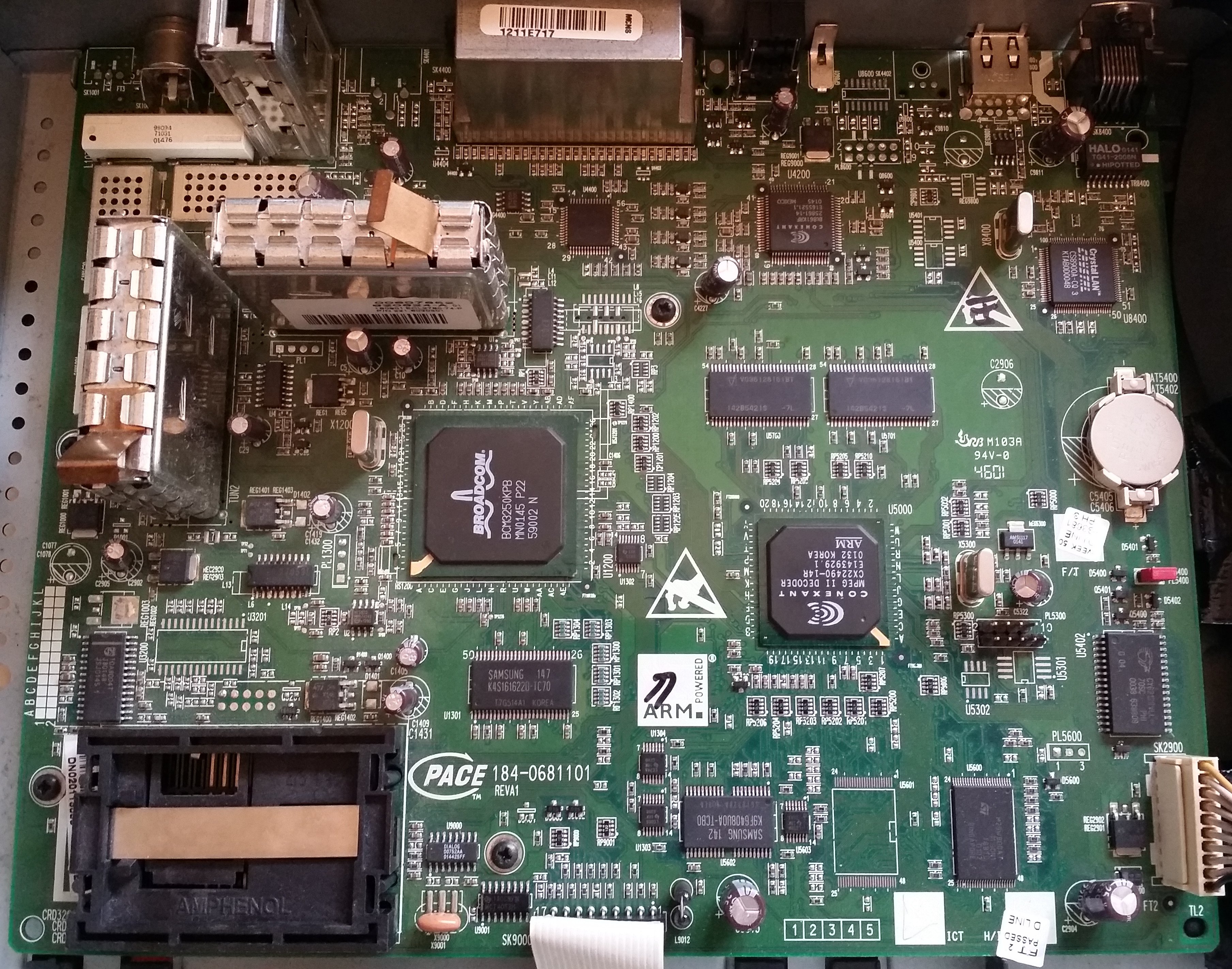
After having success finding the jtag pads on an old router, I turned my attention to some of the other old kit I have lying around. I'd had the lid off the Virgin-branded, Pace 4000 set top box previously and noticed that it had a handful of unpopulated headers on the board. The nine closest to the CPU seemed most promising, so after soldering some pins, checking the voltages (all within 3.3v) and for ground, I attached my arduino mega running jtagenum. It found this:
#   JTAG  colour
9   TDO   red
7   TCK   blue
5   TMS   green
3   TDI   pink
Using openocd I was able to hack together this config file for the Conexant 'MPEG II DECODER' ARM chip:
set _CHIPNAME conexantarm
set _CPUID 0x10940027

jtag newtap $_CHIPNAME cpu -expected-id $_CPUID -irlen 4

set _TARGETNAME $_CHIPNAME.cpu
target create $_TARGETNAME arm920t -endian little -chain-position $_TARGETNAME
Dumping from 0x0, the first 256 bytes:
lee@monkeybox ~/Downloads/openocd/openocd $ hexdump -C pace-virgin.bin | less
00000000  18 f0 9f e5 18 f0 9f e5  18 f0 9f e5 18 f0 9f e5  |................|
*
00000020  08 01 00 00 78 01 00 00  84 01 00 00 f4 01 00 00  |....x...........|
00000030  00 02 00 00 0c 02 00 00  18 02 00 00 24 02 00 00  |............$...|
00000040  2e 97 a0 a9 ba f4 a7 d4  30 5f 80 35 0e c3 bc 77  |........0_.5...w|
00000050  7c 57 55 68 dc 59 be f6  24 ae d1 52 85 62 c7 8d  ||WUh.Y..$..R.b..|
00000060  83 e2 75 03 75 29 e6 11  00 00 04 00 fc ff 03 00  |..u.u)..........|
00000070  00 00 00 20 00 00 00 00  00 00 00 00 00 00 00 00  |... ............|
00000080  08 08 00 00 00 00 00 00  00 00 6c 6f 61 64 65 72  |..........loader|
00000090  00 00 00 5f 37 37 37 37  37 37 37 37 37 37 37 37  |..._777777777777|
000000a0  37 37 37 37 37 37 37 37  37 37 37 37 37 37 37 37  |7777777777777777|
000000b0  37 37 37 37 37 37 37 37  37 37 37 37 2b f7 9f f4  |777777777777+...|
000000c0  4e 54 4c 20 4c 6f 61 64  65 72 20 56 31 2e 39 20  |NTL Loader V1.9 |
000000d0  52 65 6c 65 61 73 65 00  00 00 00 00 00 00 00 00  |Release.........|
000000e0  00 00 00 00 00 00 00 00  00 00 00 00 00 00 00 00  |................|
And through 'strings' (anyone else think the passcode for 'ENGINEERING MODE' might be '0000'? ;) ):
Stopping off air download
Paul's debug loader
BUILDING FAT:
Ethernet Download Not Avaliable
Changing to serial download
Serial Download
Skipping Download
RUN PLATFORM
FAIL
Invalid platform flash is set. Deleting non platform objects
Deleted flash object of type
Failed to delete flash object, error is
pstHeader is
Object size is
CRC offset is
*****************************************************************

PRIMARY LOADER
Ldr
Err1
RAM Fail
Err2
**********NVRAM Fail***********
Err3
FLASH Fail
Er40
Cache Initialise Fail
LED Initialise Fail
PACE
Key Initialise Fail
I2C Initialise Fail
Graphics Initialise Fail
DENC Initialise Fail
SCART Initialise Fail
REMOD Initialise Fail
Engineering mode
Failed to read keys
ENGINEERING MODE:
0000
0000
On bcm6348 based devices, the standard bootloader is called the cfe. As well as boot strapping the board - so it can start the kernel - it also usually provides a few mechanisms for installing pre-built OS images. The process is simple: connect to the uart, wait for the "Press space key to stop auto run" message and press space. The boot is halted and you're given a 'CFE>' prompt where you can execute commands:
CFE version 1.0.37-21.6.8 for BCM96348 (32bit,SP,BE)
Build Date: Thu Sep 22 10:49:20 CST 2005 (michaelc@AskeyBrcmServer)

Flash Config: CS0(1f80000a,17),Base(bf800000),Size(8MB)
Ethernet Network Device: Internal PHY

Board IP address                : 192.168.1.1:ffffff00
Host IP address                 : 192.168.1.2
Gateway IP address              :
Run from flash/host (f/h)       : f
Default host run file name      :
Default host flash file name    : bcmModelName_fs_kernel
Boot delay (1-9 seconds)        : 9
Board Id Name                   : V2091_BB
Psi size in KB                  : 24
Number of MAC Addresses (1-32)  : 3
Ethernet MAC Address            : 00:16:e3:1f:0d:1c
WEP 128bit Key                  : a986888aa527c
Memory size in MB               : 16

==== Press space key to stop auto run (9 seconds) ====
Auto run second count down(before hit space key): 4
CFE> help
Available commands:

w                   Write the whole image start from beginning of the flash
e                   Erase [n]vram or [a]ll flash except bootrom
r                   Run program from flash image or from host depend on [f/h] flag
p                   Print boot line and board parameter info
c                   Change booline parameters
f                   Write image to the flash
i                   Erase persistent storage data
b                   Change board parameters
reset               Reset the board
flashimage          Flashes a compressed image after the bootloader.
help                Obtain help for CFE commands

For more information about a command, enter 'help command-name'
*** command status = 0
CFE>
However on the bt voyager 2091 that I've been working on recently, the bootloader doesn't stop and doesn't respond to space being pressed at all. I know that on other boards the boot delay is a configurable option from with the cfe shell; the menu looks like this:
CFE> c
Press:  <enter> to use current value
Board IP address                :[192.168.1.1:ffffff00]:
Host IP address                 :[192.168.1.2]:
Gateway IP address              :[]:
Run from flash/host (f/h)       :[f]:
Default host run file name      :[]:
Default host flash file name    :[bcmModelName_fs_kernel]:
Boot delay (1-9 seconds)        :[9]:
I used jtag to pull the cfe (64k @0x1fc00000) and ran it through hexdump:
00000570  63 66 65 2d 76 01 00 25  15 06 08 00 00 00 00 00  |cfe-v..%........|
00000580  00 00 00 02 65 3d 31 39  32 2e 31 36 38 2e 31 2e  |....e=192.168.1.|
00000590  31 3a 66 66 66 66 66 66  30 30 20 68 3d 31 39 32  |1:ffffff00 h=192|
000005a0  2e 31 36 38 2e 31 2e 32  20 67 3d 20 72 3d 66 20  |.168.1.2 g= r=f |
000005b0  66 3d 20 69 3d 62 63 6d  4d 6f 64 65 6c 4e 61 6d  |f= i=bcmModelNam|
000005c0  65 5f 66 73 5f 6b 65 72  6e 65 6c 20 64 3d 31 20  |e_fs_kernel d=1 |
000005d0  00 00 00 00 00 00 00 00  00 00 00 00 00 00 00 00  |................|
It's not hard to see that there's a bunch of key=value pairs that match the expected data:
e=192.168.1.1:ffffff00        (Board IP address)
h=192.168.1.2                 (Host IP address)
g=                            (Gateway IP address)
r=f                           (Run from flash/host (f/h))
f=                            (Default host run file name)
i=bcmModelName_fs_kernel      (Default host flash file name)
d=1                           (Boot delay (1-9 seconds))
Using a hex editor I modified the boot delay value in 0x5ce from '1'(0x31) to '9'(0x39) and flashed it back to the 2091 - I was expecting that I'd at least have to find and fix up a checksum somewhere, and I was quite surprised when it booted with:
CFE version 1.0.37-21.6.8 for BCM96348 (32bit,SP,BE)
Build Date: Thu Sep 22 10:49:20 CST 2005 (michaelc@AskeyBrcmServer)

Flash Config: CS0(1f80000a,17),Base(bf800000),Size(8MB)
Ethernet Network Device: Internal PHY

*** Board is not initialized properly ***

Press:  <enter> to use current value
Board Id Name (A-O)
RTA1045VG        -------- A
RTA1045BVG       -------- B
RTA1046VW        -------- C
RTA1046BVW       -------- D
RTA1052BVW       -------- E
RTA1050V         -------- F
RTA1052V         -------- G
V220V_BBV        -------- H
V2091_BB         -------- I
V2090            -------- J
V2110            -------- K
V2500V_BBV       -------- L
V2500V_BB        -------- M
RTA1025W_16      -------- N
RTA1025BW_16     -------- O     :[I]:
Number of MAC Addresses (1-32)  :[0]:  3
Ethernet MAC Address            :[]:00:16:e3:1f:0d:1c
WEP 128bit Key                  :[a986888aa527c]:

Save and Exit  (y/n):y

Save your cnofiguration to nvram........done

Press any key to reset the board:

CFE version 1.0.37-21.6.8 for BCM96348 (32bit,SP,BE)
Build Date: Thu Sep 22 10:49:20 CST 2005 (michaelc@AskeyBrcmServer)

Flash Config: CS0(1f80000a,17),Base(bf800000),Size(8MB)
Ethernet Network Device: Internal PHY

Board IP address                : 192.168.1.1:ffffff00
Host IP address                 : 192.168.1.2
Gateway IP address              :
Run from flash/host (f/h)       : f
Default host run file name      :
Default host flash file name    : bcmModelName_fs_kernel
Boot delay (1-9 seconds)        : 9
Board Id Name                   : V2091_BB
Psi size in KB                  : 24
Number of MAC Addresses (1-32)  : 3
Ethernet MAC Address            : 00:16:e3:1f:0d:1c
WEP 128bit Key                  : a986888aa527c
Memory size in MB               : 16

==== Press space key to stop auto run (9 seconds) ====
And I could get into the cfe shell.
The final difficulty with the cfe on this board, is that the network stack seems to be disabled or uninitialised until you change the board IP address. I'm not sure if that's down to my messing with the cfe or if maybe it was intentionally disabled at the factory.
Before attempting to flash a router with openwrt, I like to jtag it so I can dump and restore the flash if it all goes horribly wrong. Unlike the the serial console, the jtag connections on the BT voyager 2091 aren't obvious - and unlike the previous bcm6348 boards I've jtag'd, someone hasn't already documented them.
Although the board has a large amount of exposed pads and/or vias, very few of these are labelled. On the underside however there's a small cluster of pads labelled BTP2, BTP3, BTP4 and BTP5. As jtag usually needs a minimum of TMS, TCK, TDO and TDI these four pads seemed like the best place to start.
I didn't want to have to manually walk through all possible combinations - especially if it turned out they weren't the correct pads and I'd have to expand my search to the numerous unlabelled pads - so I looked for a way to automate. After finding a couple of dedicated (but expensive) devices I eventually found jtagenum for the arduino. Jtagenum basically just brute forces it's way through all pin combinations and would be perfect if my arduino wasn't 5v; the 2091 is a 3.3v device.
Here's the 2091, my arduino mega and an eight-way level shifter on a breadboard, using a handful of mosfets (circuit borrowed from here).
Jtagenum really wants five pins: the usual four TMS/TCK/TDO/TDI and nTRST. As I don't have a candidate for nTRST I added and extra pin (40) to the pin[]/pinnames[] arrays and just left it unconnected. The four BTPx wires were connected to 24, 29, 32, and 37. Running the 'pattern scan' gave the following output:
================================
Starting scan for pattern:0110011101001101101000010111001001
active  ntrst:32 tck:37 tms:24 tdo:29 tdi:40	bits toggled:3
active  ntrst:32 tck:37 tms:40 tdo:29 tdi:24	bits toggled:6
active  ntrst:40 tck:37 tms:24 tdo:29 tdi:32	bits toggled:58
active  ntrst:40 tck:37 tms:32 tdo:29 tdi:24	bits toggled:6
================================
As I knew that 40 was unconnected it couldn't be either of the first two 'active' lines; one has TMS as 40 the other has TDI as 40. This left just two combinations to try with my busblaster - first one didn't work but the second one made urjtag do this:
UrJTAG 0.10 #2039
Copyright (C) 2002, 2003 ETC s.r.o.
Copyright (C) 2007, 2008, 2009 Kolja Waschk and the respective authors

UrJTAG is free software, covered by the GNU General Public License, and you are
welcome to change it and/or distribute copies of it under certain conditions.
There is absolutely no warranty for UrJTAG.

warning: UrJTAG may damage your hardware!
Type "quit" to exit, "help" for help.

jtag> cable jtagkey vid=0x403 pid=0x6010
Connected to libftdi driver.
jtag> detect
IR length: 5
Chain length: 1
Device Id: 00000110001101001000000101111111 (0x0634817F)
  Manufacturer: Broadcom (0x17F)
  Part(0):      BCM6348 (0x6348)
  Stepping:     V1
  Filename:     /usr/local/share/urjtag/broadcom/bcm6348/bcm6348
Excellent :) working JTAG!
Pin outs:
BTP2 - TDI - red
BTP3 - TDO - green
BTP4 - TMS - blue
BTP5 - TCK - purple
Soldering these tiny little spots was really tricky - considering all the coffee I'd consumed at that point!
I was gifted an old USB to compact flash adaptor recently. Inside, it's based around a SL11RIDE USB to ATA chip, a T14L256 SRAM chip and a 25LC64 i2c serial eeprom. I've been wanting to have a play with the buspirate's i2c sniffer for a while and the 'vendor/device configuration' stored in the eeprom sounded like a good first target.
Capturing the data from the buspirate is pretty trivial and really just comes down to connecting SCL/SDA/GND to the eeprom, setting the mode to i2c and starting the sniffer macro:
lee@monkeybox ~ $ cu -l /dev/ttyUSB0 -s 115200
Connected.

HiZ>m
1. HiZ
2. 1-WIRE
3. UART
4. I2C
5. SPI
6. 2WIRE
7. 3WIRE
8. LCD
9. DIO
x. exit(without change)

(1)>4
Set speed:
 1. ~5KHz
 2. ~50KHz
 3. ~100KHz
 4. ~400KHz

(1)>4
Ready
I2C>(0)
 0.Macro menu
 1.7bit address search
 2.I2C sniffer
I2C>(2)
Sniffer
Any key to exit
The output from the sniffer is a little harder to work with. The buspirate produces raw i2c primitives (start:[ / stop:] / ack:+ / nack:- / data:0x??), upon which the 24LC64's own read/write protocol is implemented:
][][][][][][][][][][][][][][][][][][][][][][][][][][][][][][][][][][][][][][][][
][][][][][][][][][][][][][][][][][][][][][][][][][][][][][][][][][][][][][][][][
][][][][][][][][][][][][][][][][][][][][][][][][][][][][][][][][][][][][][][][][
][][][][][][][][][][][][][][][][][][][][][][][][][][][][][][][][][][][][][][][][
][][][][][][][][][][][][][][][][][][][][][][][][][][][][][][][][][][][][][][][][
][][][][][][][][][][][][][][][][][][][][][][][][][][][][][][][][][][][][][][][][
][][][][][][][][][][][][][][][][][][][][][][][][][][][][][][][][][][][][][][][][
][][][][][][][][][][][][][][][][][][][][][]][][][][[][][][][][][][][][][][][][][
][][][][][][][][][][][][][][][][][][][][][][][][][][][][][][][][][][][][][][][][
][][][][][][][][][][][][][][][][][][][][][][][][][][][][][][][][][][][][][][][][
][][][][][][][][][][][][][][][][][][][][][][][][][][][][][][][][][][][][][][][][
][][][][][][][][][][][][][][][][][][][][][][][][][][][][][][][][][][][][][][][][
][][][][][][][][][][][][][][][][][][][][][][][][][][][][][][][][][][][][][][][][
][][][][][][][][][][][][][][][][][][][][][][][][][][][][][][][][][][][][][][][][
][][][][][][][][][][][][][][][][][][][][][][][][][][][][][][][][][][][][][][][][
][][][][][][][][][][][][][][][][][][][][][][][][][][][][][][][][][][][][][][][][
][][][][][][][][][][][][][][][][][][][][][][][][][][][][][][][][][][][][][][][][
][][][][][][][][][][][][][][][][][][][][][][][][][][][][][][][][][][[][][][][][]
[][][[0xA0+0x00+0x00+[0xA1+0xB6-][0xA1+0xC3-][0xA1+0x04-][0xA1+0x00-][0xA1+0x00-
][0xA1+0x06-][0xA1+0xC0-][0xA1+0x00-][0xA1+0x00-][0xA1+0xB6-][0xA1+0xC3-][0xA1+0
x04-][0xA1+0x00-][0xA1+0x00-][0xA1+0x3A-][0xA1+0xC0-][0xA1+0x09-][0xA1+0x00-][0x
A1+0xB6-][0xA1+0xC3-][0xA1+0x04-][0xA1+0x00-][0xA1+0x00-][0xA1+0xA6-][0xA1+0x00-
][0xA1+0xC2-][0xA1+0x00-][0xA1+0xB6-][0xA1+0xC3-][0xA1+0x06-][0xA1+0x00-][0xA1+0
x00-][0xA1+0xB6-][0xA1+0x00-][0xA1+0x7E-][0xA1+0x11-][0xA1+0x9E-][0xA1+0x11-][0x
A1+0xB6-][0xA1+0xC3-][0xA1+0x04-][0xA1+0x00-][0xA1+0x00-][0xA1+0xBE-][0xA1+0x00-
][0xA1+0x44-][0xA1+0x03-][0xA1+0xB6-][0xA1+0xC3-][0xA1+0x62-][0xA1+0x00-][0xA1+0
x00-][0xA1+0x1E-][0xA1+0x00-][0xA1+0xD2-][0xA1+0x07-][0xA1+0x40-][0xA1+0x00-][0x
A1+0xE7-][0xA1+0x07-][0xA1+0x08-][0xA1+0x00-][0xA1+0x7A-][0xA1+0x00-][0xA1+0x03-
][0xA1+0xAF-][0xA1+0x97-][0xA1+0xCF-][0xA1+0xE7-][0xA1+0x07-][0xA1+0x70-][0xA1+0
x11-][0xA1+0x24-][0xA1+0x01-][0xA1+0xE7-][0xA1+0x07-][0xA1+0x0D-][0xA1+0x00-][0x
A1+0x26-][0xA1+0x01-][0xA1+0xE7-][0xA1+0x09-][0xA1+0x24-][0xA1+0x01-][0xA1+0x8E-
][0xA1+0x02-][0xA1+0xE7-][0xA1+0x09-][0xA1+0x26-][0xA1+0x01-][0xA1+0x86-][0xA1+0
x02-][0xA1+0xE7-][0xA1+0x07-][0xA1+0x07-][0xA1+0x00-][0xA1+0x92-][0xA1+0xC0-][0x
A1+0x97-][0xA1+0xCF-][0xA1+0xC0-][0xA1+0x07-][0xA1+0x40-][0xA1+0x00-][0xA1+0xC9-
][0xA1+0x07-][0xA1+0x5E-][0xA1+0x02-][0xA1+0x21-][0xA1+0x30-][0xA1+0xD1-][0xA1+0
x47-][0xA1+0x00-][0xA1+0x00-][0xA1+0x97-][0xA1+0xC3-][0xA1+0x51-][0xA1+0x94-][0x
A1+0x49-][0xA1+0xDA-][0xA1+0x40-][0xA1+0x14-][0xA1+0x51-][0xA1+0x94-][0xA1+0x97-
][0xA1+0xCF-][0xA1+0xCA-][0xA1+0x07-][0xA1+0x5C-][0xA1+0x02-][0xA1+0x87-][0xA1+0
x04-][0xA1+0x12-][0xA1+0x10-][0xA1+0xD2-][0xA1+0x57-][0xA1+0x7E-][0xA1+0x15-][0x
A1+0x97-][0xA1+0xCC-][0xA1+0xD2-][0xA1+0x07-][0xA1+0x7E-][0xA1+0x11-][0xA1+0x97-
][0xA1+0xCF-][0xA1+0x00-][0xA1+0x00-][0xA1+0x00-][0xA1+0x00-][0xA1+0xB6-][0xA1+0
xC3-][0xA1+0x04-][0xA1+0x00-][0xA1+0x00-][0xA1+0x0E-][0xA1+0x00-][0xA1+0x48-][0x
A1+0x11-][0xA1+0xB6-][0xA1+0xC3-][0xA1+0x3E-][0xA1+0x00-][0xA1+0x00-][0xA1+0xC2-
][0xA1+0x00-][0xA1+0xD0-][0xA1+0x57-][0xA1+0x80-][0xA1+0x06-][0xA1+0xE7-][0xA1+0
x07-][0xA1+0xDA-][0xA1+0x11-][0xA1+0xB4-][0xA1+0x00-][0xA1+0x9F-][0xA1+0xA0-][0x
A1+0xD4-][0xA1+0x00-][0xA1+0x9F-][0xA1+0xCF-][0xA1+0x32-][0xA1+0xF3-][0xA1+0xC1-
][0xA1+0x07-][0xA1+0x8C-][0xA1+0x0F-][0xA1+0xCB-][0xA1+0x07-][0xA1+0x7E-][0xA1+0
x11-][0xA1+0xC9-][0xA1+0x07-][0xA1+0x70-][0xA1+0x00-][0xA1+0x00-][0xA1+0x90-][0x
A1+0x41-][0xA1+0xAF-][0xA1+0x2B-][0xA1+0x00-][0xA1+0x09-][0xA1+0xDA-][0xA1+0x7B-
][0xA1+0xC1-][0xA1+0xC0-][0xA1+0x09-][0xA1+0x84-][0xA1+0xC0-][0xA1+0xC0-][0xA1+0
x67-][0xA1+0x07-][0xA1+0x00-][0xA1+0x27-][0xA1+0x10-][0xA1+0xD8-][0xA1+0x11-][0x
A1+0x97-][0xA1+0xCF-][0xA1+0x4F-][0xA1+0xD8-][0xA1+0x46-][0xA1+0xAF-][0xA1+0x47-
][0xA1+0xAF-][0xA1+0xB6-][0xA1+0xC3-][0xA1+0x04-][0xA1+0x00-][0xA1+0x00-][0xA1+0
x16-][0xA1+0x00-][0xA1+0x02-][0xA1+0x03-][0xA1+0xB6-][0xA1+0xC3-][0xA1+0x50-][0x
A1+0x00-][0xA1+0x00-][0xA1+0xF2-][0xA1+0x02-][0xA1+0x00-][0xA1+0x00-][0xA1+0xCC-
][0xA1+0x07-][0xA1+0x24-][0xA1+0xC0-][0xA1+0xCD-][0xA1+0x07-][0xA1+0x5A-][0xA1+0
x02-][0xA1+0xCE-][0xA1+0x07-][0xA1+0xF2-][0xA1+0x02-][0xA1+0x97-][0xA1+0xCF-][0x
A1+0xD7-][0xA1+0x09-][0xA1+0x00-][0xA1+0xC0-][0xA1+0x4D-][0xA1+0xAF-][0xA1+0xE7-
][0xA1+0x77-][0xA1+0x02-][0xA1+0x00-][0xA1+0xF2-][0xA1+0x02-][0xA1+0x9F-][0xA1+0
xC0-][0xA1+0x06-][0xA1+0x04-][0xA1+0xCA-][0xA1+0x07-][0xA1+0x24-][0xA1+0x01-][0x
A1+0x9F-][0xA1+0xAF-][0xA1+0x4C-][0xA1+0x00-][0xA1+0x00-][0xA1+0x60-][0xA1+0x04-
][0xA1+0xC1-][0xA1+0xE7-][0xA1+0x07-][0xA1+0x04-][0xA1+0x00-][0xA1+0xF2-][0xA1+0
x02-][0xA1+0x08-][0xA1+0xCF-][0xA1+0x32-][0xA1+0x00-][0xA1+0x02-][0xA1+0x00-][0x
A1+0x9F-][0xA1+0xAF-][0xA1+0x6E-][0xA1+0x00-][0xA1+0x27-][0xA1+0xDA-][0xA1+0x7A-
][0xA1+0x00-][0xA1+0x01-][0xA1+0xC0-][0xA1+0x03-][0xA1+0xAF-][0xA1+0x4E-][0xA1+0
xAF-][0xA1+0xE7-][0xA1+0x05-][0xA1+0x00-][0xA1+0xC0-][0xA1+0xC0-][0xA1+0xDF-][0x
A1+0x97-][0xA1+0xCF-][0xA1+0xB6-][0xA1+0xC3-][0xA1+0x04-][0xA1+0x00-][0xA1+0x00-
][0xA1+0x1A-][0xA1+0x00-][0xA1+0xA2-][0xA1+0x03-][0xA1+0xB6-][0xA1+0xC3-][0xA1+0
x2E-][0xA1+0x0E-][0xA1+0x00-][0xA1+0x44-][0xA1+0x03-][0xA1+0x9F-][0xA1+0xAF-][0x
A1+0xE0-][0xA1+0xF4-][0xA1+0xE7-][0xA1+0x07-][0xA1+0x02-][0xA1+0x00-][0xA1+0x3E-
][0xA1+0xC0-][0xA1+0xE7-][0xA1+0x07-][0xA1+0x21-][0xA1+0x00-][0xA1+0x0E-][0xA1+0
xC0-][0xA1+0xE7-][0xA1+0x07-][0xA1+0x44-][0xA1+0x04-][0xA1+0xD2-][0xA1+0x02-][0x
A1+0xE7-][0xA1+0x87-][0xA1+0xD7-][0xA1+0x00-][0xA1+0x24-][0xA1+0xC0-][0xA1+0xE7-
][0xA1+0x87-][0xA1+0xD7-][0xA1+0x00-][0xA1+0x28-][0xA1+0xC0-][0xA1+0xE7-][0xA1+0
x07-][0xA1+0x00-][0xA1+0x00-][0xA1+0x5A-][0xA1+0x02-][0xA1+0xE7-][0xA1+0x07-][0x
A1+0x58-][0xA1+0x11-][0xA1+0xAE-][0xA1+0x00-][0xA1+0xE7-][0xA1+0x07-][0xA1+0x0E-
][0xA1+0x11-][0xA1+0x00-][0xA1+0x00-][0xA1+0x9F-][0xA1+0xAF-][0xA1+0x2C-][0xA1+0
x00-][0xA1+0xE7-][0xA1+0x07-][0xA1+0x00-][0xA1+0x00-][0xA1+0xF2-][0xA1+0x02-][0x
A1+0xE7-][0xA1+0x07-][0xA1+0x70-][0xA1+0x11-][0xA1+0x28-][0xA1+0x01-][0xA1+0xE7-
][0xA1+0x07-][0xA1+0x1F-][0xA1+0x00-][0xA1+0x2A-][0xA1+0x01-][0xA1+0xE7-][0xA1+0
x09-][0xA1+0x28-][0xA1+0x01-][0xA1+0x90-][0xA1+0x02-][0xA1+0xE7-][0xA1+0x09-][0x
A1+0x2A-][0xA1+0x01-][0xA1+0x88-][0xA1+0x02-][0xA1+0xE7-][0xA1+0x07-][0xA1+0x03-
][0xA1+0x00-][0xA1+0x94-][0xA1+0xC0-][0xA1+0x97-][0xA1+0xCF-][0xA1+0xD7-][0xA1+0
x09-][0xA1+0x00-][0xA1+0xC0-][0xA1+0x4D-][0xA1+0xAF-][0xA1+0xE7-][0xA1+0x07-][0x
A1+0x06-][0xA1+0x00-]0x0x]0x0x[0x0x0x0x]0x0x[0x0x0x0x]0x0x[0x0x[0x0x0x0x]0x0x[0x
0x0x0x]0x0x[0x0x[0x0x0x0x]0x0x[0x0x0x0x]0x0x[0x0x[0x0x0x0x]0x0x[0x0x0x0x]0x0x[0x
0x[0x0x0x0x]0x0x[0x0x0x0x]0x0x]0x0x[0x0x0x0x]0x0x[0x0x[00x]0x0x]0x0x[0x0x0x0x]0x
0x[0x0x[00xD0x0x]0x0x[0x0x0x0x]0x0x[0x0x[00x]0x0x]0x0x[0x0x0x0x]0x0x[0x0x[0x0x0x
0x]0x0x[0x0x0x0x]0x0x[0x0x[0x0x0x0x]0x0x[0x0x0x0x]0x0x[0x0x[00x]0x0x]0x0x[0x0x0x
0x]0x0x[0x0x[00x]0x0x]0x0x[0x0x0x0x]0x0x[0x0x[0x0x0x0x]0x0x[0x0x0x0x]0x0x[0x0x[0
0x]0x0x]0x0x[0x0x0x0x]0x0x[0x0x0x0x]0x0x]0x0x[0x0x0x0x]0x0x[0x0x[00x]0x0x]0x0x[0
[0x0x[0x0x0x0x]0x0x[0x0x0x0x]0x0x[0x0x[0x0x0x0x]0x0x[0x0x0x0x]0x0x[0x0x[0x0x0x0x
]0x0x[0x0x0x0x]0x0x[0x0x[0x0x0x0x]0x0x[0x0x0x0x]0x0x[0x0x[00x90x0x]0x0x[0x0x0x0x
]0x0x[0x0x[00x]0x0x]0x0x[0x0x0x0x]0x0x[0x0x[00x]0x0x]0x0x[0x0x0x0x]0x0x[0x0x[00x
x[0x0x[0x0x0x0x]0x0x[0x0x0x0x]0x0x]0x0x[0x0x0x0x]0x0x[0x0x0x0x]0x0x[0x0x[00x]0x0
x]0x0x[0x0x0x0x]0x0x[0x0x[0x0x0x0x]0x0x[0x0x0x0x]0x0x[0x0x[00x]0x0x]0x0x[0x0x0x0
x]0x0x[0x0x[00x00x0x]0x0x[0x0x0x0x]0x0x[0x0x[0x0x0x0x]0x0x[0x0x0x0x]0x0x[0x0x[0x
0x0x0x]0x0x[0x0x0x0x]0x0x[0x0x[0x0x0x0x]0x0x[0x0x0x0x]0x0x[0x0x[0x0x0x0x]0x0x[0x
0x[00x]0x0x]0x0x[0x0x0x0x]0x0x[0x0x[00x]0x0x]0x0x[0x0x0x0x]0x0x[0x0x[0x0x0x0x]0x
0x[0x0x0x0x]0x0x[0x0x[0x0x0x0x]0x0x[0x0x0x0x]0x0x[0x0x[0x0x0x0x]0x0x[0x0x0x0x]0x
0x[0x0x[0x0x0x0x]0x0x[0x0x0x0x]0x0x[0x0x[0x0x0x0x]0x0x[0x0x0x0x]0x0x[0x0x[0x0x0x
0x]0x0x[0x0x0x0x]0x0x[0x0x[0x0x0x0x]0x0x[0x0x0x0x]0x0x]0x0x[0x0x0x0x]0x0x[0x0x[0
0x]0x0x]0x0x[0x0x0x0x]0x0x[0x0x[00x90x0x]0x0x[0x0x0x0x]0x0x[0x0x[00x00x0x]0x0x[0
x0x0x0x]0x0x[0x0x[0x0x0x0x]0x0x[0x0x0x0x]0x0x[0x0x[0x0x0x0x]0x0x[0x0x0x0x]0x0x]0
x0x[0x0x0x0x]0x0x[0x0x[00x]0x0x]0x0x[0x0x0x0x]0x0x[0x0x[00x]0x0x[0x0x[0x0x0x0x]0
x0x[0x0x0x0x]0x0x]0x0x[0x0x0x0x]0x0x[0x0x0x0x]0x0x[0x0x[0x0x0x0x]0x0x[0x0x0x0x]0
x0x[0x0x[0x0x0x0x]0x0x[0x0x0x0x]0x0x[0x0x[0x0x0x0x]0x0x[0x0x[00x]0x0x]0x0x[0x0x0
x0x]0x0x[0x0x[00x]0x0x]0x0x[0x0x0x0x]0x0x[0x0x[00x10x0x]0x0x[0x0x0x0x]0x0x[0x0x[
00x]0x0x]0x0x[0x0x0x0x]0x0x[0x0x[00x]0x0x]0x0x[0x0x0x0x]0x0x[0x0x0x0x]0x0x[0x0x[
0x0x0x0x]0x0x[0x0x0x0x]0x0x[0x0x[0x0x0x0x]0x0x[0x0x0x0x]0x0x[0x0x[0x0x0x0x]0x0x[
0x0x0x0x]0x0x[0x0x[0x0x0x0x]0x0x[0x0x0x0x]0x0x[0x0x[0x0x0x0x]0x0x[0x0x[00x]0x0x]
0x0x[0x0x0x0x]0x0x[0x0x0x0x]0x0x]0x0x[0x0x0x0x]0x0x[0x0x0x0x]0x0x[0x0x[0x0x0x0x]
0x0x[0x0x[00x]0x0x]0x0x[0x0x0x0x]0x0x[0x0x[00x]0x0x]0x0x[0x0x0x0x]0x0x[0x0x[0x0x
0x0x]0x0x[0x0x0x0x]0x0x[0x0x[0x0x0x0x]0x0x[0x0x0x0x]0x0x[0x0x[0x0x0x0x]0x0x[0x0x
[00x]0x0x]0x0x[0x0x0x0x]0x0x[0x0x[00x]0x0x]0x0x[0x0x0x0x]0x0x[0x0x0x0x]0x0x[0x0x
[0x0x0x0x]0x0x[0x0x0x0x]0x0x[0x0x[0x0x0x0x]0x0x[0x0x0x0x]0x0x[0x0x[0x0x0x0x]0x0x
[0x0x0x0x]0x0x[0x0x[0x0x0x0x]0x0x[0x0x0x0x]0x0x[0x0x[0x0x0x0x]0x0x[0x0x[00x]0x0x
]0x0x[0x0x[0xA0+0x0F+0x8C+[0xA1+0x09-][0xA1+0x02-][0xA1+0x20-][0xA1+0x00-][0xA1+
0x01-][0xA1+0x01-][0xA1+0x00-][0xA1+0xC0-][0xA1+0x96-][0xA1+0x09-][0xA1+0x04-][0
xA1+0x00-][0xA1+0x00-][0xA1+0x02-][0xA1+0x08-][0xA1+0x06-][0xA1+0x50-][0xA1+0x00
-][0xA1+0x07-][0xA1+0x05-][0xA1+0x02-][0xA1+0x02-][0xA1+0x40-][0xA1+0x00-][0xA1+
0x00-][0xA1+0x07-][0xA1+0x05-][0xA1+0x81-][0xA1+0x02-][0xA1+0x40-][0xA1+0x00-][0
xA1+0x00-][0xA1+0x04-][0xA1+0x03-][0xA1+0x09-][0xA1+0x04-][0xA1+0x26-][0xA1+0x03
-][0xA1+0x43-][0xA1+0x00-][0xA1+0x59-][0xA1+0x00-][0xA1+0x50-][0xA1+0x00-][0xA1+
0x52-][0xA1+0x00-][0xA1+0x45-][0xA1+0x00-][0xA1+0x53-][0xA1+0x00-][0xA1+0x53-][0
xA1+0x00-][0xA1+0x20-][0xA1+0x00-][0xA1+0x53-][0xA1+0x00-][0xA1+0x4D-][0xA1+0x00
-][0xA1+0x2D-][0xA1+0x00-][0xA1+0x43-][0xA1+0x00-][0xA1+0x46-][0xA1+0x00-][0xA1+
0x20-][0xA1+0x00-][0xA1+0x30-][0xA1+0x00-][0xA1+0x2E-][0xA1+0x00-][0xA1+0x37-][0
xA1+0x00-][0xA1+0x36-][0xA1+0x00-][0xA1+0x12-][0xA1+0x03-][0xA1+0x31-][0xA1+0x00
-][0xA1+0x31-][0xA1+0x00-][0xA1+0x32-][0xA1+0x00-][0xA1+0x30-][0xA1+0x00-][0xA1+
0x34-][0xA1+0x00-][0xA1+0x45-][0xA1+0x00-][0xA1+0x43-][0xA1+0x00-][0xA1+0x30-][0
xA1+0x00-][0xA1+0x12-][0xA1+0x01-][0xA1+0x10-][0xA1+0x01-][0xA1+0x00-][0xA1+0x00
-][0xA1+0x00-][0xA1+0x08-][0xA1+0xCE-][0xA1+0x04-][0xA1+0x02-][0xA1+0x00-][0xA1+
0x76-][0xA1+0x00-][0xA1+0x01-][0xA1+0x01-][0xA1+0x02-][0xA1+0x01-][0xA1+0xFF-][0
xA1+0xFF-][0xA0+0x0F+0x8C+[0xA1+0x09-][0xA1+0x02-][0xA1+0x20-][0xA1+0x00-][0xA1+
0x01-][0xA1+0x01-][0xA1+0x00-][0xA1+0xC0-][0xA1+0x96-][0xA1+0x09-][0xA1+0x04-][0
xA1+0x00-][0xA1+0x00-][0xA1+0x02-][0xA1+0x08-][0xA1+0x06-][0xA1+0x50-][0xA1+0x00
-][0xA1+0x07-][0xA1+0x05-][0xA1+0x02-][0xA1+0x02-][0xA1+0x40-][0xA1+0x00-][0xA1+
0x00-][0xA1+0x07-][0xA1+0x05-][0xA1+0x81-][0xA1+0x02-][0xA1+0x40-][0xA1+0x00-][0
xA1+0x00-][0xA1+0x04-][0xA1+0x03-][0xA1+0x09-][0xA1+0x04-][0xA1+0x26-][0xA1+0x03
-][0xA1+0x43-][0xA1+0x00-][0xA1+0x59-][0xA1+0x00-][0xA1+0x50-][0xA1+0x00-][0xA1+
0x52-][0xA1+0x00-][0xA1+0x45-][0xA1+0x00-][0xA1+0x53-][0xA1+0x00-][0xA1+0x53-][0
xA1+0x00-][0xA1+0x20-][0xA1+0x00-][0xA1+0x53-][0xA1+0x00-][0xA1+0x4D-][0xA1+0x00
-][0xA1+0x2D-][0xA1+0x00-][0xA1+0x43-][0xA1+0x00-][0xA1+0x46-][0xA1+0x00-][0xA1+
0x20-][0xA1+0x00-][0xA1+0x30-][0xA1+0x00-][0xA1+0x2E-][0xA1+0x00-][0xA1+0x37-][0
xA1+0x00-][0xA1+0x36-][0xA1+0x00-][0xA1+0x12-][0xA1+0x03-][0xA1+0x31-][0xA1+0x00
-][0xA1+0x31-][0xA1+0x00-][0xA1+0x32-][0xA1+0x00-][0xA1+0x30-][0xA1+0x00-][0xA1+
0x34-][0xA1+0x00-][0xA1+0x45-][0xA1+0x00-][0xA1+0x43-][0xA1+0x00-][0xA1+0x30-][0
xA1+0x00-][0xA1+0x12-][0xA1+0x01-][0xA1+0x10-][0xA1+0x01-][0xA1+0x00-][0xA1+0x00
-][0xA1+0x00-][0xA1+0x08-][0xA1+0xCE-][0xA1+0x04-][0xA1+0x02-][0xA1+0x00-][0xA1+
0x76-][0xA1+0x00-][0xA1+0x01-][0xA1+0x01-][0xA1+0x02-][0xA1+0x01-][0xA1+0xFF-][0
xA1+0xFF-][0xA0+0x0F+0x8C+[0xA1+0x09-][0xA1+0x02-][0xA1+0x20-][0xA1+0x00-][0xA1+
0x01-][0xA1+0x01-][0xA1+0x00-][0xA1+0xC0-][0xA1+0x96-][0xA1+0x09-][0xA1+0x04-][0
xA1+0x00-][0xA1+0x00-][0xA1+0x02-][0xA1+0x08-][0xA1+0x06-][0xA1+0x50-][0xA1+0x00
-][0xA1+0x07-][0xA1+0x05-][0xA1+0x02-][0xA1+0x02-][0xA1+0x40-][0xA1+0x00-][0xA1+
0x00-][0xA1+0x07-][0xA1+0x05-][0xA1+0x81-][0xA1+0x02-][0xA1+0x40-][0xA1+0x00-][0
xA1+0x00-][0xA1+0x04-][0xA1+0x03-][0xA1+0x09-][0xA1+0x04-][0xA1+0x26-][0xA1+0x03
-][0xA1+0x43-][0xA1+0x00-][0xA1+0x59-][0xA1+0x00-][0xA1+0x50-][0xA1+0x00-][0xA1+
0x52-][0xA1+0x00-][0xA1+0x45-][0xA1+0x00-][0xA1+0x53-][0xA1+0x00-][0xA1+0x53-][0
xA1+0x00-][0xA1+0x20-][0xA1+0x00-][0xA1+0x53-][0xA1+0x00-][0xA1+0x4D-][0xA1+0x00
-][0xA1+0x2D-][0xA1+0x00-][0xA1+0x43-][0xA1+0x00-][0xA1+0x46-][0xA1+0x00-][0xA1+
0x20-][0xA1+0x00-][0xA1+0x30-][0xA1+0x00-][0xA1+0x2E-][0xA1+0x00-][0xA1+0x37-][0
xA1+0x00-][0xA1+0x36-][0xA1+0x00-][0xA1+0x12-][0xA1+0x03-][0xA1+0x31-][0xA1+0x00
-][0xA1+0x31-][0xA1+0x00-][0xA1+0x32-][0xA1+0x00-][0xA1+0x30-][0xA1+0x00-][0xA1+
0x34-][0xA1+0x00-][0xA1+0x45-][0xA1+0x00-][0xA1+0x43-][0xA1+0x00-][0xA1+0x30-][0
xA1+0x00-][0xA1+0x12-][0xA1+0x01-][0xA1+0x10-][0xA1+0x01-][0xA1+0x00-][0xA1+0x00
-][0xA1+0x00-][0xA1+0x08-][0xA1+0xCE-][0xA1+0x04-][0xA1+0x02-][0xA1+0x00-][0xA1+
0x76-][0xA1+0x00-][0xA1+0x01-][0xA1+0x01-][0xA1+0x02-][0xA1+0x01-][0xA1+0xFF-][0
xA1+0xFF-][0xA0+0x0F+0x8C+[0xA1+0x09-][0xA1+0x02-][0xA1+0x20-][0xA1+0x00-][0xA1+
0x01-][0xA1+0x01-][0xA1+0x00-][0xA1+0xC0-][0xA1+0x96-][0xA1+0x09-][0xA1+0x04-][0
xA1+0x00-][0xA1+0x00-][0xA1+0x02-][0xA1+0x08-][0xA1+0x06-][0xA1+0x50-][0xA1+0x00
-][0xA1+0x07-][0xA1+0x05-][0xA1+0x02-][0xA1+0x02-][0xA1+0x40-][0xA1+0x00-][0xA1+
0x00-][0xA1+0x07-][0xA1+0x05-][0xA1+0x81-][0xA1+0x02-][0xA1+0x40-][0xA1+0x00-][0
xA1+0x00-][0xA1+0x04-][0xA1+0x03-][0xA1+0x09-][0xA1+0x04-][0xA1+0x26-][0xA1+0x03
-][0xA1+0x43-][0xA1+0x00-][0xA1+0x59-][0xA1+0x00-][0xA1+0x50-][0xA1+0x00-][0xA1+
0x52-][0xA1+0x00-][0xA1+0x45-][0xA1+0x00-][0xA1+0x53-][0xA1+0x00-][0xA1+0x53-][0
xA1+0x00-][0xA1+0x20-][0xA1+0x00-][0xA1+0x53-][0xA1+0x00-][0xA1+0x4D-][0xA1+0x00
-][0xA1+0x2D-][0xA1+0x00-][0xA1+0x43-][0xA1+0x00-][0xA1+0x46-][0xA1+0x00-][0xA1+
0x20-][0xA1+0x00-][0xA1+0x30-][0xA1+0x00-][0xA1+0x2E-][0xA1+0x00-][0xA1+0x37-][0
xA1+0x00-][0xA1+0x36-][0xA1+0x00-][0xA1+0x12-][0xA1+0x03-][0xA1+0x31-][0xA1+0x00
-][0xA1+0x31-][0xA1+0x00-][0xA1+0x32-][0xA1+0x00-][0xA1+0x30-][0xA1+0x00-][0xA1+
0x34-][0xA1+0x00-][0xA1+0x45-][0xA1+0x00-][0xA1+0x43-][0xA1+0x00-][0xA1+0x30-][0
xA1+0x00-][0xA1+0x12-][0xA1+0x01-][0xA1+0x10-][0xA1+0x01-][0xA1+0x00-][0xA1+0x00
-][0xA1+0x00-][0xA1+0x08-][0xA1+0xCE-][0xA1+0x04-][0xA1+0x02-][0xA1+0x00-][0xA1+
0x76-][0xA1+0x00-][0xA1+0x01-][0xA1+0x01-][0xA1+0x02-][0xA1+0x01-][0xA1+0xFF-][0
xA1+0xFF-][0xA0+0x0F+0x8C+[0xA1+0x09-][0xA1+0x02-][0xA1+0x20-][0xA1+0x00-][0xA1+
0x01-][0xA1+0x01-][0xA1+0x00-][0xA1+0xC0-][0xA1+0x96-][0xA1+0x09-][0xA1+0x04-][0
xA1+0x00-][0xA1+0x00-][0xA1+0x02-][0xA1+0x08-][0xA1+0x06-][0xA1+0x50-][0xA1+0x00
-][0xA1+0x07-][0xA1+0x05-][0xA1+0x02-][0xA1+0x02-][0xA1+0x40-][0xA1+0x00-][0xA1+
0x00-][0xA1+0x07-][0xA1+0x05-][0xA1+0x81-][0xA1+0x02-][0xA1+0x40-][0xA1+0x00-][0
xA1+0x00-][0xA1+0x04-][0xA1+0x03-][0xA1+0x09-][0xA1+0x04-][0xA1+0x26-][0xA1+0x03
-][0xA1+0x43-][0xA1+0x00-][0xA1+0x59-][0xA1+0x00-][0xA1+0x50-][0xA1+0x00-][0xA1+
0x52-][0xA1+0x00-][0xA1+0x45-][0xA1+0x00-][0xA1+0x53-][0xA1+0x00-][0xA1+0x53-][0
xA1+0x00-][0xA1+0x20-][0xA1+0x00-][0xA1+0x53-][0xA1+0x00-][0xA1+0x4D-][0xA1+0x00
-][0xA1+0x2D-][0xA1+0x00-][0xA1+0x43-][0xA1+0x00-][0xA1+0x46-][0xA1+0x00-][0xA1+
0x20-][0xA1+0x00-][0xA1+0x30-][0xA1+0x00-][0xA1+0x2E-][0xA1+0x00-][0xA1+0x37-][0
xA1+0x00-][0xA1+0x36-][0xA1+0x00-][0xA1+0x12-][0xA1+0x03-][0xA1+0x31-][0xA1+0x00
-][0xA1+0x31-][0xA1+0x00-][0xA1+0x32-][0xA1+0x00-][0xA1+0x30-][0xA1+0x00-][0xA1+
0x34-][0xA1+0x00-][0xA1+0x45-][0xA1+0x00-][0xA1+0x43-][0xA1+0x00-][0xA1+0x30-][0
xA1+0x00-][0xA10x[0x0x0x0x]0x0x[0x0x0x0x]0x0x[0x0x[00x]0x0x]0x0x[0x0x0x0x]0x0x[0
x0x[00x]0x0x]0x0x[0x0x0x0x][0xA0x0x0x0x]0x0x[0x0x0x0x]0x0x[0x0x0x0x]0x0x[0x0x[0x
0x0x0x]0x0x[0x0x0x0x]0x0x[0x0x[00x]0x0x]0x0x[0x0x0x0x]0x0x[0x0x0x0x]0x0x[0x0x[00
x]0x0x]0x0x[0x0x0x0x]0x0x[0x0x0x0x]0x0x[0x0x[0x0x0x0x]0x0x[0x0x0x0x]0x0x[0x0x[00
x]0x0x]0x0x[0x0x0x0x]0x0x[0x0x[00x]0x0x]0x0x[0x0x0x0x]0x0x[0x0x0x0x]0x0x[0x0x[00
x]0x0x]0x0x[0x0x0x0x]0x0x[0x0x0x0x]0x0x]0x0x[0x0x0x0x]0x0x[0x0x0x0x]0x0x[0x0x[0x
0x0x0x]0x0x[0x0x0x0x]0x0x[0x0x0x0x]0x0x[0x0x[0x0x0x0x]0x0x[0x0x0x0x]0x0x[0x0x[00
x]0x0x]0x0x[0x0x0x0x]0x0x[0x0x0x0x]0x0x[0x0x[00x]0x0x]0x0x[0x0x0x0x]0x0x[0x0x0x0
x][0xA0x0x[00x]0x0x]0x0x[0x0x0x0x]0x0x[0x0x0x0x]0x0x[0x0x[0x0x0x0x]0x0x[0x0x0x0x
]0x0x[0x0x[00x]0x0x]0x0x[0x0x0x0x]0x0x[0x0x0x0x]0x0x]0x0x[0x0x0x0x]0x0x[0x0x0x0x
]0x0x[0x0x[0x0x0x0x]0x0x[0x0x0x0x]0x0x[0x0x[00x]0x0x]0x0x[0x0x0x0x]0x0x[0x0x0x0x
]0x0x[0x0x[0x0x0x0x]0x0x[0x0x0x0x]0x0x[0x0x0x0x]0x0x[0x0x[0x0x0x0x]0x0x[0x0x0x0x
]0x0x[0x0x[00x]0x0x]0x0x[0x0x0x0x]0x0x[0x0x0x0x]0x0x[0x0x[00x]0x0x]0x0x[0x0x0x0x
]0x0x[0x0x0x0x]0x0x[0x0x[0x0x0x0x]0x0x[0x0x0x0x]0x0x[0x0x[0x0x0x0x]0x0x[0x0x0x0x
]0x0x[0x0x0x0x]0x0x[0x0x[0x0x0x0x]0x0x[0x0x0x0x]0x0x[0x0x[0xA0+0x0x0x0x[0x0x[0x0
x0x0x]0x0x[0x0x0x0x]0x0x[0x0x[00x]0x0x]0x0x[0x0x0x0x]0x0x[0x0x0x0x]0x0x[0x0x[0x0
x0x0x]0x0x[0x0x0x0x]0x0x[0x0x[00x]0x0x]0x0x[0x0x0x0x]0x0x[0x0x[00x]0x0x[0x0x[0x0
x0x0x]0x0x[0x0x0x0x]0x0x[0x0x[00x]0x0x]0x0x[0x0x0x0x]0x0x[0x0x0x0x]0x0x[0x0x[00x
00x0x]0x0x[0x0x0x0x]0x0x[0x0x0x0x]0x0x[0x0x[0x0x0x0x]0x0x[0x0x0x0x]0x0x[0x0x[00x
]0x0x]0x0x[0x0x0x0x]0x0x[0x0x0x0x]0x0x[0x0x[0x0x0x0x]0x0x[0x0x0x0x]0x0x[0x0x[00x
00x0x]0x0x[0x0x0x0x]0x0x[0x0x0x0x]0x0x[0x0x[0x0x0x0x]0x0x[0x0x0x0x]0x0x[0x0x[00x
]0x0x]0x0x[0x0x0x0x]0x0x[0x0x[00x][0xA0+0x0F+0x8C+[0xA1+0x09-][0xA1+0x02-][0xA1+
0x20-][0xA1+0x00-][0xA1+0x01-][0xA1+0x01-][0xA1+0x00-][0xA1+0xC0-][0xA1+0x96-][0
xA1+0x09-][0xA1+0x04-][0xA1+0x00-][0xA1+0x00-][0xA1+0x02-][0xA1+0x08-][0xA1+0x06
-][0xA1+0x50-][0xA1+0x00-][0xA1+0x07-][0xA1+0x05-][0xA1+0x02-][0xA1+0x02-][0xA1+
0x40-][0xA1+0x00-][0xA1+0x00-][0xA1+0x07-][0xA1+0x05-][0xA1+0x81-][0xA1+0x02-][0
xA1+0x40-][0xA1+0x00-][0xA1+0x00-][0xA1+0x04-][0xA1+0x03-][0xA1+0x09-][0xA1+0x04
-][0xA1+0x26-][0xA1+0x03-][0xA1+0x43-][0xA1+0x00-][0xA1+0x59-][0xA1+0x00-][0xA1+
0x50-][0xA1+0x00-][0xA1+0x52-][0xA1+0x00-][0xA1+0x45-][0xA1+0x00-][0xA1+0x53-][0
xA1+0x00-][0xA1+0x53-][0xA1+0x00-][0xA1+0x20-][0xA1+0x00-][0xA1+0x53-][0xA1+0x00
-][0xA1+0x4D-][0xA1+0x00-][0xA1+0x2D-][0xA1+0x00-][0xA1+0x43-][0xA1+0x00-][0xA1+
0x46-][0xA1+0x00-][0xA1+0x20-][0xA1+0x00-][0xA1+0x30-][0xA1+0x00-][0xA1+0x2E-][0
xA1+0x00-][0xA1+0x37-][0xA1+0x00-][0xA1+0x36-][0xA1+0x00-][0xA1+0x12-][0xA1+0x03
-][0xA1+0x31-][0xA1+0x00-][0xA1+0x31-][0xA1+0x00-][0xA1+0x32-][0xA1+0x00-][0xA1+
0x30-][0xA1+0x00-][0xA1+0x34-][0xA1+0x00-][0xA1+0x45-][0xA1+0x00-][0xA1+0x43-][0
xA1+0x00-][0xA1+0x30-][0xA1+0x00-][0xA1+0x12-][0xA1+0x01-][0xA1+0x10-][0xA1+0x01
-][0xA1+0x00-][0xA1+0x00-][0xA1+0x00-][0xA1+0x08-][0xA1+0xCE-][0xA1+0x04-][0xA1+
0x02-][0xA1+0x00-][0xA1+0x76-][0xA1+0x00-][0xA1+0x01-][0xA1+0x01-][0xA1+0x02-][0
xA1+0x01-][0xA1+0xFF-][0xA1+0xFF-][0xA0+0x0F+0x8C+[0xA1+0x09-][0xA1+0x02-][0xA1+
0x20-][0xA1+0x00-][0xA1+0x01-][0xA1+0x01-][0xA1+0x00-][0xA1+0xC0-][0xA1+0x96-][0
xA1+0x09-][0xA1+0x04-][0xA1+0x00-][0xA1+0x00-][0xA1+0x02-][0xA1+0x08-][0xA1+0x06
-][0xA1+0x50-][0xA1+0x00-][0xA1+0x07-][0xA1+0x05-][0xA1+0x02-][0xA1+0x02-][0xA1+
0x40-][0xA1+0x00-][0xA1+0x00-][0xA1+0x07-][0xA1+0x05-][0xA1+0x81-][0xA1+0x02-][0
xA1+0x40-][0xA1+0x00-][0xA1+0x00-][0xA1+0x04-][0xA1+0x03-][0xA1+0x09-][0xA1+0x04
-][0xA1+0x26-][0xA1+0x03-][0xA1+0x43-][0xA1+0x00-][0xA1+0x59-][0xA1+0x00-][0xA1+
0x50-][0xA1+0x00-][0xA1+0x52-][0xA1+0x00-][0xA1+0x45-][0xA1+0x00-][0xA1+0x53-][0
xA1+0x00-][0xA1+0x53-][0xA1+0x00-][0xA1+0x20-][0xA1+0x00-][0xA1+0x53-][0xA1+0x00
-][0xA1+0x4D-][0xA1+0x00-][0xA1+0x2D-][0xA1+0x00-][0xA1+0x43-][0xA1+0x00-][0xA1+
0x46-][0xA1+0x00-][0xA1+0x20-][0xA1+0x00-][0xA1+0x30-][0xA1+0x00-][0xA1+0x2E-][0
xA1+0x00-][0xA1+0x37-][0xA1+0x00-][0xA1+0x36-][0xA1+0x00-][0xA1+0x12-][0xA1+0x03
-][0xA1+0x31-][0xA1+0x00-][0xA1+0x31-][0xA1+0x00-][0xA1+0x32-][0xA1+0x00-][0xA1+
0x30-][0xA1+0x00-][0xA1+0x34-][0xA1+0x00-][0xA1+0x45-][0xA1+0x00-][0xA1+0x43-][0
xA1+0x00-][0xA1+0x30-][0xA1+0x00-][0xA1+0x12-][0xA1+0x01-][0xA1+0x10-][0xA1+0x01
-][0xA1+0x00-][0xA1+0x00-][0xA1+0x00-][0xA1+0x08-][0xA1+0xCE-][0xA1+0x04-][0xA1+
0x02-][0xA1+0x00-][0xA1+0x76-][0xA1+0x00-][0xA1+0x01-][0xA1+0x01-][0xA1+0x02-][0
xA1+0x01-][0xA1+0xFF-][0xA1+0xFF-][
Although the output is not easy on the eyes (and I've trimmed some of the nulls too), it's easy to see that it's split into three blocks that start with "[0xA0+0x??+0x??+" followed many "[0xA1+0x??-]" chunks. According to the datasheet the first byte is the 'control byte', and the first nibble of that byte is the 'control code' - in binary: 1010 or 'A' in hex. The first three bits of the second nibble are chip select bits; this board only has a single chip so is all zero's here (although it does have unpopulated pads for a second one). The last bit specifies if we're reading(0) or writing(1) - this made sense for the 0xA1 commands: the last bit was set so they were reads, but the 0xA0 commands should be writes. After re-reading the datasheet I realised that to set the memory location to start reading from, you need to initiate a write but abort after setting the address and start reading instead.
Now it's clear what's being read: the first 288 bytes, followed by - strangely - the same location (0x0f80) being read twice; once for 114 bytes and then for 124 bytes...
Finally I wanted to be able to capture the data in a raw binary file suitable for further analysis, and so I've put together a python script to mirror the read commands into a file. Running this file through hexdump we get the promised vendor/device config:
lee@monkeybox ~/Documents $ hexdump -C sniffed_24LC64.bin
00000000  c3 00 06 00 b6 04 00 c0  00 c3 00 a6 c2 b6 06 00  |................|
00000010  00 11 11 c3 00 be 44 b6  62 00 00 07 00 07 00 00  |......D.b.......|
00000020  af cf 07 11 01 07 00 01  09 01 02 09 01 02 07 00  |................|
00000030  c0 cf 07 00 07 02 30 47  00 c3 94 da 14 94 cf 07  |......0G........|
00000040  02 04 10 57 15 cc 07 11  cf 00 00 c3 00 0e 48 b6  |...W..........H.|
00000050  3e 00 00 57 06 07 11 00  a0 00 cf f3 07 0f 07 11  |>..W............|
00000060  07 00 90 af 00 da c1 09  c0 67 00 10 11 cf d8 af  |.........g......|
00000070  af c3 00 16 02 b6 50 00  02 00 07 c0 07 02 07 02  |......P.........|
00000080  cf 09 c0 af 77 00 02 c0  04 07 01 af 00 60 c1 07  |....w........`..|
00000090  00 02 cf 00 00 af 00 da  00 c0 af af 05 c0 df cf  |................|
000000a0  c3 00 1a a2 b6 2e 00 03  af f4 07 00 c0 07 00 c0  |................|
000000b0  07 04 02 87 00 c0 87 00  c0 07 00 02 07 11 00 07  |................|
000000c0  11 00 af 00 07 00 02 07  11 01 07 00 01 09 01 02  |................|
000000d0  09 01 02 07 00 c0 cf 09  c0 af 07 00 09 20 01 00  |............. ..|
000000e0  96 04 00 08 50 07 02 40  00 05 02 00 04 09 26 43  |....P..@......&C|
000000f0  59 50 52 45 53 53 20 53  4d 2d 43 46 20 30 2e 37  |YPRESS SM-CF 0.7|
00000100  36 12 31 31 32 30 34 45  43 30 12 10 00 00 ce 02  |6.11204EC0......|
00000110  76 01 02 ff 00 00 00 00  00 00 00 00 00 00 00 00  |v...............|
00000120  00 00 00 00 00 00 00 00  00 00 00 00 00 00 00 00  |................|
*
00000f80  00 00 00 00 00 00 00 00  00 00 00 00 02 00 01 c0  |................|
00000f90  09 00 02 06 00 05 02 00  07 81 40 00 03 04 03 00  |..........@.....|
00000fa0  00 00 00 00 00 00 00 00  00 00 00 00 00 00 00 00  |................|
00000fb0  00 03 00 00 00 00 00 00  00 00 01 01 00 08 04 00  |................|
00000fc0  00 01 01 ff 09 20 01 00  96 04 00 08 50 07 02 40  |..... ......P..@|
00000fd0  00 05 02 00 04 09 26 43  59 50 52 45 53 53 20 53  |......&CYPRESS S|
00000fe0  4d 2d 43 46 20 30 2e 37  36 12 31 31 32 30 34 45  |M-CF 0.76.11204E|
00000ff0  43 30 12 10 00 00 ce 02  76 01 02 ff              |C0......v...|
00000ffc
Which is pretty much what the kernel says (interestingly the 'SerialNumber' gets incremented on reconnect..):
[1321152.572460] usb 1-6.2: New USB device found, idVendor=04ce, idProduct=0002
[1321152.572468] usb 1-6.2: New USB device strings: Mfr=1, Product=1, SerialNumber=2
[1321152.572474] usb 1-6.2: Product: CYPRESS SM-CF 0.76
[1321152.572479] usb 1-6.2: Manufacturer: CYPRESS SM-CF 0.76
[1321152.572483] usb 1-6.2: SerialNumber: 11204EC3
Quick and dirty python script, writes to 'sniffed_24LC64.bin':
'''
Parses 24LC64 reads, writes a 64k file, filling data in from reads captured using the
buspirate's i2c sniffer.
'''

sniffed = '''][][][][][][][][][][][][]
[][][][][][][][][][][][][][][][][][][][][][][][][][][][][][][][][][][][][][][][]
[][][][][][][][][][][][][][][][][][][][][][][][][][][][][][][][][][][][][][][][]
[][][][][][][][][][][][][][][][][][][][][][][][][][][][][][][][][][][][][][][][]
[][][][][][][][][][][][][][][][][][][][][][][][][][][][][][][][][][][][][][][][]
[][][][][][][][][][][][][][][][][][][][][][][][][][][][][][][][][][][][][][][][]
[][][][][][][][][][][][][][][][][][][][][][][][][][][][][][][][][][][][][][][][]
[][][][][][][][][][][][][][][][][][][][][][][][][][][][][][][][][][][][][][][][]
[][][][][][][][][]][][][][[][][][][][][][][][][][][][][][][][][][][][][][][][][]
[][][][][][][][][][][][][][][][][][][][][][][][][][][][][][][][][][][][][][][][]
[][][][][][][][][][][][][][][][][][][][][][][][][][][][][][][][][][][][][][][][]
[][][][][][][][][][][][][][][][][][][][][][][][][][][][][][][][][][][][][][][][]
[][][][][][][][][][][][][][][][][][][][][][][][][][][][][][][][][][][][][][][][]
[][][][][][][][][][][][][][][][][][][][][][][][][][][][][][][][][][][][][][][][]
[][][][][][][][][][][][][][][][][][][][][][][][][][][][][][][][][][][][][][][][]
[][][][][][][][][][][][][][][][][][][][][][][][][][][][][][][][][][][][][][][][]
[][][][][][][][][][][][][][][][][][][][][][][][][][][][][][][][][][][][][][][][]
[][][][][][][][][][][][][][][][][][][][][][][][][][][][][][][][][][][][][][][][]
[][][][][][][][][][][][][][][][][][][][][][[][][][][][][][][[0xA0+0x00+0x00+[0xA
1+0xB6-][0xA1+0xC3-][0xA1+0x04-][0xA1+0x00-][0xA1+0x00-][0xA1+0x06-][0xA1+0xC0-]
[0xA1+0x00-][0xA1+0x00-][0xA1+0xB6-][0xA1+0xC3-][0xA1+0x04-][0xA1+0x00-][0xA1+0x
00-][0xA1+0x3A-][0xA1+0xC0-][0xA1+0x09-][0xA1+0x00-][0xA1+0xB6-][0xA1+0xC3-][0xA
1+0x04-][0xA1+0x00-][0xA1+0x00-][0xA1+0xA6-][0xA1+0x00-][0xA1+0xC2-][0xA1+0x00-]
[0xA1+0xB6-][0xA1+0xC3-][0xA1+0x06-][0xA1+0x00-][0xA1+0x00-][0xA1+0xB6-][0xA1+0x
00-][0xA1+0x7E-][0xA1+0x11-][0xA1+0x9E-][0xA1+0x11-][0xA1+0xB6-][0xA1+0xC3-][0xA
1+0x04-][0xA1+0x00-][0xA1+0x00-][0xA1+0xBE-][0xA1+0x00-][0xA1+0x44-][0xA1+0x03-]
[0xA1+0xB6-][0xA1+0xC3-][0xA1+0x62-][0xA1+0x00-][0xA1+0x00-][0xA1+0x1E-][0xA1+0x
00-][0xA1+0xD2-][0xA1+0x07-][0xA1+0x40-][0xA1+0x00-][0xA1+0xE7-][0xA1+0x07-][0xA
1+0x08-][0xA1+0x00-][0xA1+0x7A-][0xA1+0x00-][0xA1+0x03-][0xA1+0xAF-][0xA1+0x97-]
[0xA1+0xCF-][0xA1+0xE7-][0xA1+0x07-][0xA1+0x70-][0xA1+0x11-][0xA1+0x24-][0xA1+0x
01-][0xA1+0xE7-][0xA1+0x07-][0xA1+0x0D-][0xA1+0x00-][0xA1+0x26-][0xA1+0x01-][0xA
1+0xE7-][0xA1+0x09-][0xA1+0x24-][0xA1+0x01-][0xA1+0x8E-][0xA1+0x02-][0xA1+0xE7-]
[0xA1+0x09-][0xA1+0x26-][0xA1+0x01-][0xA1+0x86-][0xA1+0x02-][0xA1+0xE7-][0xA1+0x
07-][0xA1+0x07-][0xA1+0x00-][0xA1+0x92-][0xA1+0xC0-][0xA1+0x97-][0xA1+0xCF-][0xA
1+0xC0-][0xA1+0x07-][0xA1+0x40-][0xA1+0x00-][0xA1+0xC9-][0xA1+0x07-][0xA1+0x5E-]
[0xA1+0x02-][0xA1+0x21-][0xA1+0x30-][0xA1+0xD1-][0xA1+0x47-][0xA1+0x00-][0xA1+0x
00-][0xA1+0x97-][0xA1+0xC3-][0xA1+0x51-][0xA1+0x94-][0xA1+0x49-][0xA1+0xDA-][0xA
1+0x40-][0xA1+0x14-][0xA1+0x51-][0xA1+0x94-][0xA1+0x97-][0xA1+0xCF-][0xA1+0xCA-]
[0xA1+0x07-][0xA1+0x5C-][0xA1+0x02-][0xA1+0x87-][0xA1+0x04-][0xA1+0x12-][0xA1+0x
10-][0xA1+0xD2-][0xA1+0x57-][0xA1+0x7E-][0xA1+0x15-][0xA1+0x97-][0xA1+0xCC-][0xA
1+0xD2-][0xA1+0x07-][0xA1+0x7E-][0xA1+0x11-][0xA1+0x97-][0xA1+0xCF-][0xA1+0x00-]
[0xA1+0x00-][0xA1+0x00-][0xA1+0x00-][0xA1+0xB6-][0xA1+0xC3-][0xA1+0x04-][0xA1+0x
00-][0xA1+0x00-][0xA1+0x0E-][0xA1+0x00-][0xA1+0x48-][0xA1+0x11-][0xA1+0xB6-][0xA
1+0xC3-][0xA1+0x3E-][0xA1+0x00-][0xA1+0x00-][0xA1+0xC2-][0xA1+0x00-][0xA1+0xD0-]
[0xA1+0x57-][0xA1+0x80-][0xA1+0x06-][0xA1+0xE7-][0xA1+0x07-][0xA1+0xDA-][0xA1+0x
11-][0xA1+0xB4-][0xA1+0x00-][0xA1+0x9F-][0xA1+0xA0-][0xA1+0xD4-][0xA1+0x00-][0xA
1+0x9F-][0xA1+0xCF-][0xA1+0x32-][0xA1+0xF3-][0xA1+0xC1-][0xA1+0x07-][0xA1+0x8C-]
[0xA1+0x0F-][0xA1+0xCB-][0xA1+0x07-][0xA1+0x7E-][0xA1+0x11-][0xA1+0xC9-][0xA1+0x
07-][0xA1+0x70-][0xA1+0x00-][0xA1+0x00-][0xA1+0x90-][0xA1+0x41-][0xA1+0xAF-][0xA
1+0x2B-][0xA1+0x00-][0xA1+0x09-][0xA1+0xDA-][0xA1+0x7B-][0xA1+0xC1-][0xA1+0xC0-]
[0xA1+0x09-][0xA1+0x84-][0xA1+0xC0-][0xA1+0xC0-][0xA1+0x67-][0xA1+0x07-][0xA1+0x
00-][0xA1+0x27-][0xA1+0x10-][0xA1+0xD8-][0xA1+0x11-][0xA1+0x97-][0xA1+0xCF-][0xA
1+0x4F-][0xA1+0xD8-][0xA1+0x46-][0xA1+0xAF-][0xA1+0x47-][0xA1+0xAF-][0xA1+0xB6-]
[0xA1+0xC3-][0xA1+0x04-][0xA1+0x00-][0xA1+0x00-][0xA1+0x16-][0xA1+0x00-][0xA1+0x
02-][0xA1+0x03-][0xA1+0xB6-][0xA1+0xC3-][0xA1+0x50-][0xA1+0x00-][0xA1+0x00-][0xA
1+0xF2-][0xA1+0x02-][0xA1+0x00-][0xA1+0x00-][0xA1+0xCC-][0xA1+0x07-][0xA1+0x24-]
[0xA1+0xC0-][0xA1+0xCD-][0xA1+0x07-][0xA1+0x5A-][0xA1+0x02-][0xA1+0xCE-][0xA1+0x
07-][0xA1+0xF2-][0xA1+0x02-][0xA1+0x97-][0xA1+0xCF-][0xA1+0xD7-][0xA1+0x09-][0xA
1+0x00-][0xA1+0xC0-][0xA1+0x4D-][0xA1+0xAF-][0xA1+0xE7-][0xA1+0x77-][0xA1+0x02-]
[0xA1+0x00-][0xA1+0xF2-][0xA1+0x02-][0xA1+0x9F-][0xA1+0xC0-][0xA1+0x06-][0xA1+0x
04-][0xA1+0xCA-][0xA1+0x07-][0xA1+0x24-][0xA1+0x01-][0xA1+0x9F-][0xA1+0xAF-][0xA
1+0x4C-][0xA1+0x00-][0xA1+0x00-][0xA1+0x60-][0xA1+0x04-][0xA1+0xC1-][0xA1+0xE7-]
[0xA1+0x07-][0xA1+0x04-][0xA1+0x00-][0xA1+0xF2-][0xA1+0x02-][0xA1+0x08-][0xA1+0x
CF-][0xA1+0x32-][0xA1+0x00-][0xA1+0x02-][0xA1+0x00-][0xA1+0x9F-][0xA1+0xAF-][0xA
1+0x6E-][0xA1+0x00-][0xA1+0x27-][0xA1+0xDA-][0xA1+0x7A-][0xA1+0x00-][0xA1+0x01-]
[0xA1+0xC0-][0xA1+0x03-][0xA1+0xAF-][0xA1+0x4E-][0xA1+0xAF-][0xA1+0xE7-][0xA1+0x
05-][0xA1+0x00-][0xA1+0xC0-][0xA1+0xC0-][0xA1+0xDF-][0xA1+0x97-][0xA1+0xCF-][0xA
1+0xB6-][0xA1+0xC3-][0xA1+0x04-][0xA1+0x00-][0xA1+0x00-][0xA1+0x1A-][0xA1+0x00-]
[0xA1+0xA2-][0xA1+0x03-][0xA1+0xB6-][0xA1+0xC3-][0xA1+0x2E-][0xA1+0x0E-][0xA1+0x
00-][0xA1+0x44-][0xA1+0x03-][0xA1+0x9F-][0xA1+0xAF-][0xA1+0xE0-][0xA1+0xF4-][0xA
1+0xE7-][0xA1+0x07-][0xA1+0x02-][0xA1+0x00-][0xA1+0x3E-][0xA1+0xC0-][0xA1+0xE7-]
[0xA1+0x07-][0xA1+0x21-][0xA1+0x00-][0xA1+0x0E-][0xA1+0xC0-][0xA1+0xE7-][0xA1+0x
07-][0xA1+0x44-][0xA1+0x04-][0xA1+0xD2-][0xA1+0x02-][0xA1+0xE7-][0xA1+0x87-][0xA
1+0xD7-][0xA1+0x00-][0xA1+0x24-][0xA1+0xC0-][0xA1+0xE7-][0xA1+0x87-][0xA1+0xD7-]
[0xA1+0x00-][0xA1+0x28-][0xA1+0xC0-][0xA1+0xE7-][0xA1+0x07-][0xA1+0x00-][0xA1+0x
00-][0xA1+0x5A-][0xA1+0x02-][0xA1+0xE7-][0xA1+0x07-][0xA1+0x58-][0xA1+0x11-][0xA
1+0xAE-][0xA1+0x00-][0xA1+0xE7-][0xA1+0x07-][0xA1+0x0E-][0xA1+0x11-][0xA1+0x00-]
[0xA1+0x00-][0xA1+0x9F-][0xA1+0xAF-][0xA1+0x2C-][0xA1+0x00-][0xA1+0xE7-][0xA1+0x
07-][0xA1+0x00-][0xA1+0x00-][0xA1+0xF2-][0xA1+0x02-][0xA1+0xE7-][0xA1+0x07-][0xA
1+0x70-][0xA1+0x11-][0xA1+0x28-][0xA1+0x01-][0xA1+0xE7-][0xA1+0x07-][0xA1+0x1F-]
[0xA1+0x00-][0xA1+0x2A-][0xA1+0x01-][0xA1+0xE7-][0xA1+0x09-][0xA1+0x28-][0xA1+0x
01-][0xA1+0x90-][0xA1+0x02-][0xA1+0xE7-][0xA1+0x09-][0xA1+0x2A-][0xA1+0x01-][0xA
1+0x88-][0xA1+0x02-][0xA1+0xE7-][0xA1+0x07-][0xA1+0x03-][0xA1+0x00-][0xA1+0x94-]
[0xA1+0xC0-][0xA1+0x97-][0xA1+0xCF-][0xA1+0xD7-][0xA1+0x09-][0xA1+0x00-][0xA1+0x
C0-][0xA1+0x4D-][0xA1+0xAF-][0xA1+0xE7-][0xA1+0x07-][0xA1+0x06-][0xA1+0x00-]0x0x
]0x0x[0x0x0x0x]0x0x[0x0x0x0x]0x0x[0x0x[0x0x0x0x]0x0x[0x0x0x0x]0x0x[0x0x[0x0x0x0x
]0x0x[0x0x0x0x]0x0x[0x0x[0x0x0x0x]0x0x[0x0x0x0x]0x0x[0x0x[0x0x0x0x]0x0x[0x0x0x0x
]0x0x]0x0x[0x0x0x0x]0x0x[0x0x[00x]0x0x]0x0x[0x0x0x0x]0x0x[0x0x[00xD0x0x]0x0x[0x0
x0x0x]0x0x[0x0x[00x]0x0x]0x0x[0x0x0x0x]0x0x[0x0x[0x0x0x0x]0x0x[0x0x0x0x]0x0x[0x0
x[0x0x0x0x]0x0x[0x0x0x0x]0x0x[0x0x[00x]0x0x]0x0x[0x0x0x0x]0x0x[0x0x[00x]0x0x]0x0
x[0x0x0x0x]0x0x[0x0x[0x0x0x0x]0x0x[0x0x0x0x]0x0x[0x0x[00x]0x0x]0x0x[0x0x0x0x]0x0
x[0x0x0x0x]0x0x]0x0x[0x0x0x0x]0x0x[0x0x[00x]0x0x]0x0x[0x0x0x0x]0x0x[0x0x[0x0x0x0
x]0x0x[0x0x0x0x]0x0x[0x0x[0x0x0x0x]0x0x[0x0x0x0x]0x0x[0x0x[0x0x0x0x]0x0x[0x0x0x0
x]0x0x[0x0x[0x0x0x0x]0x0x[0x0x0x0x]0x0x]0x0x[0x0x0x0x]0x0x[0x0x0x0x]0x0x[0x0x[0x
0x0x0x]0x0x[0x0x0x0x]0x0x[0x0x[0x0x0x0x]0x0x[0x0x0x0x]0x0x[0x0x[0x0x0x0x]0x0x[0x
0x0x0x]0x0x[0x0x[0x0x0x0x]0x0x[0x0x0x0x]0x0x[0x0x[0x0x0x0x]0x0x[0x0x0x0x]0x0x[0x
0x[0x0x0x0x]0x0x[0x0x0x0x]0x0x[0x0x[0x0x0x0x]0x0x[0x0x0x0x]0x0x[0x0x[0x0x0x0x]0x
0x[0x0x0x0x]0x0x[0x0x[00x]0x0x]0x0x[0x0x0x0x]0x0x[0x0x[00x]0x0x]0x0x[0x0x0x0x]0x
0x[0x0x[00x]0x0x]0x0x[0x0x0x0x]0x0x[0x0x[00x]0x0x]0x0x[0x0x0x0x]0x0x[0x0x[00x]0x
0x]0x0x[0x0x0x0x]0x0x[0x0x[00x]0x0x]0x0x[0x0x0x0x]0x0x[0x0x[00x]0x0x]0x0x[0x0x0x
0x]0x0x[0x0x[00x]0x0x]0x0x[0x0x0x0x]0x0x[0x0x[00x]0x0x]0x0x[0x0x0x0x]0x0x[0x0x[0
x0x0x0x]0x0x[0x0x0x0x]0x0x[0x0x[00x]0x0x]0x0x[0x0x0x0x]0x0x[0x0x[00x]0x0x]0x0x[0
x0x0x0x]0x0x[0x0x[00x]0x0x]0x0x[0x0x0x0x]0x0x[0x0x[0x0x0x0x]0x0x[0x0x0x0x]0x0x[0
x0x[00x]0x0x]0x0x[0x0x0x0x]0x0x[0x0x[0x0x0x0x]0x0x[0x0x0x0x]0x0x[0x0x[0x0x0x0x]0
x0x[0x0x0x0x]0x0x[0x0x[0x0x0x0x]0x0x[0x0x0x0x]0x0x[0x0x[00x]0x0x]0x0x[0x0x0x0x]0
x0x[0x0x[00x]0x0x]0x0x[0x0x0x0x]0x0x[0x0x[0x0x0x0x]0x0x[0x0x0x0x]0x0x[0x0x[0x0x0
x0x]0x0x[0x0x0x0x]0x0x[0x0x[0x0x0x0x]0x0x[0x0x0x0x]0x0x[0x0x[0x0x0x0x]0x0x[0x0x0
x0x]0x0x[0x0x[0x0x0x0x]0x0x[0x0x0x0x]0x0x[0x0x[0x0x0x0x]0x0x[0x0x0x0x]0x0x[0x0x[
0x0x0x0x]0x0x[0x0x0x0x]0x0x[0x0x[00x90x0x]0x0x[0x0x0x0x]0x0x[0x0x[00x]0x0x]0x0x[
0x0x0x0x]0x0x[0x0x[00x]0x0x]0x0x[0x0x0x0x]0x0x[0x0x[00x]0x0x]0x0x[0x0x0x0x]0x0x[
0x0x[0x0x0x0x]0x0x[0x0x0x0x]0x0x[0x0x[00xC0x0x]0x0x[0x0x0x0x]0x0x[0x0x[0x0x0x0x]
0x0x[0x0x0x0x]0x0x[0x0x[0x0x0x0x]0x0x[0x0x0x0x]0x0x[0x0x[0x0x0x0x]0x0x[0x0x0x0x]
0x0x[0x0x[0x0x0x0x]0x0x[0x0x0x0x]0x0x[0x0x[0x0x0x0x]0x0x[0x0x0x0x]0x0x[0x0x[0x0x
0x0x]0x0x[0x0x0x0x]0x0x[0x0x[0x0x0x0x]0x0x[0x0x0x0x]0x0x[0x0x[00x]0x0x]0x0x[0x0x
0x0x]0x0x[0x0x[00x]0x0x]0x0x[0x0x0x0x]0x0x[0x0x[00x]0x0x]0x0x[0x0x0x0x]0x0x[0x0x
[0x0x0x0x]0x0x[0x0x0x0x]0x0x[0x0x[00x]0x0x]0x0x[0x0x0x0x]0x0x[0x0x[00x]0x0x]0x0x
[0x0x0x0x]0x0x[0x0x0x0x]0x0x]0x0x[0x0x0x0x]0x0x[0x0x0x0x]0x0x[0x0x[0x0x0x0x]0x0x
[0x0x0x0x]0x0x[0x0x[0x0x0x0x]0x0x[0x0x0x0x]0x0x[0x0x[0x0x0x0x]0x0x[0x0x0x0x]0x0x
[0x0x[00x]0x0x]0x0x[0x0x0x0x]0x0x[0x0x[00x]0x0x]0x0x[0x0x0x0x]0x0x[0x0x[0x0x0x0x
]0x0x[0x0x0x0x]0x0x[0x0x[0x0x0x0x]0x0x[0x0x0x0x]0x0x[0x0x[0x0x0x0x]0x0x[0x0x[00x
]0x0x[0x0x[0x0x0x0x]0x0x[0x0x0x0x]0x0x[0x0x[0x0x0x0x]0x0x[0x0x0x0x]0x0x[0x0x[0x0
x0x0x]0x0x[0x0x0x0x]0x0x[0x0x[0x0x0x0x]0x0x[0x0x[00x]0x0x]0x0x[0x0x0x0x]0x0x[0x0
x0x0x]0x0x]0x0x[0x0x0x0x]0x0x[0x0x[00x20x0x]0x0x[0x0x0x0x]0x0x[0x0x[0x0x0x0x]0x0
x[0x0x0x0x]0x0x[0x0x[00x70x0x]0x0x[0x0x0x0x]0x0x[0x0x[00x]0x0x]0x0x[0x0x0x0x]0x0
x[0x0x[00x]0x0x]0x0x[0x0x0x0x]0x0x[0x0x[00x]0x0x]0x0x[0x0x0x0x]0x0x[0x0x[00x]0x0
x]0x0x[0x0x0x0x]0x0x[0x0x[0x0x0x0x]0x0x[0x0x0x0x]0x0x[0x0x[0x0x0x0x]0x0x[0x0x0x0
x]0x0x[0x0x[0x0x0x0x]0x0x[0x0x0x0x]0x0x[0x0x[0x0x0x0x]0x0x[0x0x0x0x]0x0x[0x0x[0x
0x0x0x]0x0x[0x0x0x0x]0x0x[0x0x[0x0x0x0x]0x0x[0x0x0x0x]0x0x[0x0x[0x0x0x0x]0x0x[0x
0x0x0x]0x0x[0x0x[00x]0x0x]0x0x[0x0x0x0x]0x0x[0x0x[0x0x0x0x]0x0x[0x0x0x0x]0x0x[0x
0x[0x0x0x0x]0x0x[0x0x0x0x]0x0x[0x0x[0x0x0x0x]0x0x[0x0x0x0x]0x0x[0x0x[0x0x0x0x]0x
0x[0x0x0x0x]0x0x[0x0x[0x0x0x0x]0x0x[0x0x0x0x]0x0x[0x0x[0x0x0x0x]0x0x[0x0x0x0x]0x
0x[0x0x[0x0x0x0x]0x0x[0x0x0x0x]0x0x[0x0x[0x0x0x0x]0x0x[0x0x0x0x]0x0x[0x0x[0x0x0x
0x]0x0x[0x0x[00x]0x0x]0x0x[0x0x0x0x]0x0x[0x0x0x0x]0x0x]0x0x[0x0x0x0x]0x0x[0x0x0x
0x]0x0x]0x0x[0x0x0x0x]0x0x[0x0x0x0x]0x0x[0x0x[0x0x0x0x]0x0x[0x0x0x0x]0x0x[0x0x[0
x0x0x0x]0x0x[0x0x0x0x]0x0x[0x0x[00x]0x0x]0x0x[0x0x0x0x]0x0x[0x0x[00x]0x0x]0x0x[0
x0x0x0x]0x0x[0x0x[0x0x0x0x]0x0x[0x0x0x0x]0x0x[0x0x[0x0x0x0x]0x0x[0x0x0x0x]0x0x[0
x0x[0x0x0x0x]0x0x[0x0x0x0x]0x0x[0x0x[0x0x0x0x]0x0x[0x0x0x0x]0x0x[0x0x[00x]0x0x]0
x0x[0x0x0x0x]0x0x[0x0x[00x]0x0x]0x0x[0x0x0x0x]0x0x[0x0x[0x0x0x0x]0x0x[0x0x0x0x]0
x0x[0x0x[0x0x0x0x]0x0x[0x0x0x0x]0x0x[0x0x[0x0x0x0x]0x0x[0x0x0x0x]0x0x[0x0x[0x0x0
x0x]0x0x[0x0x0x0x]0x0x[0x0x[00x]0x0x]0x0x[0x0x0x0x]0x0x[0x0x[0x0x0x0x]0x0x[0x0x0
x0x]0x0x[0x0x[00x]0x0x]0x0x[0x0x0x0x]0x0x[0x0x[0x0]0x0x]0x0x[0x0x0x0x]0x0x[0x0x[
00x]0x0x]0x0x[0x0x0x0x]0x0x[0x0x[0x0x0x0x]0x0x[0x0x0x0x]0x0x[0x0x[0x0x0x0x]0x0x[
0x0x0x0x]0x0x[0x0x[0x0x0x0x]0x0x[0x0x0x0x]0x0x[0x0x[0x0x0x0x]0x0x[0x0x[00x]0x0x]
0x0x[0x0x0x0x]0x0x[0x0x0x0x]0x0x[0x0x[0x0x0x0x]0x0x[0x0x0x0x]0x0x[0x0x[0x0x0x0x]
0x0x[0x0x0x0x]0x0x[0x0x[0x0x0x0x]0x0x[0x0x0x0x]0x0x[0x0x[0x0x0x0x]0x0x[0x0x0x0x]
0x0x[0x0x[00x]0x0x]0x0x[0x0x0x0x]0x0x[0x0x[00x90x0x]0x0x[0x0x0x0x]0x0x[0x0x[00x0
0x0x]0x0x[0x0x0x0x]0x0x[0x0x[0x0x0x0x]0x0x[0x0x0x0x]0x0x[0x0x[00x00x0x]0x0x[0x0x
0x0x]0x0x[0x0x[0x0x0x0x]0x0x[0x0x0x0x]0x0x[0x0x[0x0x0x0x]0x0x[0x0x0x0x]0x0x[0x0x
[00x]0x0x]0x0x[0x0x0x0x]0x0x[0x0x[00x]0x0x]0x0x[0x0x0x0x]0x0x[0x0x[00x]0x0x]0x0x
[0x0x0x0x]0x0x[0x0x[00x]0x0x]0x0x[0x0x0x0x]0x0x[0x0x[0x0x0x0x]0x0x[0x0x0x0x]0x0x
[0x0x[0x0x0x0x]0x0x[0x0x0x0x]0x0x[0x0x[0x0x0x0x]0x0x[0x0x0x0x]0x0x[0x0x[0x0x0x0x
]0x0x[0x0x0x0x]0x0x]0x0x[0x0x0x0x]0x0x[0x0x0x0x]0x0x[0x0x[0x0x0x0x]0x0x[0x0x0x0x
]0x0x[0x0x[0x0x0x0x]0x0x[0x0x0x0x]0x0x[0x0x[00x]0x0x]0x0x[0x0x0x0x]0x0x[0x0x[00x
]0x0x]0x0x[0x0x0x0x]0x0x[0x0x[00x]0x0x]0x0x[0x0x0x0x]0x0x[0x0x[00xE0x0x]0x0x[0x0
x0x0x]0x0x[0x0x[00x]0x0x]0x0x[0x0x0x0x]0x0x[0x0x[00x]0x0x]0x0x[0x0x0x0x]0x0x[0x0
x[00x]0x0x]0x0x[0x0x0x0x]0x0x[0x0x[00x]0x0x]0x0x[0x0x0x0x]0x0x[0x0x[00x]0x0x]0x0
x[0x0x0x0x]0x0x[0x0x[00x]0x0x]0x0x[0x0x0x0x]0x0x[0x0x[00x]0x0x]0x0x[0x0x0x0x]0x0
x[0x0x[0x0]0x0x]0x0x[0x0x0x0x]0x0x[0x0x[00x]0x0x]0x0x[0x0x0x0x]0x0x[0x0x[00x]0x0
x]0x0x[0x0x0x0x]0x0x[0x0x[00x]0x0x]0x0x[0x0x0x0x]0x0x[0x0x[00x]0x0x]0x0x[0x0x0x0
x]0x0x[0x0x[00x]0x0x]0x0x[0x0x0x0x]0x0x[0x0x[0x0x0x0x]0x0x[0x0x0x0x]0x0x[0x0x[0x
0x0x0x]0x0x[0x0x0x0x]0x0x[0x0x[0x0x0x0x]0x0x[0x0x0x0x]0x0x[0x0x[0x0x0x0x]0x0x[0x
0x0x0x]0x0x[0x0x[0x0x0x0x]0x0x[0x0x0x0x]0x0x[0x0x[00x00x0x]0x0x[0x0x0x0x]0x0x[0x
0x[00x90x0x]0x0x[0x0x0x0x]0x0x[0x0x[00x]0x0x]0x0x[0x0x0x0x]0x0x[0x0x0x0x]0x0x[0x
0x[0x0x0x0x]0x0x[0x0x0x0x]0x0x[0x0x[0x0x0x0x]0x0x[0x0x0x0x]0x0x[0x0x[0x0x0x0x]0x
0x[0x0x0x0x]0x0x]0x0x[0x0x0x0x]0x0x[0x0x[00x]0x0x]0x0x[0x0x0x0x]0x0x[0x0x[00x]0x
0x]0x0x[0x0x0x0x]0x0x[0x0x0x0x]0x0x[0x0x[0x0x0x0x]0x0x[0x0x0x0x]0x0x[0x0x[0x0x0x
0x]0x0x[0x0x0x0x]0x0x[0x0x[0x0x0x0x]0x0x[0x0x0x0x]0x0x[0x0x[0x0x0x0x]0x0x[0x0x0x
0x]0x0x[0x0x[0x0x0x0x]0x0x[0x0x0x0x]0x0x[0x0x[0x0x0x0x]0x0x[0x0x0x0x]0x0x[0x0x[0
x0x0x0x]0x0x[0x0x0x0x]0x0x[0x0x[0x0]0x0x]0x0x[0x0x0x0x]0x0x[0x0x[00x]0x0x]0x0x[0
x0x0x0x]0x0x[0x0x[00x]0x0x]0x0x[0x0x0x0x]0x0x[0x0x[00x]0x0x]0x0x[0x0x0x0x]0x0x[0
x0x[00x]0x0x]0x0x[0x0x0x0x]0x0x[0x0x[00xC0x0x]0x0x[0x0x0x0x]0x0x[0x0x[0x0x0x0x]0
x0x[0x0x0x0x]0x0x[0x0x[0x0x0x0x]0x0x[0x0x0x0x]0x0x[0x0x[0x0x0x0x]0x0x[0x0x0x0x]0
x0x[0x0x[0x0x0x0x]0x0x[0x0x0x0x]0x0x[0x0x[0x0x0x0x]0x0x[0x0x0x0x]0x0x[0x0x[00x]0
x0x]0x0x[0x0x0x0x]0x0x[0x0x[00x]0x0x]0x0x[0x0x0x0x]0x0x[0x0x[00x]0x0x]0x0x[0x0x0
x0x]0x0x[0x0x[00x]0x0x]0x0x[0x0x0x0x]0x0x[0x0x0x0x]0x0x[0x0x[0x0x0x0x]0x0x[0x0x0
x0x]0x0x[0x0x[0x0x0x0x]0x0x[0x0x[00x]0x0x]0x0x[0x0x0x0x]0x0x[0x0x[00x]0x0x]0x0x[
0x0x0x0x]0x0x[0x0x[00x]0x0x]0x0x[0x0x0x0x]0x0x[0x0x[00x]0x0x]0x0x[0x0x0x0x]0x0x[
0x0x[00xD0x0x]0x0x[0x0x0x0x]0x0x[0x0x[0x0x0x0x]0x0x[0x0x0x0x]0x0x[0x0x[0x0x0x0x]
0x0x[0x0x0x0x]0x0x[0x0x[00x]0x0x]0x0x[0x0x0x0x]0x0x[0x0x0x0x]0x0x]0x0x[0x0x0x0x]
0x0x[0x0x[00x40x0x]0x0x[0x0x0x0x]0x0x[0x0x[0x0x0x0x]0x0x[0x0x0x0x]0x0x[0x0x[00x]
0x0x]0x0x[0x0x0x0x]0x0x[0x0x[00x]0x0x]0x0x[0x0x0x0x]0x0x[0x0x[00xC0x0x]0x0x[0x0x
0x0x]0x0x[0x0x[00x]0x0x]0x0x[0x0x0x0x]0x0x[0x0x[00x]0x0x]0x0x[0x0x0x0x]0x0x[0x0x
[00x]0x0x]0x0x[0x0x0x0x]0x0x[0x0x0x0x]0x0x]0x0x[0x0x0x0x]0x0x[0x0x[00x]0x0x]0x0x
[0x0x0x0x]0x0x[0x0x[00x]0x0x]0x0x[0x0x0x0x]0x0x[0x0x[00x]0x0x]0x0x[0x0x0x0x]0x0x
[0x0x[00x]0x0x]0x0x[0x0x0x0x]0x0x[0x0x0x0x]0x0x]0x0x[0x0x0x0x]0x0x[0x0x0x0x]0x0x
]0x0x[0x0x0x0x]0x0x[0x0x0x0x]0x0x[0x0x[0x0x0x0x]0x0x[0x0x0x0x]0x0x[0x0x[0x0x0x0x
]0x0x[0x0x0x0x]0x0x[0x0x[0x0x0x0x]0x0x[0x0x0x0x]0x0x[0x0x[0x0x0x0x]0x0x[0x0x0x0x
]0x0x]0x0x[0x0x0x0x]0x0x[0x0x[00x]0x0x[0x0x[0x0x0x0x]0x0x[0x0x[00x]0x0x]0x0x[0x0
x0x0x]0x0x[0x0x0x0x]0x0x[0x0x[0x0x0x0x]0x0x[0x0x0x0x]0x0x[0x0x[0x0x0x0x]0x0x[0x0
x0x0x]0x0x[0x0x[0x0x0x0x]0x0x[0x0x0x0x]0x0x[0x0x[0x0x0x0x]0x0x[0x0x0x0x]0x0x]0x0
x[0x0x0x0x]0x0x[0x0x[00x]0x0x]0x0x[0x0x0x0x]0x0x[0x0x[00x]0x0x]0x0x[0x0x0x0x]0x0
x[0x0x[00x]0x0x]0x0x[0x0x0x0x]0x0x[0x0x[00x]0x0x[0x0x[0x0x0x0x]0x0x[0x0x0x0x]0x0
x[0x0x[0x0x0x0x]0x0x[0x0x0x0x]0x0x[0x0x[0x0x0x0x]0x0x[0x0x0x0x]0x0x[0x0x[0x0x0x0
x]0x0x[0x0x0x0x]0x0x[0x0x[00x]0x0x]0x0x[0x0x0x0x]0x0x[0x0x[00x40x0x]0x0x[0x0x0x0
x]0x0x[0x0x[00x]0x0x]0x0x[0x0x0x0x]0x0x[0x0x[00x]0x0x]0x0x[0x0x0x0x]0x0x[0x0x0x0
x]0x0x[0x0x[0x0x0x0x]0x0x[0x0x0x0x]0x0x[0x0x[0x0x0x0x]0x0x[0x0x[00x]0x0x]0x0x[0x
0x0x0x]0x0x[0x0x[00x]0x0x]0x0x[0x0x0x0x]0x0x[0x0x0x0x]0x0x[0x0x[0x0x0x0x]0x0x[0x
0x0x0x]0x0x[0x0x[0x0x0x0x]0x0x[0x0x0x0x]0x0x[0x0x[0x0x0x0x]0x0x[0x0x0x0x]0x0x[0x
0x[0x0x0x0x]0x0x[0x0x0x0x]0x0x[0x0x[0x0x0x0x]0x0x[0x0x[00x]0x0x[0x0x[0x0x0x0x]0x
0x[0x0x0x0x]0x0x[0x0x[0x0x0x0x]0x0x[0x0x0x0x]0x0x[0x0x[0x0x0x0x]0x0x[0x0x0x0x]0x
0x[0x0x[0x0x0x0x]0x0x[0x0x0x0x]0x0x[0x0x[0x0x0x0x]0x0x[0x0x0x0x]0x0x[0x0x[00x]0x
0x]0x0x[0x0x0x0x]0x0x[0x0x[00x]0x0x]0x0x[0x0x0x0x]0x0x[0x0x[00x]0x0x]0x0x[0x0x0x
0x]0x0x[0x0x0x0x]0x0x]0x0x[0x0x0x0x]0x0x[0x0x[00x]0x0x]0x0x[0x0x0x0x]0x0x[0x0x[0
0x]0x0x]0x0x[0x0x0x0x]0x0x[0x0x0x0x]0x0x[0x0x[0x0x0x0x]0x0x[0x0x0x0x]0x0x[0x0x[0
x0x0x0x]0x0x[0x0x0x0x]0x0x[0x0x[0x0x0x0x]0x0x[0x0x[00x]0x0x]0x0x[0x0x0x0x]0x0x[0
x0x[00x]0x0x]0x0x[0x0x0x0x]0x0x[0x0x[00x]0x0x]0x0x[0x0x0x0x]0x0x[0x0x0x0x]0x0x[0
x0x[0x0x0x0x]0x0x[0x0x0x0x]0x0x[0x0x[0x0x0x0x]0x0x[0x0x0x0x]0x0x[0x0x[0x0x0x0x]0
x0x[0x0x0x0x]0x0x[0x0x[0x0x0x0x]0x0x[0x0x0x0x]0x0x[0x0x[0x0x0x0x]0x0x[0x0x0x0x]0
x0x[0x0x[0x0x0x0x]0x0x[0x0x0x0x]0x0x[0x0x[00x]0x0x]0x0x[0x0x0x0x]0x0x[0x0x[00x]0
x0x]0x0x[0x0x0x0x]0x0x[0x0x[00x]0x0x]0x0x[0x0x0x0x]0x0x[0x0x[00x]0x0x[0x0x[0x0x0
x0x]0x0x[0x0x[00x]0x0x]0x0x[0x0x0x0x]0x0x[0x0x[0x0x0x0x]0x0x[0x0x0x0x]0x0x[0x0x[
0x0x0x0x]0x0x[0x0x0x0x]0x0x[0x0x[00x]0x0x]0x0x[0x0x0x0x]0x0x[0x0x[00x]0x0x]0x0x[
0x0x0x0x]0x0x[0x0x[00x]0x0x]0x0x[0x0x0x0x]0x0x[0x0x0x0x]0x0x[0x0x[0x0x0x0x]0x0x[
0x0x0x0x]0x0x[0x0x[0x0x0x0x]0x0x[0x0x0x0x]0x0x]0x0x[0x0x0x0x]0x0x[0x0x[0x0x0x0x]
0x0x[0x0x0x0x]0x0x[0x0x[0x0x0x0x]0x0x[0x0x0x0x]0x0x[0x0x[0x0x0x0x]0x0x[0x0x0x0x]
0x0x[0x0x[0x0x0x0x]0x0x[0x0x0x0x]0x0x[0x0x[0x0x0x0x]0x0x[0x0x[00x]0x0x]0x0x[0x0x
0x0x]0x0x[0x0x[00x]0x0x]0x0x[0x0x0x0x]0x0x[0x0x[0x0x0x0x]0x0x[0x0x0x0x]0x0x[0x0x
[00x]0x0x]0x0x[0x0x0x0x]0x0x[0x0x[00x]0x0x]0x0x[0x0x0x0x]0x0x[0x0x[0x0x0x0x]0x0x
[0x0x0x0x]0x0x[0x0x[0x0x0x0x]0x0x[0x0x[00x]0x0x]0x0x[0x0x0x0x]0x0x[0x0x[00x]0x0x
]0x0x[0x0x0x0x]0x0x[0x0x[00x]0x0x]0x0x[0x0x0x0x]0x0x[0x0x[00x]0x0x]0x0x[0x0x0x0x
]0x0x[0x0x[00x]0x0x]0x0x[0x0x0x0x]0x0x[0x0x[00x]0x0x]0x0x[0x0x0x0x]0x0x[0x0x[00x
]0x0x]0x0x[0x0x0x0x]0x0x[0x0x[00x]0x0x]0x0x[0x0x0x0x]0x0x[0x0x[00x]0x0x[0x0x[0x0
x0x0x]0x0x[0x0x[00x]0x0x]0x0x[0x0x0x0x]0x0x[0x0x[0x0x0x0x]0x0x[0x0x0x0x]0x0x[0x0
x[00x]0x0x]0x0x[0x0x0x0x]0x0x[0x0x[0x0x0x0x]0x0x[0x0x0x0x]0x0x[0x0x[0x0x0x0x]0x0
x[0x0x0x0x]0x0x[0x0x[0x0x0x0x]0x0x[0x0x0x0x]0x0x[0x0x[0x0x0x0x]0x0x[0x0x0x0x]0x0
x[0x0x[0x0x0x0x]0x0x[0x0x0x0x]0x0x]0x0x[0x0x0x0x]0x0x[0x0x[0x0x0x0x]0x0x[0x0x0x0
x]0x0x[0x0x[0x0x0x0x]0x0x[0x0x0x0x]0x0x[0x0x[0x0x0x0x]0x0x[0x0x0x0x]0x0x[0x0x[0x
0x0x0x]0x0x[0x0x0x0x]0x0x[0x0x[0x0x0x0x]0x0x[0x0x0x0x]0x0x]0x0x[0x0x0x0x]0x0x[0x
0x[0x0x0x0x]0x0x[0x0x0x0x]0x0x[0x0x[00x]0x0x]0x0x[0x0x0x0x]0x0x[0x0x[0x0x0x0x]0x
0x[0x0x0x0x]0x0x[0x0x[0x0x0x0x]0x0x[0x0x0x0x]0x0x[0x0x[0x0x0x0x]0x0x[0x0x0x0x]0x
0x[0x0x[0x0x0x0x]0x0x[0x0x0x0x]0x0x]0x0x[0x0x0x0x]0x0x[0x0x0x0x]0x0x]0x0x[0x0x0x
0x]0x0x[0x0x0x0x]0x0x]0x0x[0x0x0x0x]0x0x[0x0x[00x]0x0x]0x0x[0x0x0x0x]0x0x[0x0x0x
0x]0x0x]0x0x[0x0x0x0x]0x0x[0x0x[0x0x0x0x]0x0x[0x0x0x0x]0x0x[0x0x[00x50x0x]0x0x[0
x0x0x0x]0x0x[0x0x[0x0x0x0x]0x0x[0x0x[00x]0x0x[0x0x[0x0x0x0x]0x0x[0x0x0x0x]0x0x[0
x0x[0x0x0x0x]0x0x[0x0x0x0x]0x0x]0x0x[0x0x0x0x]0x0x[0x0x[00x]0x0x]0x0x[0x0x0x0x]0
x0x[0x0x[00x]0x0x]0x0x[0x0x0x0x]0x0x[0x0x[0x0x0x0x]0x0x[0x0x0x0x]0x0x[0x0x[0x0x0
x0x]0x0x[0x0x0x0x]0x0x[0x0x[00x]0x0x]0x0x[0x0x0x0x]0x0x[0x0x[0x0x0x0x]0x0x[0x0x0
x0x]0x0x[0x0x[0x0x0x0x]0x0x[0x0x0x0x]0x0x]0x0x[0x0x0x0x]0x0x[0x0x0x0x]0x0x[0x0x[
0x0x0x0x]0x0x[0x0x0x0x]0x0x[0x0x[0x0x0x0x]0x0x[0x0x0x0x]0x0x[0x0x[0x0x0x0x]0x0x[
0x0x0x0x]0x0x[0x0x[0x0x0x0x]0x0x[0x0x0x0x]0x0x[0x0x[00x]0x0x]0x0x[0x0x0x0x]0x0x[
0x0x[00x]0x0x]0x0x[0x0x0x0x]0x0x[0x0x[0x0x0x0x]0x0x[0x0x0x0x]0x0x]0x0x[0x0x0x0x]
0x0x[0x0x[0x0x0x0x]0x0x[0x0x0x0x]0x0x[0x0x[0x0x0x0x]0x0x[0x0x0x0x]0x0x[0x0x[0x0x
0x0x]0x0x[0x0x0x0x]0x0x[0x0x[0x0x0x0x]0x0x[0x0x0x0x]0x0x]0x0x[0x0x0x0x]0x0x[0x0x
0x0x]0x0x[0x0x[0x0x0x0x]0x0x[0x0x[00x]0x0x]0x0x[0x0x0x0x]0x0x[0x0x0x0x]0x0x[0x0x
[0x0x0x0x]0x0x[0x0x0x0x]0x0x[0x0x[0x0x0x0x]0x0x[0x0x0x0x]0x0x[0x0x[0x0x0x0x]0x0x
[0x0x0x0x]0x0x[0x0x[0x0x0x0x]0x0x[0x0x0x0x]0x0x[0x0x[0x0x0x0x]0x0x[0x0x0x0x]0x0x
[0x0x[0x0x0x0x]0x0x[0x0x0x0x]0x0x[0x0x[0x0x0x0x]0x0x[0x0x0x0x]0x0x[0x0x[0x0x0x0x
]0x0x[0x0x0x0x]0x0x[0x0x[00x]0x0x]0x0x[0x0x0x0x]0x0x[0x0x[00x]0x0x]0x0x[0x0x0x0x
]0x0x[0x0x[0x0x0x0x]0x0x[0x0x0x0x]0x0x[0x0x[0x0x0x0x]0x0x[0x0x0x0x]0x0x[0x0x[0x0
x0x0x]0x0x[0x0x0x0x]0x0x[0x0x[0x0x0x0x]0x0x[0x0x0x0x]0x0x[0x0x[0x0x0x0x]0x0x[0x0
x0x0x]0x0x[0x0x[0x0x0x0x]0x0x[0x0x0x0x]0x0x[0x0x[0x0x0x0x]0x0x[0x0x0x0x]0x0x[0x0
x[0x0x0x0x]0x0x[0x0x0x0x]0x0x[0x0x[0x0x0x0x]0x0x[0x0x0x0x]0x0x[0x0x[0x0x0x0x]0x0
x[0x0x0x0x]0x0x[0x0x[0x0x0x0x]0x0x[0x0x0x0x]0x0x]0x0x[0x0x0x0x]0x0x[0x0x[00x20x0
x]0x0x[0x0x0x0x]0x0x[0x0x[00xD0x0x]0x0x[0x0x0x0x]0x0x[0x0x[0x0x0x0x]0x0x[0x0x0x0
x]0x0x[0x0x[0x0x0x0x]0x0x[0x0x0x0x]0x0x[0x0x[0x0x0x0x]0x0x[0x0x0x0x]0x0x[0x0x[0x
0x0x0x]0x0x[0x0x[00x]0x0x]0x0x[0x0x0x0x]0x0x[0x0x[00x]0x0x[0x0x[0x0x0x0x]0x0x[0x
0x0x0x]0x0x]0x0x[0x0x0x0x]0x0x[0x0x0x0x]0x0x[0x0x[0x0x0x0x]0x0x[0x0x0x0x]0x0x[0x
0x[0x0x0x0x]0x0x[0x0x[00x]0x0x[0x0x[0x0x0x0x]0x0x[0x0x0x0x]0x0x[0x0x[0x0x0x0x]0x
0x[0x0x0x0x]0x0x[0x0x[0x0x0x0x]0x0x[0x0x[00x]0x0x]0x0x[0x0x0x0x]0x0x[0x0x[00x]0x
0x]0x0x[0x0x0x0x]0x0x[0x0x[00x]0x0x]0x0x[0x0x0x0x]0x0x[0x0x[0x0x0x0x]0x0x[0x0x0x
0x]0x0x[0x0x[00x]0x0x]0x0x[0x0x0x0x]0x0x[0x0x[0x0x0x0x]0x0x[0x0x[00x]0x0x]0x0x[0
x0x0x0x]0x0x[0x0x0x0x]0x0x]0x0x[0x0x0x0x]0x0x[0x0x0x0x]0x0x[0x0x[0x0x0x0x]0x0x[0
x0x[00x]0x0x]0x0x[0x0x0x0x]0x0x[0x0x[00x]0x0x]0x0x[0x0x0x0x]0x0x[0x0x[00x]0x0x]0
x0x[0x0x0x0x]0x0x[0x0x[0x0x0x0x]0x0x[0x0x0x0x]0x0x]0x0x[0x0x0x0x]0x0x[0x0x0x0x]0
x0x[0x0x[0x0x0x0x]0x0x[0x0x0x0x]0x0x[0x0x[0x0x0x0x]0x0x[0x0x0x0x]0x0x[0x0x[0x0x0
x0x]0x0x[0x0x0x0x]0x0x[0x0x[0x0x0x0x]0x0x[0x0x0x0x]0x0x]0x0x[0x0x0x0x]0x0x[0x0x0
x0x]0x0x[0x0x[0x0x0x0x]0x0x[0x0x0x0x]0x0x[0x0x[0x0x0x0x]0x0x[0x0x0x0x]0x0x]0x0x[
0x0x0x0x]0x0x[0x0x[00x]0x0x]0x0x[0x0x0x0x]0x0x[0x0x[0x0x0x0x]0x0x[0x0x0x0x]0x0x[
0x0x[0x0x0x0x]0x0x[0x0x0x0x]0x0x[0x0x[0x0x0x0x]0x0x[0x0x0x0x]0x0x]0x0x[0x0x0x0x]
0x0x[0x0x[0x0x0x0x]0x0x[0x0x0x0x]0x0x[0x0x[0x0x0x0x]0x0x[0x0x0x0x]0x0x[0x0x[0x0x
0x0x]0x0x[0x0x0x0x]0x0x]0x0x[0x0x0x0x]0x0x[0x0x0x0x]0x0x[0x0x[0x0x0x0x]0x0x[0x0x
0x0x]0x0x]0x0x[0x0x0x0x]0x0x[0x0x0x0x]0x0x[0x0x[00x]0x0x]0x0x[0x0x0x0x]0x0x[0x0x
[0x0x0x0x]0x0x[0x0x0x0x]0x0x[0x0x[00x]0x0x]0x0x[0x0x0x0x]0x0x[0x0x[00x00x0x]0x0x
[0x0x0x0x]0x0x[0x0x[0x0x0x0x]0x0x[0x0x0x0x]0x0x[0x0x[0x0x0x0x]0x0x[0x0x0x0x]0x0x
[0x0x[0x0x0x0x]0x0x[0x0x0x0x]0x0x[0x0x[0x0x0x0x]0x0x[0x0x[00x]0x0x]0x0x[0x0x0x0x
]0x0x[0x0x[00x]0x0x]0x0x[0x0x0x0x]0x0x[0x0x[0x0x0x0x]0x0x[0x0x0x0x]0x0x[0x0x[0x0
x0x0x]0x0x[0x0x0x0x]0x0x[0x0x[0x0x0x0x]0x0x[0x0x0x0x]0x0x[0x0x[0x0x0x0x]0x0x[0x0
x0x0x]0x0x[0x0x[0x0x0x0x]0x0x[0x0x0x0x]0x0x[0x0x[0x0x0x0x]0x0x[0x0x0x0x]0x0x[0x0
x[0x0x0x0x]0x0x[0x0x0x0x]0x0x]0x0x[0x0x0x0x]0x0x[0x0x[00x]0x0x]0x0x[0x0x0x0x]0x0
x[0x0x[00x90x0x]0x0x[0x0x0x0x]0x0x[0x0x[00x00x0x]0x0x[0x0x0x0x]0x0x[0x0x[0x0x0x0
x]0x0x[0x0x0x0x]0x0x[0x0x[0x0x0x0x]0x0x[0x0x0x0x]0x0x]0x0x[0x0x0x0x]0x0x[0x0x[00
x]0x0x]0x0x[0x0x0x0x]0x0x[0x0x[00x]0x0x[0x0x[0x0x0x0x]0x0x[0x0x0x0x]0x0x]0x0x[0x
0x0x0x]0x0x[0x0x0x0x]0x0x[0x0x[0x0x0x0x]0x0x[0x0x0x0x]0x0x[0x0x[0x0x0x0x]0x0x[0x
0x0x0x]0x0x[0x0x[0x0x0x0x]0x0x[0x0x[00x]0x0x]0x0x[0x0x0x0x]0x0x[0x0x[00x]0x0x]0x
0x[0x0x0x0x]0x0x[0x0x[00x10x0x]0x0x[0x0x0x0x]0x0x[0x0x[00x]0x0x]0x0x[0x0x0x0x]0x
0x[0x0x[00x]0x0x]0x0x[0x0x0x0x]0x0x[0x0x0x0x]0x0x[0x0x[0x0x0x0x]0x0x[0x0x0x0x]0x
0x[0x0x[0x0x0x0x]0x0x[0x0x0x0x]0x0x[0x0x[0x0x0x0x]0x0x[0x0x0x0x]0x0x[0x0x[0x0x0x
0x]0x0x[0x0x0x0x]0x0x[0x0x[0x0x0x0x]0x0x[0x0x[00x]0x0x]0x0x[0x0x0x0x]0x0x[0x0x0x
0x]0x0x]0x0x[0x0x0x0x]0x0x[0x0x0x0x]0x0x[0x0x[0x0x0x0x]0x0x[0x0x[00x]0x0x]0x0x[0
x0x0x0x]0x0x[0x0x[00x]0x0x]0x0x[0x0x0x0x]0x0x[0x0x[0x0x0x0x]0x0x[0x0x0x0x]0x0x[0
x0x[0x0x0x0x]0x0x[0x0x0x0x]0x0x[0x0x[0x0x0x0x]0x0x[0x0x[00x]0x0x]0x0x[0x0x0x0x]0
x0x[0x0x[00x]0x0x]0x0x[0x0x0x0x]0x0x[0x0x0x0x]0x0x[0x0x[0x0x0x0x]0x0x[0x0x0x0x]0
x0x[0x0x[0x0x0x0x]0x0x[0x0x0x0x]0x0x[0x0x[0x0x0x0x]0x0x[0x0x0x0x]0x0x[0x0x[0x0x0
x0x]0x0x[0x0x0x0x]0x0x[0x0x[0x0x0x0x]0x0x[0x0x[00x]0x0x]0x0x[0x0x[0xA0+0x0F+0x8C
+[0xA1+0x09-][0xA1+0x02-][0xA1+0x20-][0xA1+0x00-][0xA1+0x01-][0xA1+0x01-][0xA1+0
x00-][0xA1+0xC0-][0xA1+0x96-][0xA1+0x09-][0xA1+0x04-][0xA1+0x00-][0xA1+0x00-][0x
A1+0x02-][0xA1+0x08-][0xA1+0x06-][0xA1+0x50-][0xA1+0x00-][0xA1+0x07-][0xA1+0x05-
][0xA1+0x02-][0xA1+0x02-][0xA1+0x40-][0xA1+0x00-][0xA1+0x00-][0xA1+0x07-][0xA1+0
x05-][0xA1+0x81-][0xA1+0x02-][0xA1+0x40-][0xA1+0x00-][0xA1+0x00-][0xA1+0x04-][0x
A1+0x03-][0xA1+0x09-][0xA1+0x04-][0xA1+0x26-][0xA1+0x03-][0xA1+0x43-][0xA1+0x00-
][0xA1+0x59-][0xA1+0x00-][0xA1+0x50-][0xA1+0x00-][0xA1+0x52-][0xA1+0x00-][0xA1+0
x45-][0xA1+0x00-][0xA1+0x53-][0xA1+0x00-][0xA1+0x53-][0xA1+0x00-][0xA1+0x20-][0x
A1+0x00-][0xA1+0x53-][0xA1+0x00-][0xA1+0x4D-][0xA1+0x00-][0xA1+0x2D-][0xA1+0x00-
][0xA1+0x43-][0xA1+0x00-][0xA1+0x46-][0xA1+0x00-][0xA1+0x20-][0xA1+0x00-][0xA1+0
x30-][0xA1+0x00-][0xA1+0x2E-][0xA1+0x00-][0xA1+0x37-][0xA1+0x00-][0xA1+0x36-][0x
A1+0x00-][0xA1+0x12-][0xA1+0x03-][0xA1+0x31-][0xA1+0x00-][0xA1+0x31-][0xA1+0x00-
][0xA1+0x32-][0xA1+0x00-][0xA1+0x30-][0xA1+0x00-][0xA1+0x34-][0xA1+0x00-][0xA1+0
x45-][0xA1+0x00-][0xA1+0x43-][0xA1+0x00-][0xA1+0x30-][0xA1+0x00-][0xA1+0x12-][0x
A1+0x01-][0xA1+0x10-][0xA1+0x01-][0xA1+0x00-][0xA1+0x00-][0xA1+0x00-][0xA1+0x08-
][0xA1+0xCE-][0xA1+0x04-][0xA1+0x02-][0xA1+0x00-][0xA1+0x76-][0xA1+0x00-][0xA1+0
x01-][0xA1+0x01-][0xA1+0x02-][0xA1+0x01-][0xA1+0xFF-][0xA1+0xFF-][0xA0+0x0F+0x8C
+[0xA1+0x09-][0xA1+0x02-][0xA1+0x20-][0xA1+0x00-][0xA1+0x01-][0xA1+0x01-][0xA1+0
x00-][0xA1+0xC0-][0xA1+0x96-][0xA1+0x09-][0xA1+0x04-][0xA1+0x00-][0xA1+0x00-][0x
A1+0x02-][0xA1+0x08-][0xA1+0x06-][0xA1+0x50-][0xA1+0x00-][0xA1+0x07-][0xA1+0x05-
][0xA1+0x02-][0xA1+0x02-][0xA1+0x40-][0xA1+0x00-][0xA1+0x00-][0xA1+0x07-][0xA1+0
x05-][0xA1+0x81-][0xA1+0x02-][0xA1+0x40-][0xA1+0x00-][0xA1+0x00-][0xA1+0x04-][0x
A1+0x03-][0xA1+0x09-][0xA1+0x04-][0xA1+0x26-][0xA1+0x03-][0xA1+0x43-][0xA1+0x00-
][0xA1+0x59-][0xA1+0x00-][0xA1+0x50-][0xA1+0x00-][0xA1+0x52-][0xA1+0x00-][0xA1+0
x45-][0xA1+0x00-][0xA1+0x53-][0xA1+0x00-][0xA1+0x53-][0xA1+0x00-][0xA1+0x20-][0x
A1+0x00-][0xA1+0x53-][0xA1+0x00-][0xA1+0x4D-][0xA1+0x00-][0xA1+0x2D-][0xA1+0x00-
][0xA1+0x43-][0xA1+0x00-][0xA1+0x46-][0xA1+0x00-][0xA1+0x20-][0xA1+0x00-][0xA1+0
x30-][0xA1+0x00-][0xA1+0x2E-][0xA1+0x00-][0xA1+0x37-][0xA1+0x00-][0xA1+0x36-][0x
A1+0x00-][0xA1+0x12-][0xA1+0x03-][0xA1+0x31-][0xA1+0x00-][0xA1+0x31-][0xA1+0x00-
][0xA1+0x32-][0xA1+0x00-][0xA1+0x30-][0xA1+0x00-][0xA1+0x34-][0xA1+0x00-][0xA1+0
x45-][0xA1+0x00-][0xA1+0x43-][0xA1+0x00-][0xA1+0x30-][0xA1+0x00-][0xA1+0x12-][0x
A1+0x01-][0xA1+0x10-][0xA1+0x01-][0xA1+0x00-][0xA1+0x00-][0xA1+0x00-][0xA1+0x08-
][0xA1+0xCE-][0xA1+0x04-][0xA1+0x02-][0xA1+0x00-][0xA1+0x76-][0xA1+0x00-][0xA1+0
x01-][0xA1+0x01-][0xA1+0x02-][0xA1+0x01-][0xA1+0xFF-][0xA1+0xFF-][0xA0+0x0F+0x8C
+[0xA1+0x09-][0xA1+0x02-][0xA1+0x20-][0xA1+0x00-][0xA1+0x01-][0xA1+0x01-][0xA1+0
x00-][0xA1+0xC0-][0xA1+0x96-][0xA1+0x09-][0xA1+0x04-][0xA1+0x00-][0xA1+0x00-][0x
A1+0x02-][0xA1+0x08-][0xA1+0x06-][0xA1+0x50-][0xA1+0x00-][0xA1+0x07-][0xA1+0x05-
][0xA1+0x02-][0xA1+0x02-][0xA1+0x40-][0xA1+0x00-][0xA1+0x00-][0xA1+0x07-][0xA1+0
x05-][0xA1+0x81-][0xA1+0x02-][0xA1+0x40-][0xA1+0x00-][0xA1+0x00-][0xA1+0x04-][0x
A1+0x03-][0xA1+0x09-][0xA1+0x04-][0xA1+0x26-][0xA1+0x03-][0xA1+0x43-][0xA1+0x00-
][0xA1+0x59-][0xA1+0x00-][0xA1+0x50-][0xA1+0x00-][0xA1+0x52-][0xA1+0x00-][0xA1+0
x45-][0xA1+0x00-][0xA1+0x53-][0xA1+0x00-][0xA1+0x53-][0xA1+0x00-][0xA1+0x20-][0x
A1+0x00-][0xA1+0x53-][0xA1+0x00-][0xA1+0x4D-][0xA1+0x00-][0xA1+0x2D-][0xA1+0x00-
][0xA1+0x43-][0xA1+0x00-][0xA1+0x46-][0xA1+0x00-][0xA1+0x20-][0xA1+0x00-][0xA1+0
x30-][0xA1+0x00-][0xA1+0x2E-][0xA1+0x00-][0xA1+0x37-][0xA1+0x00-][0xA1+0x36-][0x
A1+0x00-][0xA1+0x12-][0xA1+0x03-][0xA1+0x31-][0xA1+0x00-][0xA1+0x31-][0xA1+0x00-
][0xA1+0x32-][0xA1+0x00-][0xA1+0x30-][0xA1+0x00-][0xA1+0x34-][0xA1+0x00-][0xA1+0
x45-][0xA1+0x00-][0xA1+0x43-][0xA1+0x00-][0xA1+0x30-][0xA1+0x00-][0xA1+0x12-][0x
A1+0x01-][0xA1+0x10-][0xA1+0x01-][0xA1+0x00-][0xA1+0x00-][0xA1+0x00-][0xA1+0x08-
][0xA1+0xCE-][0xA1+0x04-][0xA1+0x02-][0xA1+0x00-][0xA1+0x76-][0xA1+0x00-][0xA1+0
x01-][0xA1+0x01-][0xA1+0x02-][0xA1+0x01-][0xA1+0xFF-][0xA1+0xFF-][0xA0+0x0F+0x8C
+[0xA1+0x09-][0xA1+0x02-][0xA1+0x20-][0xA1+0x00-][0xA1+0x01-][0xA1+0x01-][0xA1+0
x00-][0xA1+0xC0-][0xA1+0x96-][0xA1+0x09-][0xA1+0x04-][0xA1+0x00-][0xA1+0x00-][0x
A1+0x02-][0xA1+0x08-][0xA1+0x06-][0xA1+0x50-][0xA1+0x00-][0xA1+0x07-][0xA1+0x05-
][0xA1+0x02-][0xA1+0x02-][0xA1+0x40-][0xA1+0x00-][0xA1+0x00-][0xA1+0x07-][0xA1+0
x05-][0xA1+0x81-][0xA1+0x02-][0xA1+0x40-][0xA1+0x00-][0xA1+0x00-][0xA1+0x04-][0x
A1+0x03-][0xA1+0x09-][0xA1+0x04-][0xA1+0x26-][0xA1+0x03-][0xA1+0x43-][0xA1+0x00-
][0xA1+0x59-][0xA1+0x00-][0xA1+0x50-][0xA1+0x00-][0xA1+0x52-][0xA1+0x00-][0xA1+0
x45-][0xA1+0x00-][0xA1+0x53-][0xA1+0x00-][0xA1+0x53-][0xA1+0x00-][0xA1+0x20-][0x
A1+0x00-][0xA1+0x53-][0xA1+0x00-][0xA1+0x4D-][0xA1+0x00-][0xA1+0x2D-][0xA1+0x00-
][0xA1+0x43-][0xA1+0x00-][0xA1+0x46-][0xA1+0x00-][0xA1+0x20-][0xA1+0x00-][0xA1+0
x30-][0xA1+0x00-][0xA1+0x2E-][0xA1+0x00-][0xA1+0x37-][0xA1+0x00-][0xA1+0x36-][0x
A1+0x00-][0xA1+0x12-][0xA1+0x03-][0xA1+0x31-][0xA1+0x00-][0xA1+0x31-][0xA1+0x00-
][0xA1+0x32-][0xA1+0x00-][0xA1+0x30-][0xA1+0x00-][0xA1+0x34-][0xA1+0x00-][0xA1+0
x45-][0xA1+0x00-][0xA1+0x43-][0xA1+0x00-][0xA1+0x30-][0xA1+0x00-][0xA1+0x12-][0x
A1+0x01-][0xA1+0x10-][0xA1+0x01-][0xA1+0x00-][0xA1+0x00-][0xA1+0x00-][0xA1+0x08-
][0xA1+0xCE-][0xA1+0x04-][0xA1+0x02-][0xA1+0x00-][0xA1+0x76-][0xA1+0x00-][0xA1+0
x01-][0xA1+0x01-][0xA1+0x02-][0xA1+0x01-][0xA1+0xFF-][0xA1+0xFF-][0xA0+0x0F+0x8C
+[0xA1+0x09-][0xA1+0x02-][0xA1+0x20-][0xA1+0x00-][0xA1+0x01-][0xA1+0x01-][0xA1+0
x00-][0xA1+0xC0-][0xA1+0x96-][0xA1+0x09-][0xA1+0x04-][0xA1+0x00-][0xA1+0x00-][0x
A1+0x02-][0xA1+0x08-][0xA1+0x06-][0xA1+0x50-][0xA1+0x00-][0xA1+0x07-][0xA1+0x05-
][0xA1+0x02-][0xA1+0x02-][0xA1+0x40-][0xA1+0x00-][0xA1+0x00-][0xA1+0x07-][0xA1+0
x05-][0xA1+0x81-][0xA1+0x02-][0xA1+0x40-][0xA1+0x00-][0xA1+0x00-][0xA1+0x04-][0x
A1+0x03-][0xA1+0x09-][0xA1+0x04-][0xA1+0x26-][0xA1+0x03-][0xA1+0x43-][0xA1+0x00-
][0xA1+0x59-][0xA1+0x00-][0xA1+0x50-][0xA1+0x00-][0xA1+0x52-][0xA1+0x00-][0xA1+0
x45-][0xA1+0x00-][0xA1+0x53-][0xA1+0x00-][0xA1+0x53-][0xA1+0x00-][0xA1+0x20-][0x
A1+0x00-][0xA1+0x53-][0xA1+0x00-][0xA1+0x4D-][0xA1+0x00-][0xA1+0x2D-][0xA1+0x00-
][0xA1+0x43-][0xA1+0x00-][0xA1+0x46-][0xA1+0x00-][0xA1+0x20-][0xA1+0x00-][0xA1+0
x30-][0xA1+0x00-][0xA1+0x2E-][0xA1+0x00-][0xA1+0x37-][0xA1+0x00-][0xA1+0x36-][0x
A1+0x00-][0xA1+0x12-][0xA1+0x03-][0xA1+0x31-][0xA1+0x00-][0xA1+0x31-][0xA1+0x00-
][0xA1+0x32-][0xA1+0x00-][0xA1+0x30-][0xA1+0x00-][0xA1+0x34-][0xA1+0x00-][0xA1+0
x45-][0xA1+0x00-][0xA1+0x43-][0xA1+0x00-][0xA1+0x30-][0xA1+0x00-][0xA10x[0x0x0x0
x]0x0x[0x0x0x0x]0x0x[0x0x[00x]0x0x]0x0x[0x0x0x0x]0x0x[0x0x[00x]0x0x]0x0x[0x0x0x0
x][0xA0x0x0x0x]0x0x[0x0x0x0x]0x0x[0x0x0x0x]0x0x[0x0x[0x0x0x0x]0x0x[0x0x0x0x]0x0x
[0x0x[00x]0x0x]0x0x[0x0x0x0x]0x0x[0x0x0x0x]0x0x[0x0x[00x]0x0x]0x0x[0x0x0x0x]0x0x
[0x0x0x0x]0x0x[0x0x[0x0x0x0x]0x0x[0x0x0x0x]0x0x[0x0x[00x]0x0x]0x0x[0x0x0x0x]0x0x
[0x0x[00x]0x0x]0x0x[0x0x0x0x]0x0x[0x0x0x0x]0x0x[0x0x[00x]0x0x]0x0x[0x0x0x0x]0x0x
[0x0x0x0x]0x0x]0x0x[0x0x0x0x]0x0x[0x0x0x0x]0x0x[0x0x[0x0x0x0x]0x0x[0x0x0x0x]0x0x
[0x0x0x0x]0x0x[0x0x[0x0x0x0x]0x0x[0x0x0x0x]0x0x[0x0x[00x]0x0x]0x0x[0x0x0x0x]0x0x
[0x0x0x0x]0x0x[0x0x[00x]0x0x]0x0x[0x0x0x0x]0x0x[0x0x0x0x][0xA0x0x[00x]0x0x]0x0x[
0x0x0x0x]0x0x[0x0x0x0x]0x0x[0x0x[0x0x0x0x]0x0x[0x0x0x0x]0x0x[0x0x[00x]0x0x]0x0x[
0x0x0x0x]0x0x[0x0x0x0x]0x0x]0x0x[0x0x0x0x]0x0x[0x0x0x0x]0x0x[0x0x[0x0x0x0x]0x0x[
0x0x0x0x]0x0x[0x0x[00x]0x0x]0x0x[0x0x0x0x]0x0x[0x0x0x0x]0x0x[0x0x[0x0x0x0x]0x0x[
0x0x0x0x]0x0x[0x0x0x0x]0x0x[0x0x[0x0x0x0x]0x0x[0x0x0x0x]0x0x[0x0x[00x]0x0x]0x0x[
0x0x0x0x]0x0x[0x0x0x0x]0x0x[0x0x[00x]0x0x]0x0x[0x0x0x0x]0x0x[0x0x0x0x]0x0x[0x0x[
0x0x0x0x]0x0x[0x0x0x0x]0x0x[0x0x[0x0x0x0x]0x0x[0x0x0x0x]0x0x[0x0x0x0x]0x0x[0x0x[
0x0x0x0x]0x0x[0x0x0x0x]0x0x[0x0x[0xA0+0x0x0x0x[0x0x[0x0x0x0x]0x0x[0x0x0x0x]0x0x[
0x0x[00x]0x0x]0x0x[0x0x0x0x]0x0x[0x0x0x0x]0x0x[0x0x[0x0x0x0x]0x0x[0x0x0x0x]0x0x[
0x0x[00x]0x0x]0x0x[0x0x0x0x]0x0x[0x0x[00x]0x0x[0x0x[0x0x0x0x]0x0x[0x0x0x0x]0x0x[
0x0x[00x]0x0x]0x0x[0x0x0x0x]0x0x[0x0x0x0x]0x0x[0x0x[00x00x0x]0x0x[0x0x0x0x]0x0x[
0x0x0x0x]0x0x[0x0x[0x0x0x0x]0x0x[0x0x0x0x]0x0x[0x0x[00x]0x0x]0x0x[0x0x0x0x]0x0x[
0x0x0x0x]0x0x[0x0x[0x0x0x0x]0x0x[0x0x0x0x]0x0x[0x0x[00x00x0x]0x0x[0x0x0x0x]0x0x[
0x0x0x0x]0x0x[0x0x[0x0x0x0x]0x0x[0x0x0x0x]0x0x[0x0x[00x]0x0x]0x0x[0x0x0x0x]0x0x[
0x0x[00x][0xA0+0x0F+0x8C+[0xA1+0x09-][0xA1+0x02-][0xA1+0x20-][0xA1+0x00-][0xA1+0
x01-][0xA1+0x01-][0xA1+0x00-][0xA1+0xC0-][0xA1+0x96-][0xA1+0x09-][0xA1+0x04-][0x
A1+0x00-][0xA1+0x00-][0xA1+0x02-][0xA1+0x08-][0xA1+0x06-][0xA1+0x50-][0xA1+0x00-
][0xA1+0x07-][0xA1+0x05-][0xA1+0x02-][0xA1+0x02-][0xA1+0x40-][0xA1+0x00-][0xA1+0
x00-][0xA1+0x07-][0xA1+0x05-][0xA1+0x81-][0xA1+0x02-][0xA1+0x40-][0xA1+0x00-][0x
A1+0x00-][0xA1+0x04-][0xA1+0x03-][0xA1+0x09-][0xA1+0x04-][0xA1+0x26-][0xA1+0x03-
][0xA1+0x43-][0xA1+0x00-][0xA1+0x59-][0xA1+0x00-][0xA1+0x50-][0xA1+0x00-][0xA1+0
x52-][0xA1+0x00-][0xA1+0x45-][0xA1+0x00-][0xA1+0x53-][0xA1+0x00-][0xA1+0x53-][0x
A1+0x00-][0xA1+0x20-][0xA1+0x00-][0xA1+0x53-][0xA1+0x00-][0xA1+0x4D-][0xA1+0x00-
][0xA1+0x2D-][0xA1+0x00-][0xA1+0x43-][0xA1+0x00-][0xA1+0x46-][0xA1+0x00-][0xA1+0
x20-][0xA1+0x00-][0xA1+0x30-][0xA1+0x00-][0xA1+0x2E-][0xA1+0x00-][0xA1+0x37-][0x
A1+0x00-][0xA1+0x36-][0xA1+0x00-][0xA1+0x12-][0xA1+0x03-][0xA1+0x31-][0xA1+0x00-
][0xA1+0x31-][0xA1+0x00-][0xA1+0x32-][0xA1+0x00-][0xA1+0x30-][0xA1+0x00-][0xA1+0
x34-][0xA1+0x00-][0xA1+0x45-][0xA1+0x00-][0xA1+0x43-][0xA1+0x00-][0xA1+0x30-][0x
A1+0x00-][0xA1+0x12-][0xA1+0x01-][0xA1+0x10-][0xA1+0x01-][0xA1+0x00-][0xA1+0x00-
][0xA1+0x00-][0xA1+0x08-][0xA1+0xCE-][0xA1+0x04-][0xA1+0x02-][0xA1+0x00-][0xA1+0
x76-][0xA1+0x00-][0xA1+0x01-][0xA1+0x01-][0xA1+0x02-][0xA1+0x01-][0xA1+0xFF-][0x
A1+0xFF-][0xA0+0x0F+0x8C+[0xA1+0x09-][0xA1+0x02-][0xA1+0x20-][0xA1+0x00-][0xA1+0
x01-][0xA1+0x01-][0xA1+0x00-][0xA1+0xC0-][0xA1+0x96-][0xA1+0x09-][0xA1+0x04-][0x
A1+0x00-][0xA1+0x00-][0xA1+0x02-][0xA1+0x08-][0xA1+0x06-][0xA1+0x50-][0xA1+0x00-
][0xA1+0x07-][0xA1+0x05-][0xA1+0x02-][0xA1+0x02-][0xA1+0x40-][0xA1+0x00-][0xA1+0
x00-][0xA1+0x07-][0xA1+0x05-][0xA1+0x81-][0xA1+0x02-][0xA1+0x40-][0xA1+0x00-][0x
A1+0x00-][0xA1+0x04-][0xA1+0x03-][0xA1+0x09-][0xA1+0x04-][0xA1+0x26-][0xA1+0x03-
][0xA1+0x43-][0xA1+0x00-][0xA1+0x59-][0xA1+0x00-][0xA1+0x50-][0xA1+0x00-][0xA1+0
x52-][0xA1+0x00-][0xA1+0x45-][0xA1+0x00-][0xA1+0x53-][0xA1+0x00-][0xA1+0x53-][0x
A1+0x00-][0xA1+0x20-][0xA1+0x00-][0xA1+0x53-][0xA1+0x00-][0xA1+0x4D-][0xA1+0x00-
][0xA1+0x2D-][0xA1+0x00-][0xA1+0x43-][0xA1+0x00-][0xA1+0x46-][0xA1+0x00-][0xA1+0
x20-][0xA1+0x00-][0xA1+0x30-][0xA1+0x00-][0xA1+0x2E-][0xA1+0x00-][0xA1+0x37-][0x
A1+0x00-][0xA1+0x36-][0xA1+0x00-][0xA1+0x12-][0xA1+0x03-][0xA1+0x31-][0xA1+0x00-
][0xA1+0x31-][0xA1+0x00-][0xA1+0x32-][0xA1+0x00-][0xA1+0x30-][0xA1+0x00-][0xA1+0
x34-][0xA1+0x00-][0xA1+0x45-][0xA1+0x00-][0xA1+0x43-][0xA1+0x00-][0xA1+0x30-][0x
A1+0x00-][0xA1+0x12-][0xA1+0x01-][0xA1+0x10-][0xA1+0x01-][0xA1+0x00-][0xA1+0x00-
][0xA1+0x00-][0xA1+0x08-][0xA1+0xCE-][0xA1+0x04-][0xA1+0x02-][0xA1+0x00-][0xA1+0
x76-][0xA1+0x00-][0xA1+0x01-][0xA1+0x01-][0xA1+0x02-][0xA1+0x01-][0xA1+0xFF-][0x
A1+0xFF-]['''

import re
import struct
transactions = re.findall(r'[(0x.{2}.*?)]?[', sniffed)

f = open('sniffed_24LC64.bin', 'wb')

for tx in transactions:
  tx = tx.split(']')[0]

  #first byte is the command
  if tx.startswith('0xA0+'):
    # 'BYTE WRITE'

    # next two bytes in this transaction set the memory location
    # this is used even when reading..
    bytes = tx.split('+')

    high = int(bytes[1], 16)
    low = int(bytes[2], 16)
    address = (high << 8) | low

    print
    print '0x%04x' % address,
    #seek to address in output file
    f.seek(address)

  elif tx.startswith('0xA1+'):
    # 'BYTE READ'
    # next byte is data to be written at the address location, inc the address location
    bytes = tx.split('+')
    data = int(bytes[1][:-1], 16)

    print hex(data),
    address = address + 1
    #write data byte to output file
    f.write(struct.pack('B', data))
So it looks like Samsung is offline this morning. This shouldn't bother me - I don't work for them and their network isn't my problem. However it turns out that my Samsung Smart TV thinks there's no internet if there's no www.samsung.com :( - using tcpdump I started looking at what the TV was trying to contact when I pressed the 'Retry' button in the the network settings; this is what the DNS requests/replies to/from the TV look like:
ethertype IPv4 (0x0800), length 75: 192.168.1.110.52284 > 192.168.1.252.53: 58569+ A? www.samsung.com. (33)
ethertype IPv4 (0x0800), length 79: 192.168.1.252.53 > 192.168.1.110.59998: 27816 ServFail 0/0/0 (37)
I was hoping it was just using a DNS ping, so I overrode the DNS and pointed it to 127.0.0.1 and tried again. That didn't work so I pointed it at one of my web servers, thinking that it might just be a tcp connect on port 80. That didn't work either - but now I had the HTTP headers, so now I had the file and path too:
	0x0000:  4500 0092 a9c2 4000 4006 0ce1 c0a8 016e  E.....@.@......n
	0x0010:  c0a8 0104 baf8 0050 12e0 4833 7964 7769  .......P..H3ydwi
	0x0020:  8018 01c9 b33f 0000 0101 080a 0000 e1f3  .....?..........
	0x0030:  a764 4edc 4745 5420 2f67 6c6f 6261 6c2f  .dN.GET./global/
	0x0040:  7072 6f64 7563 7473 2f74 762f 696e 666f  products/tv/info
	0x0050:  6c69 6e6b 2f75 732e 786d 6c20 4854 5450  link/us.xml.HTTP
	0x0060:  2f31 2e31 0d0a 486f 7374 3a20 7777 772e  /1.1..Host:.www.
	0x0070:  7361 6d73 756e 672e 636f 6d0d 0a43 6f6e  samsung.com..Con
	0x0080:  6e65 6374 696f 6e3a 2063 6c6f 7365 0d0a  nection:.close..
	0x0090:  0d0a                                     ..
I added a vhost for www.samsung.com, mkdir'd the "global/products/tv/infolink" path and touched "us.xml" and clicked retry again - still no dice :( . Concluding it needed a valid XML file I turned to Google, who had thankfully cached a copy - here it is again, in case you need it:
<?xml version="1.0" encoding="utf-8"?>
<urlinfo>
<icon>http://www.usatoday.com/repurposing/samsung/usat-logo-54x22.png</icon>
<weather>
<item>
<title>current</title>
<url>http://content.usatoday.com/repurposing/samsung/weather-data.ashx?type=c&zip=</url>
</item>
<item>
<title>forecast</title>
<url>http://content.usatoday.com/repurposing/samsung/weather-data.ashx?type=f&zip=</url>
</item>
</weather>
<news>
<item>
<title>News</title>
<icon>http://www.usatoday.com/repurposing/samsung/news.png</icon>
<url>http://content.usatoday.com/repurposing/samsung/story-data.ashx?type=topnews</url>
</item>
<item>
<title>Money</title>
<icon>http://www.usatoday.com/repurposing/samsung/money.png</icon>
<url>http://content.usatoday.com/repurposing/samsung/story-data.ashx?type=business</url>
</item>
<item>
<title>Politics</title>
<icon>http://www.usatoday.com/repurposing/samsung/politics.png</icon>
<url>http://content.usatoday.com/repurposing/samsung/story-data.ashx?type=politics</url>
</item>
<item>
<title>Life</title>
<icon>http://www.usatoday.com/repurposing/samsung/life.png</icon>
<url>http://content.usatoday.com/repurposing/samsung/story-data.ashx?type=entertainment</url>
</item>
<item>
<title>Sports</title>
<icon>http://www.usatoday.com/repurposing/samsung/sports.png</icon>
<url>http://content.usatoday.com/repurposing/samsung/story-data.ashx?type=sports</url>
</item>
<item>
<title>World</title>
<icon>http://www.usatoday.com/repurposing/samsung/world.png</icon>
<url>http://content.usatoday.com/repurposing/samsung/story-data.ashx?type=world</url>
</item>
</news>
<stock>
<index>
<item>
<title>Dow</title>
<url>http://content.usatoday.com/repurposing/samsung/markets-data.ashx?type=index&sym=I:DJI</url>
</item>
<item>
<title>nasdaq</title>
<url>http://content.usatoday.com/repurposing/samsung/markets-data.ashx?type=index&sym=I:COMP</url>
</item>
<item>
<title>s&p</title>
<url>http://content.usatoday.com/repurposing/samsung/markets-data.ashx?type=index&sym=INX</url>
</item>
</index>
<market>
<item>
<title>NYSE</title>
<url>http://content.usatoday.com/repurposing/samsung/markets-data.ashx?type=simple&exch=NYSE&range=a-z</url>
</item>
<item>
<title>NASDAQ</title>
<url>http://content.usatoday.com/repurposing/samsung/markets-data.ashx?type=simple&exch=NASDAQ&range=a-z</url>
</item>
</market>
<code>
<title>code</title>
<url>http://content.usatoday.com/repurposing/samsung/markets-data.ashx?type=stock</url>
</code>
<marketindex>
<item>
<start>A</start>
<end>B</end>
</item>
<item>
<start>C</start>
<end>E</end>
</item>
<item>
<start>F</start>
<end>H</end>
</item>
<item>
<start>I</start>
<end>K</end>
</item>
<item>
<start>L</start>
<end>N</end>
</item>
<item>
<start>O</start>
<end>Q</end>
</item>
<item>
<start>R</start>
<end>T</end>
</item>
<item>
<start>U</start>
<end>W</end>
</item>
<item>
<start>X</start>
<end>Z</end>
</item>
</marketindex>
<cp>Interactive Data</cp>
</stock>
<stocknews>1</stocknews>
</urlinfo>
After poking that into us.xml the TV decided it could see the internet again. Most importantly Netflix works again ;)
Following on from my earlier work emulating the Roomba-style virtual walls I thought I'd take a look at the IR codes used by my robot vacuum XR's dock. The dock is a charging station that the vacuum looks for when it's battery is low. Both the dock and the vacuum have a pair of metal contacts on the front; the vacuum just drives into the dock until it detects the charging voltage.
As I already knew that the virtual wall used the exact same IR signal as the Roomba, I thought that it might be likely that the IR codes for the dock had been copied as-is too. The Roomba dock uses three 38KHz modulated IR LEDs; a short range, uni-directional 'force field' on top and two forward projecting beams - called the red buoy and the green buoy. Each of these transmit different but synchronised 8 bit code, that has been carefully chosen so that where the beams overlap the bit streams are logically AND'd together. For example if the bit stream for the red buoy is 11110001 and the green buoy is 11110010, then where the beams overlap (i.e. in the middle) the bit stream would appear as 11110011. This technique cleverly increases the number of zones the robot can detect near the dock.
The IR bit format for the Roomba is well documented, but essentially a one is 3ms on/1ms off and a zero is 1ms on/3ms off - with the bit stream being terminated by a long off (4ms or more). This isn't that far from the simple 1ms on/1ms off arduino code I wrote to emulate the virtual wall, and so I modified the code to produce one of the Roomba dock codes. Testing with the XR showed nothing interesting, so I tried a couple of other Roomba codes but still nothing - at this point I decided I needed to see what the XR's dock was actually doing.
The XR is considered 'production' kit in my house and so any reverse engineering has to be without opening it up (I like to pretend it has some sort of anti-tamper device). An old DTV set top box donated a 38KHz IR sensor which I connected to an arduino loaded with Ken Shirriff's IRrecvDump code. Then I used my phone's camera to locate the IR LEDs.
The XR's dock has four IR LEDs, three forward facing and the uni-directional one on top; it's difficult to get a picture that includes all three forward facing LEDs as they've been deliberately arranged such that all three beams don't overlap. With the IR sensor held up to each LED in turn, this is the raw output from the arduino:
Left:

Raw (16): -31586 2850 -650 2800 -650 2850 -600 2900 -600 2800 -650 800 -2700 750 -2700 800
Raw (16): -31586 2850 -600 2850 -600 2850 -650 2800 -650 2850 -650 750 -2700 800 -2650 800
Raw (16): -31586 2850 -600 2800 -700 2800 -650 2850 -650 2850 -600 800 -2650 750 -2750 750
Raw (16): -31636 2800 -700 2800 -650 2850 -650 2850 -600 2850 -600 750 -2750 750 -2700 800

Center:

Raw (16): -31586 2850 -600 2850 -650 2800 -650 2850 -600 750 -2750 750 -2700 2850 -650 750
Raw (16): -31586 2850 -600 2900 -600 2800 -650 2850 -650 750 -2750 750 -2700 2850 -600 800
Raw (16): -31636 2900 -600 2800 -650 2850 -650 2850 -650 750 -2700 750 -2700 2800 -700 750
Raw (16): -31636 2850 -600 2850 -650 2850 -600 2850 -650 750 -2700 750 -2750 2850 -600 800

Right:

Raw (16): -31586 2900 -600 2850 -600 2850 -650 2800 -650 800 -2700 2850 -600 800 -2650 800
Raw (16): -31586 2850 -600 2850 -650 2850 -600 2850 -650 750 -2700 2850 -650 750 -2700 750
Raw (16): -31636 2850 -650 2850 -650 2800 -650 2850 -600 800 -2700 2800 -650 800 -2700 750
Raw (16): -31586 2850 -650 2850 -600 2850 -600 2850 -650 750 -2700 2850 -650 750 -2700 800

Force field:

Raw (16): -31850 2850 -600 2850 -650 2850 -600 2850 -650 750 -2700 750 -2750 750 -2700 2850
Raw (16): -31850 2850 -650 2850 -600 2850 -650 2850 -600 750 -2750 750 -2700 750 -2750 2800
Raw (16): -31900 2850 -600 2850 -600 2900 -600 2800 -700 750 -2700 750 -2750 750 -2700 2850
Raw (16): -31850 2850 -600 2850 -650 2850 -600 2850 -650 750 -2700 750 -2750 700 -2750 2800
These are pulse timings in microseconds; negative numbers are the off time, positive numbers show the on time. The first large off time (~30ms) marks the beginning/end of the bit stream, and then there's an on time of around 3ms - which is what I'd expect to see from a real Roomba dock; however the off time is much shorter than the 1ms of the Roomba. Making the assumption that the XR's IR protocol only differs in the short time being ~0.5ms rather than 1ms - so that one is 3ms on/0.5ms off(long-short) and a zero is 0.5ms on/3ms off(short-long) - the timings decode as:
Left:
Raw (16): -31586 | 2850 -600 | 2800 -700 | 2800 -650 | 2850 -650 | 2850 -600 | 750 -2700 | 750 -2750 | 750
                 | long-short| long-short| long-short| long-short| long-short| short-long| short-long| short-long
                 | 1         | 1         | 1         | 1         | 1         | 0         | 0         | 0


Center:
Raw (16): -31586 | 2850 -600 | 2850 -650 | 2800 -650 | 2850 -600 | 750 -2750 | 750 -2700 | 2850 -650 | 750
                 | long-short| long-short| long-short| long-short| short-long| short-long| long-short| short-long
                 | 1         | 1         | 1         | 1         | 0         | 0         | 1         | 0


Right:
Raw (16): -31586 | 2900 -600 | 2850 -600 | 2850 -650 | 2800 -650 | 800 -2700 | 2850 -600 | 800 -2650 | 800
                 | long-short| long-short| long-short| long-short| short-long| long-short| short-long| short-long
                 | 1         | 1         | 1         | 1         | 0         | 1         | 0         | 0


Force field:
Raw (16): -31850 | 2850 -600 | 2850 -650 | 2850 -600 | 2850 -650 | 750 -2700 | 750 -2750 | 750 -2700 | 2850
                 | long-short| long-short| long-short| long-short| short-long| short-long| short-long| long-short
                 | 1         | 1         | 1         | 1         | 0         | 0         | 0         | 1
Looking at the bit patterns you can see how the only difference is in which bit is set in the last four bits:
Left:        1111 1000
Right:       1111 0100
Center:      1111 0010
Force field: 1111 0001
Putting some quick and dirty code onto the arduino to emulate these codes/timings had the expected effect on the XR - sort of. When the center LED was emulated, as soon as it came into the robot's view, the XR just drove straight forward. Emulating the left LED made the robot turn right; the right LED caused it to turn left. Thinking about how the robot must guide itself in, this seems to make sense but also means the physical layout of the LEDs is important. Expanding the bit patterns out to include the beam overlaps produces the final code table:
Left:           1111 1000
Left/center:    1111 1010
Right:          1111 0100
Right/center:   1111 0110
Center:         1111 0010
Center/FF:      1111 0011
Right/center/FF:1111 0111
Left/center/FF :1111 1011
Force field:    1111 0001
We've had a robot vacuum at home for a couple of months and now we've got one for the office at work. The XR at home came with a virtual wall that produces an infrared beam that the vacuum just wont go anywhere near. The Vileda at work didn't come with one (nor a remote or a dock) which would of been handy; there's a couple of areas we'd like to keep it away from.
On the front of the Vileda there's a 360 degree IR sensor that both my XR and the Roomba's have - although the Vileda doesn't come with any accessories that it would need it for (dock, virtual wall) - nor at present does Vileda appear to sell any. Making the assumption that both of these had probably been - for at least some part - reverse engineered from a Roomba, I took the virtual wall from home into work and tested it against the Vileda; it too wouldn't go any where near it :)
I'm not really allowed to open up the the XR (or it's accessories) at home as it's technically "in production", but initial thoughts were that I just needed to be able to detect the beam coming from the virtual wall myself and then re-create it. Before doing that though I thought I'd see if the Roomba virtual wall had been reverse engineered already and see if I could implement that, and if it caused the XR to flee.
After a little searching I found this post that details some of the IR protocol used on the Roomba's - and right at the bottom of the page there is this:"The Virtual Walls generate a 1ms ON, 1ms OFF signal continuously. The 1ms ON is a 38Khz PWM pulse."
Excellent. A little more searching and I found this post on the arduino forums; right at the bottom of the code block there's this function:
// this will write an oscillation at 38KHz for a certain time in useconds
void oscillationWrite(int pin, int time) {
 for(int i = 0; i <= time/26; i++) {
   digitalWrite(pin, HIGH);
   delayMicroseconds(13);
   digitalWrite(pin, LOW);
   delayMicroseconds(13);
 }
}
So I swiped an IR LED from an old TV remote and after a bit of messing with my phones camera (it doesn't have an IR filter so I could use it to see the infrared) and the blink example program, I wrapped oscillationWrite() up in loop() so that it did a 38KHz pulse every millisecond:
void loop() {
  oscillationWrite(irled, 1000);
  delayMicroseconds(1000);
}
I was pretty hopeful that this would work and went to test it with the XR, but it completely ignored it. Assuming one of the timings was off I hooked the scope to the LED pins. The millisecond pulse was a little off but not by a lot, but the 13 microsecond pulses that make up the 38KHz carrier were coming in at 18 microseconds, probably due to the amount of code that's executed by digitalWrite(). Rather than mess around using port manipulation to speed up toggling the pin, I just knocked the delay time down to 8us to compensate.
Testing again with the XR proved successful, with it backing away whenever it got to close to my improvised beam :) for a complete test I trapped the XR between my beam and the virtual wall it came with. My 'wall' is across the bottom of the door next to the olde worlde CD player and the real one is the black object on the floor next to the sofa. Everytime it sees a beam, it backs away. (The bumper is actually at the front - it's just that in the video, the XR spends most of it's time going backwards!)
Although I now had a working solution I couldn't help but think that the hardware PWM could generate the carrier more accurately than rapidly toggling a pin. Yet more searching brought up this this post that suggested a wonderful simple solution:
"Why not just use the Tone() function?"
Swapping out oscillationWrite() for tone() works perfectly and results in this very concise sketch:
int irled = 40;

void setup() {
  pinMode(irled, OUTPUT);
}

void loop() {
  tone(irled, 38000, 1);
  delayMicroseconds(1000);
}
Hardware-wise, it's nothing special; just an IR LED with it's positive leg connected via a current-limiting resistor to the +5v, and it's negative leg to any pin you like. (Pin 40 for me, using a Mega.)